
Phone system
A construction phone system for the office and the field, on one number.
Buildalytic is a construction phone system for general contractors, subcontractors and their offices. Office staff get extensions, calls on existing phones, browser workspace access, project channels and meetings, and Brody, the AI teammate, answers and makes calls, texts and emails on the same company number.
Office phone access included in each paid operating user. Free scoped field participation. Calls, messages and AI work use company pools.
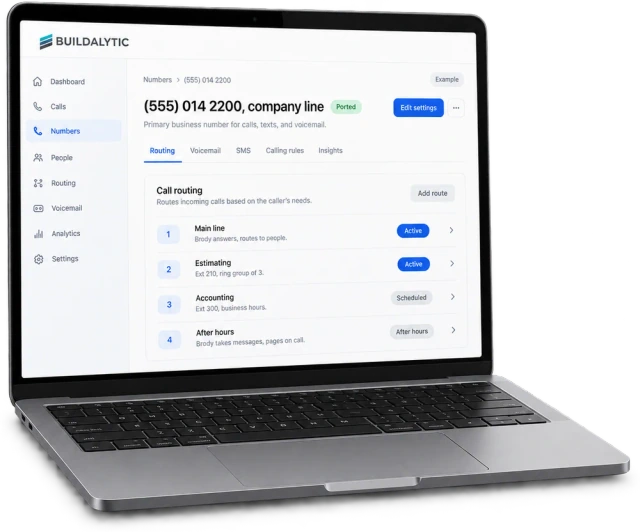
Everything an office phone does. Plus Brody on the line, and every call written back to the job.
Sheet 01, the phone system
What does a construction phone system need? The full office phone, built in.
A construction phone system needs one company number that rings the office and field cell phones, shared texting with photos, after hours routing and numbers the company owns. Buildalytic has all of that, plus extensions, ring groups, desk phones and project channels.
One company number
Office, field, subs, suppliers and customers reach you on the same main line, with your company name on caller ID.
Extensions and departments
Every office user gets an extension. Group people into estimating, accounting, dispatch and safety.
Ring groups and queues
Ring several people at once or in order, hold callers in a queue and offer a callback instead of a long wait.
Hold, transfer and conferencing
Warm and cold transfer, hold with music, and conference calls that pull in a PM, a sub and an owner rep.
Voicemail to email
Every voicemail arrives in the right inbox with a transcript, filed against the caller and the job.
Business hours and holidays
Set office hours, holiday schedules and after hours routing per department, and change them in plain language.
Your phones and browser workspace
Use your existing phones for calls and texts, and the browser workspace for company routing, records and approvals.
Desk phones
Keep IP desk phones at the front desk, the estimating room or the yard where your team uses them.
Number porting
Bring your main number and direct lines from RingCentral or another provider once every check passes.
Fax where used
Offices that still send and receive fax keep those numbers working after the move.
Internal calling and presence
Call a coworker by extension or name, transfer internally and see who is available before you dial.
Project channels and meetings
Job channels, direct messages, group calls and video meetings on the same system as your outside calls.
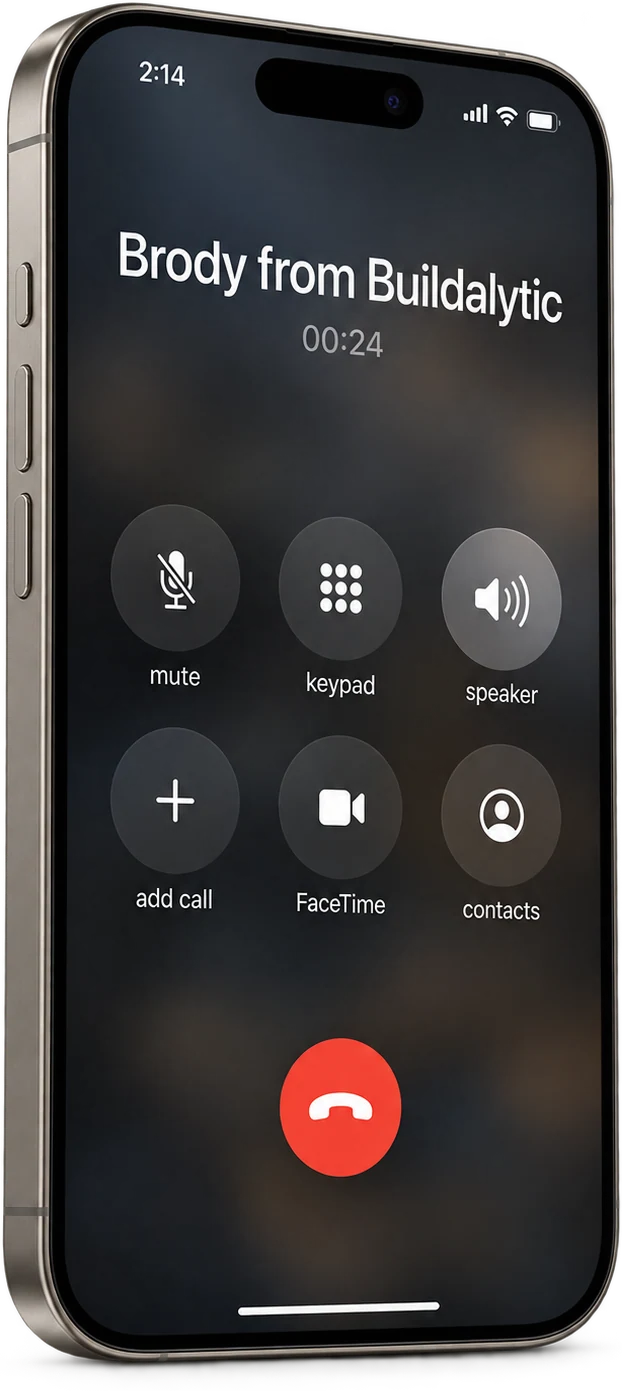
Brody on the main line
Brody picks up the main line and knows the job. When a caller needs Kim, he puts them through with the reason already on her screen.
Brody answers in your company name, says he is an AI assistant, and handles what he can. He reads the bid package, the schedule and your contacts, so he can answer a sub, take a supplier delay or route an owner rep to the right PM. When a person is needed, he transfers warm with a short summary. He also makes calls, from bid coverage to delivery confirmations, with your company on caller ID. When crews text job photos to the same number, Brody files them to the right job, captions them and adds them to the daily report and Procore.
Routing
How do calls get to the right person? The phones follow the rules you describe.
Calls follow rules you write the way you would explain them to a new receptionist. Brody and the phone system use the same rules for people, departments, business hours and after hours, so an owner rep reaches the right PM and a sub reaches the right super.
Call routing in plain language. Main line to Brody, estimating to a ring group, accounting during business hours, after hours to the on call PM.
Custom workflowsCompare
How is this different from RingCentral? Same phone basics. Built around the job.
RingCentral is a widely used cloud business phone, messaging and video platform. Buildalytic covers the same office phone basics and adds Brody, who works on construction calls and keeps your job records current.
| What you need | General business phone system | Buildalytic |
|---|---|---|
| Extensions, ring groups, queues | Standard on most business phone systems | Included for every office phone user |
| Mobile, desktop and desk phones | Standard on most business phone systems | Included, with desk phones where you use them |
| Project channels and meetings | Offered by many providers, check their current plans | Included, or use your Teams, Zoom or Google Meet |
| AI that answers and makes calls | Varies by provider, check their current plans | Brody answers and calls with your jobs, people and documents |
| Field crews and subs in project channels | Usually needs a paid seat or app, check their current plans | Field members join by plain text at no charge |
| Construction workflows | Usually separate tools | Daily reports, field photo capture, bid coverage, crew dispatch and insurance compliance on the same number |
| Records after the call | Call logs and recordings | Call logs, recordings where consent allows, and updates in Procore, Vista and your records |
| Price | Check their current plans | Office phone access included in each paid operating user. |
Key facts
What do you get with each office user? The phone system at a glance.
Office phone access is included in each paid operating user. There is no separate office-seat surcharge. Each user contributes to the company calling pools. Each paid user adds 50 AI calling minutes, 250 messaging units, 250 human US calling minutes and 500 standard AI work items each month. These separate pools are shared across the company, not reserved for individual users.
| What it is | A business phone system for construction companies, with Brody, the AI teammate, on the same company number. |
| Who it is for | General contractors, subcontractors and construction offices replacing RingCentral or another business phone provider. |
| Price | One full Platform plan at $99 per operating user per month, or $89 per user per month billed annually. Start with one paid user. Standard setup is free. |
| Field workers | Scoped participants are free. Crews, subcontractors, suppliers and customers can reply, submit reports and photos, confirm assignments or review an assigned item. Their calls, messages and AI work use your company pools. Full workspace access requires a paid operating user. |
| Each office user gets | An extension, calls on existing phones, browser workspace access, internal calling, project channels and meetings. |
| Calling minutes | Office phone access is included in each paid operating user. There is no separate office-seat surcharge. Each user contributes to the company calling pools. Each paid user adds 50 AI calling minutes, 250 messaging units, 250 human US calling minutes and 500 standard AI work items each month. These separate pools are shared across the company, not reserved for individual users. |
| AI minutes | Each paid user adds 50 AI calling minutes, 250 messaging units, 250 human US calling minutes and 500 standard AI work items each month. These separate pools are shared across the company, not reserved for individual users. |
| Devices | Existing phones for calls and texts, plus a browser workspace for office teams. Supported desk phones are confirmed during setup. |
| Calls at once | Many simultaneous calls on the same company number, human and AI, with your company name on caller ID. |
| Compliance | Country appropriate emergency calling setup, AI disclosure on every Brody call, required recording notices and registered business texting with instant opt out. |
| Meetings | Built in group calls and video meetings, or your existing Teams, Zoom or Google Meet. |
| Migration | No setup fee. Standard onboarding includes your company number, normal messaging registration, a standard roster import, released connector setup and two 45-minute assisted sessions for your first two supported workflows. |
| Field and subs | Scoped field participants can reply and share updates for free. Calls, messages and AI work use company pools. Full workspace access requires a paid operating user. |
| How to start | Book a demo. Brody starts on one workflow, then the office moves when the porting checks pass. |
| About Brody | Brody by Buildalytic is the AI teammate for construction. One company number answers and makes calls, texts and emails with crews, subcontractors, suppliers and customers in their own language, and updates Procore, Vista, SharePoint and OneDrive. |
Porting your main number
What has to be true before we port? Every check passes on your real setup.
Your main number moves only when every line on this list passes in a test on your real setup, and your current provider keeps ringing until then. Phone features roll out in stages, so we confirm in writing what is live for your setup before any port.
Calling
Human and AI calls in and out, your company caller ID, and many calls at the same time on the main number.
Routing
Named people, departments, business hours, ring groups, queues and callbacks all ring the way your office expects.
Handoffs
Warm and cold transfers, hold, no answer handling and voicemail to email work for every user.
Devices
Each office user confirms their existing phone, call routing and browser workspace access. Any supported desk phones you keep are configured and tested.
Texting
Shared texting with ownership, photos, opt outs and history, running on your approved registered business texting campaign.
Company mailboxes are connected and share one task history with calls and texts.
Records
Call logs, recordings where consent allows, search and export all work before the old system goes away.
Failure handling
If the AI or browser workspace is unavailable, calls fall back to people and voicemail so no caller hits a dead line.
Emergency calling
Emergency calling availability and location requirements are confirmed and tested for each country and supported device. US deployments include E911 setup where supported.
Internal calling
Staff call each other by extension or name, transfer internally and see who is available.
Team messaging
Project channels and direct messages with history, files, search and mobile access replace the messaging you use today.
Meetings
Group calls and video meetings work, either built in or through your existing Teams, Zoom or Google Meet.
Anything else you use
Fax, paging, a front desk console or any other service you rely on today is listed and tested.
Compliance
What rules does a phone company follow? The same ones we follow on every call.
A company phone system needs emergency calling with a registered location, appropriate recording notices, business texting registration, contact permissions and protected call data. Requirements vary by country. We confirm and test the relevant capabilities before moving your main number.
Emergency calling
Emergency calling and location requirements are confirmed per country and device. US setups include E911, dispatchable locations and required notifications where supported.
Recording notices
Recorded calls open with a notice, and recording follows each state’s rules, including all party consent states like California.
Texting registration
Business texting uses the sender registration required in each country, including A2P 10DLC for US local numbers, with opt outs honored instantly.
AI disclosure
Brody says who he works for and that he is an AI assistant at the start of every call. He never pretends to be a person.
Consent for outbound AI calls
Outbound AI calls follow TCPA rules for artificial voices, with the right consent, opt outs and calling windows.
Your call data
Call records are protected, never sold, and never used to train models for other companies. You can export them any time.
A person on request
Any caller who asks for a person is transferred to the right PM, super or office user, or leaves a voicemail that arrives by email with a transcript.
What Brody will not do
Quote prices, sign contracts, approve change orders or commit your company to anything you have not approved.
Switching
How does switching work? Four steps, no dead lines.
You switch in four steps, and your current provider keeps your main line until every check passes. Setup is planned around your office, not a cutover weekend.
Map your setup
We list every user, extension, ring group, queue, desk phone, fax line and after hours rule you have today.
Run side by side
Brody starts on one workflow on a new or forwarded number while your current provider keeps the main line.
Pass every check
We test calling, routing, devices, texting, records, failure handling, agreed emergency calling capabilities and meetings on your real setup.
Port and switch off
Your main number and direct lines move. Once your team confirms everything works, you cancel the old service.
What is the best phone system for a construction company?
The best fit rings the office and the field on one company number, lets crews and subs text photos, routes after hours calls, keeps numbers with the company when people leave and runs on registered business texting. Buildalytic does all of that, and Brody answers and makes calls on the same number and updates your job records.
Can Brody replace RingCentral for our office and field teams?
Yes, once every check on our porting list passes on your real setup. Office users get extensions, ring groups, calls on existing phones, browser workspace access, internal calling, project channels and meetings, and field crews and subs reach the same number by call or text. Until the checks pass, Brody runs next to the phones you have.
Can we keep our existing company phone number?
Yes. We port your main number and any direct lines from RingCentral or another provider. We move the main number only after every check on our porting list passes on your real setup, and your current provider keeps ringing until then.
Do superintendents and PMs use their own cell phones?
Yes. Supers, PMs and estimators use the phones they already carry for calls, texts and email. Office teams manage company routing, records and approvals in the browser workspace. There is no Buildalytic mobile or desktop app to install. Company-number routing and caller ID are confirmed during setup.
Can crews and subs text photos to the company number?
Yes. Foremen, crews and subs text photos to the same company number from any phone. Brody files each photo to the right job, captions it and adds it to the daily report and Procore.
How is Brody priced compared with per user phone plans?
One full Platform plan at $99 per operating user per month, or $89 per user per month billed annually. Start with one paid user. Standard setup is free. Office phone access is included in each paid operating user. There is no separate office-seat surcharge. Each user contributes to the company calling pools. Free scoped field participation. Calls, messages and AI work use company pools.
How does emergency calling work on office lines?
Emergency calling capabilities, numbers and location requirements are confirmed for each country and supported device before activation. For US office lines, this includes E911 registration, dispatchable locations and on site notifications where supported. Your main number moves only after the agreed checks pass.
Do we have to switch everything at once?
No. Most companies start with Brody on one workflow, such as daily reports or after hours calls, on a new or forwarded number. The office moves over when the team is ready and the porting checks pass.
One number for the office and the field.
Move your phones when they are ready.
Start Brody on one workflow on a real project. Your main number moves only after every check passes.
One full Platform plan. No standard setup fee. Start with one supported workflow.
Plan your rollout
Pricing, security reviews, procurement and rollout across your projects and regions.