
Crew dispatch by call and text
Call the crew. Text the details. Know who is heading to the job.
Brody calls or texts each worker with the site, start time, access details and what to bring. Start with the channel each person prefers, record their answer and give the superintendent one list of confirmed and open assignments.
Existing phones. No Buildalytic app. Calls and texts follow your approved contact windows.
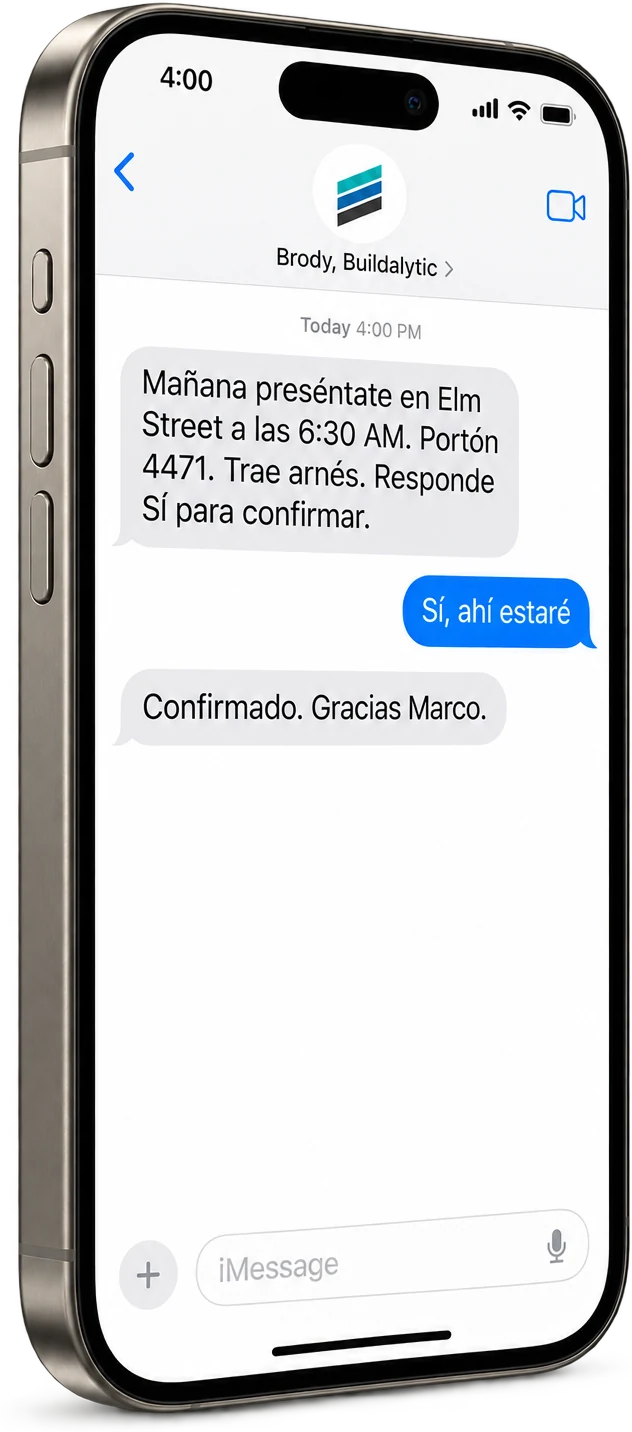
The assignment
One roster. Two ways to reach people. A call or a text, from the first notice.
Choose calls, texts or an approved combination for your crew. Both carry the same job details and lead back to the same confirmation record.
Start from the roster
Use your schedule, lookahead or spreadsheet. Select the crew, approved assignment and contact preferences.
Call with the assignment
Brody explains the site and start time, asks for an answer and records questions during the call.
Send a written notice
Text the address, meeting point, access notes and what to bring. The worker replies to confirm or raise a question.
Use the agreed language
Reach each worker in the language tested for your deployment, with a human fallback when needed.
Record an explicit answer
Track confirmations, declines and unresolved assignments. Delivery alone does not mean a worker accepted.
Hand off what is open
Follow the approved reminder plan and contact windows. Send missing details and unanswered assignments to the super.
When plans change
The pour moved. The assignment changed. Confirm the new instruction, not yesterday’s plan.
Tell Brody which assignment changed and approve the new details. He reaches the affected workers by their agreed channel and tracks fresh answers separately.
Illustrative change notice
Tomorrow’s assignment has changed to Bayview Library, west gate, at 7 AM. Report to your foreman and bring the tools on your crew list. Can you confirm the new site and start time?
The same instruction can be spoken on a call or sent as a text.
What the superintendent sees
- Confirmed
- The worker explicitly accepts the new assignment.
- Declined
- The worker cannot make it. Their reason goes to the super.
- Unresolved
- No answer, missing detail or contact outside the permitted window. A person takes the next step.
An urgent schedule change does not bypass consent or calling windows. Use your own emergency procedure for emergencies.
For the superintendent
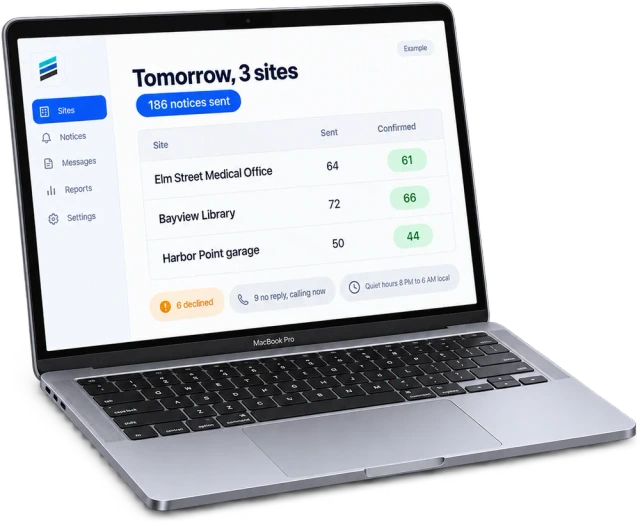
One list before the shift. Who confirmed, and who needs a person?
Call answers and text replies land on the same roster, organized by site and trade. Review the list at the times your team chooses.
- Explicit confirmations and reasons for declines
- Open assignments and missing information
- Approved follow up by call or text
- Human review before changing a crew assignment
Your dispatch rules
One crew or several sites. Set the channel, the window and the handoff.
The assignment list drives outreach. Your team decides how people are contacted, when follow up is allowed and who resolves the open items.
01A preferred channel for each worker
Use a call as the first notice for workers who prefer speaking, or a text for workers who prefer a written assignment. Approve any channel changes and follow up rules before dispatch starts.
02Permitted contact windows
Configure calling and texting windows for the recipient’s location and applicable rules. Hold contact outside those windows and show the superintendent which assignments still need attention.
03Questions and missing details
Brody answers from the approved job information. A missing gate code, conflicting assignment or question outside that information goes to the responsible superintendent.
04Opt outs and human handoff
Honor text opt outs and requests for a person. Mark the assignment unresolved and hand it to the superintendent when an allowed channel is unavailable. Do not switch channels to bypass an opt out.
Setup
From roster to first assignment. How do you set up crew dispatch by call and text?
Start with one crew. Approve the assignment, contact preferences and handoff rules before anyone is contacted.
Load the roster
Add workers, numbers, languages, crews and preferred call or text channel from your approved records.
Confirm the job details
Check the site, start time, meeting point, access notes and responsible superintendent.
Approve contact and follow up
Set recipient contact windows, permissions, reminders and the owner of unresolved assignments.
Dispatch and review
Brody calls or texts, records explicit answers and returns open items to your team.
The facts
Crew dispatch by call and text. What do you get, and what does it cost?
Crew dispatch is a Platform workflow. Calls and texts use the same shared company allowances as your other workflows.
| What it is | Approved crew assignments by call or text, with explicit answers recorded on one roster. |
| Who it is for | General contractors and subcontractors coordinating their own crews and subcontractor foremen across sites. |
| What workers need | An existing phone for ordinary calls or texts. No Buildalytic app, login or fee. Carrier rates may apply. |
| Contact preferences | A preferred channel, agreed language and permitted contact windows for each recipient. |
| Each assignment | Site, address, start time, meeting point, access and parking, foreman and what to bring. |
| Confirmation and handoff | Explicit confirmations, reasons for declines and unresolved assignments sent to the responsible person. |
| Languages | English and Spanish fully tested. Additional languages tested with your crew before go live. |
| Platform price | One full Platform plan at $99 per operating user per month, or $89 per user per month billed annually. Start with one paid user. Standard setup is free. Each paid user adds 50 AI calling minutes, 250 messaging units, 250 human US calling minutes and 500 standard AI work items each month. These separate pools are shared across the company, not reserved for individual users. |
| Extra usage | Authorized additional usage costs $0.40 per AI minute, $0.04 per messaging unit, $0.04 per human US calling minute and $0.10 per standard AI work item. |
| Controls | Agreed disclosure, consent, calling windows and country-specific messaging registration. Opt outs do not authorize a switch to another channel. |
| How to start | Enterprise is the same platform with agreed organizational, support, capacity or deployment requirements. Ordinary onboarding has no setup fee. Additional engineering, substantial migration, private deployment and private-model projects are optional and separately quoted. Company headcount alone does not require an upgrade. |
Can Brody dispatch crews by phone call as well as text?
Yes. Calls and texts are both dispatch options. Choose each worker’s preferred channel and permitted contact window. Brody can call with the assignment and record the worker’s answer, or send a text and collect a reply. A call does not have to wait for an unanswered text.
What does a dispatch call or text include?
The site name, address, start time, meeting point, access and parking notes, who to report to and what to bring. Brody uses the approved job details. Workers can confirm, decline or ask a question on the call or by text. Missing details go back to the superintendent rather than being guessed.
Do crew members need to download an app?
No. Workers answer an ordinary phone call or reply to a normal text on their existing phone. They need no Buildalytic app or login and pay no Buildalytic fee. Their carrier’s call, message and data rates may apply.
How do we know who confirmed?
Brody records explicit answers from calls and text replies as confirmed, declined or unresolved. A sent text or unanswered call is not a confirmation. Follow up uses the timing and channels you approve, and the superintendent receives the open assignments and reasons for declines.
Can Brody dispatch in each worker’s language?
Yes. Calls and texts use the language agreed for each worker. English and Spanish are fully tested. Additional languages are tested with your crews before go live, with a human fallback for anything unclear. Review the published language scope for your deployment.
What happens when an assignment changes outside calling hours?
Brody follows the configured contact windows for that recipient’s location and channel. The change stays unresolved until an explicit answer is recorded. If contact is not permitted or the worker does not answer, the superintendent gets the open item to handle. Crew dispatch does not replace an emergency response procedure or make an emergency exception automatically.
Can subcontractor foremen receive dispatch calls and texts?
Yes. Your own workers and subcontractor foremen can receive approved assignments from your company number by call or text. Brody can confirm a sub’s start date and crew size, record questions and hand unresolved readiness items to the PM. Subs need no new app.
How are disclosure, consent and opt outs handled?
Each call opens with Brody identifying himself as an AI assistant for your company. Notices, consent, calling windows and messaging registration follow the rules agreed for the deployment. Text opt outs are honored. An opt out does not automatically authorize a follow up call. A person can ask for the superintendent or a human handoff.
What does crew dispatch by call and text cost?
One full Platform plan at $99 per operating user per month, or $89 per user per month billed annually. Start with one paid user. Standard setup is free. Each paid user adds 50 AI calling minutes, 250 messaging units, 250 human US calling minutes and 500 standard AI work items each month. These separate pools are shared across the company, not reserved for individual users.
The right crew. The right site.
Call or text tomorrow’s assignments with Brody.
Evaluate one dispatch workflow with one crew. Choose calls, texts or an approved combination, then review the confirmations and open items with your superintendent.
One full Platform plan. No standard setup fee. Start with one supported workflow.
Plan your rollout
Pricing, security reviews, procurement and rollout across your projects and regions.