
Custom workflows
Custom AI workflows for construction. Describe it, approve it, Brody runs it.
Custom workflows let construction companies automate their own follow up in plain language. You describe the process, approve the steps once, and Brody runs the calls, texts, emails, waits and approvals on your company number.
Each paid user contributes 500 standard AI work items to the company pool each month. A workflow uses one item per defined case or recipient, not one per internal step.
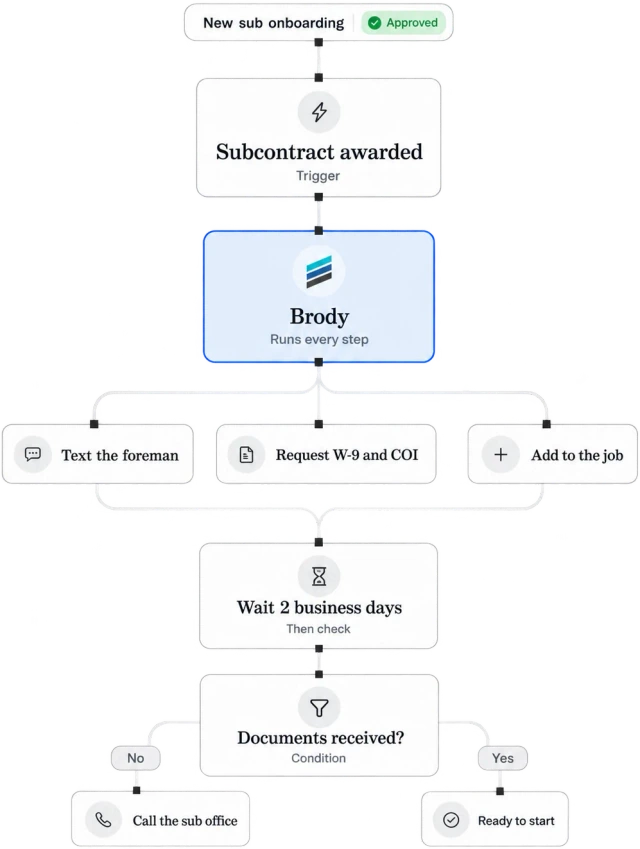
Templates first. Start from construction workflows that already work, then change them in your own words.
Sheet 01, the building blocks
Eight kinds of steps. What can a workflow do?
A workflow can start from a trigger, check conditions, call, text and email people, wait, hold for approval and stop when the goal is met. Brody builds it from your description and shows every step before anything runs.
Triggers
A sub is awarded, a schedule date moves, a report is missing, a text comes in or a time of day arrives.
Conditions
Only for jobs over a size, only for certain trades, only when a field is empty or a date has passed.
Calls
Brody calls the sub, broker, supplier or worker, asks your questions and logs the answer.
Texts
Messages in each person’s language, with replies read and filed to the right record.
Emails
Requests and updates from your connected mailbox, with attachments filed to the job.
Waits
Pause for hours or days, or until a date on the schedule, then pick up where it left off.
Approvals
Hold a step until a named person approves it from a text, the browser workspace or a job channel.
Stop rules
End the run when the goal is met, a person replies or a limit is reached, so nobody is contacted twice.
Plain language
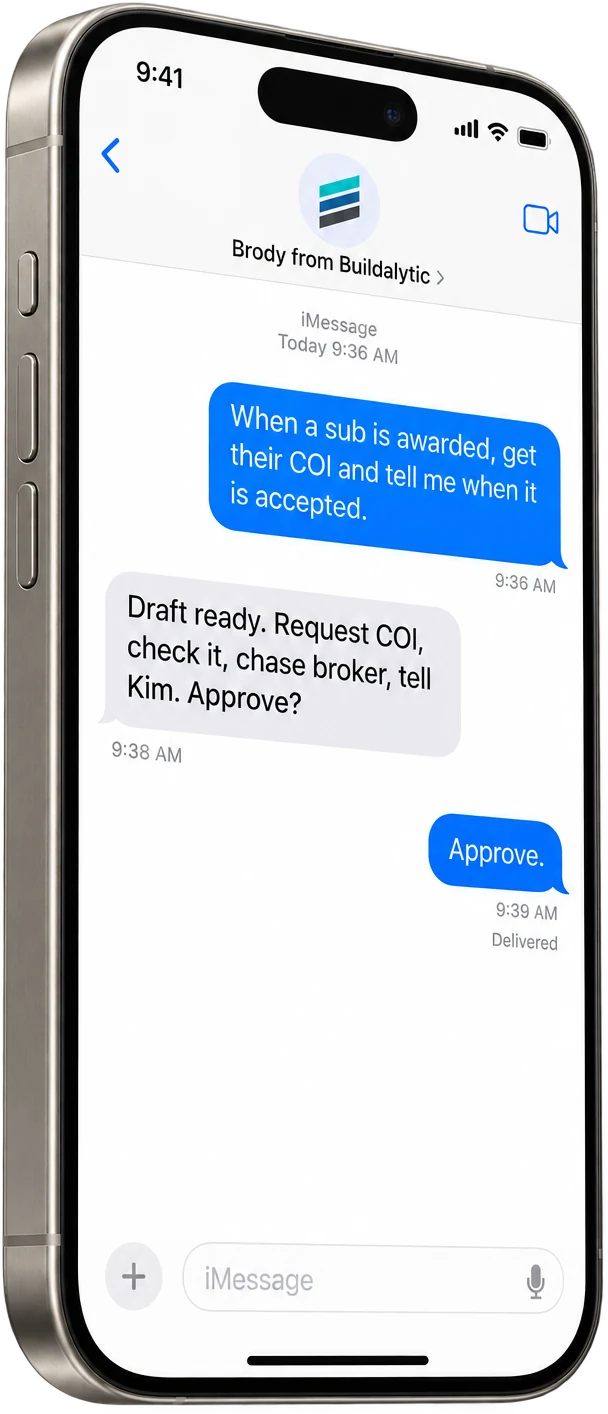
When a sub is awarded a job, get their COI, check it, follow up with the broker and tell me when it is accepted. That sentence is the whole setup.
Brody reads the request, turns it into the steps on the left and asks you to approve them. You can change who gets called, how long to wait or who has to sign off, all in plain words.
Once approved, the workflow uses the same company number, contacts and records as everything else in Buildalytic, so it never runs in a corner nobody can see.
Durable runs
Built for days, not seconds. What does a workflow run look like?
A run is a logged series of steps that can last for days. It keeps its place while a broker fixes a certificate or a sub calls back next week, retries what failed and stops when the job is done.
Scroll to see the full workflow.
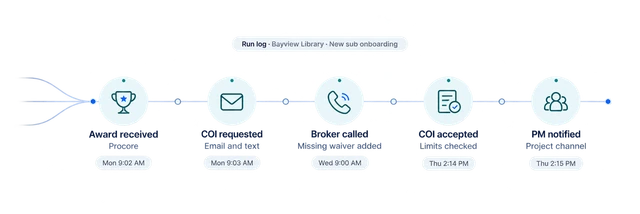
Every run is logged. Each step shows when it ran, what Brody did and what changed on the job and the contact's card.
Exception managementTemplates
Start from what works. Which workflows do teams start with?
Teams start with templates for the follow up offices do every week, such as sub onboarding, missing dailies and crew confirmations. Each one can be changed in plain language.
01New sub onboarding
Request the COI, check the certificate against the subcontract, follow up with the broker and tell the PM when the sub is ready to start.
02Missing daily report
If no report is in by the time you set, text the super, then call, then tell the PM. Quiet hours stay respected.
03Equipment confirmation
If the crane or pump is not confirmed by 2 PM the day before, call the rental company, then the PM if still unconfirmed.
04Monday crew confirmation
Text each worker their site and start time on Friday, follow up with anyone silent on Sunday and give the super the list.
05Certification expiry recall
Thirty days before a card or certificate lapses, text or call the worker for the renewal and update their record.
06Subcontractor prequalification
Ask each new sub for the prequalification details you require, follow up until the answers are in and file them to the sub’s profile.
07Past due invoice follow up
When an invoice passes its due date, email the customer a reminder, then call, and tell the office who answered and what they promised.
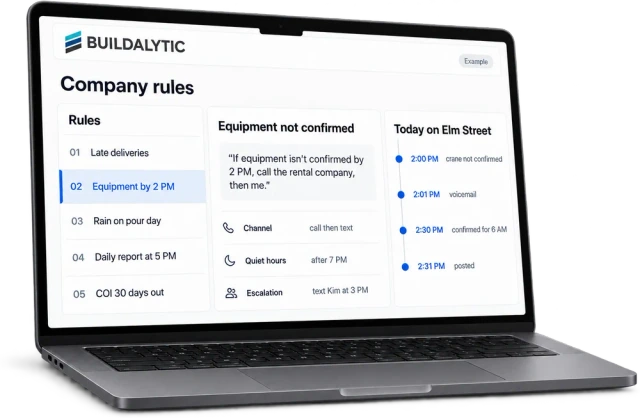
Example draft. Names and projects are fictional.
Other tools
Your systems, plus the long tail. How do workflows reach the tools we already use?
Workflows read and write through Brody's live standard connectors. Use the Buildalytic Zapier connector for steps that can wait a few minutes, or start work from the Buildalytic connector for ChatGPT and the Claude connector through MCP. Each connection uses your approved account permissions.
Built in connectors
Fast, two way reads and writes for the systems a construction company runs on.
Zapier connector, live
Connect the long tail of tools. Live calls and urgent steps always stay on our own engine.
Custom connector
Need a system we do not cover? We quote a fixed price before any work starts.
ChatGPT and Claude, live
A Buildalytic connector for ChatGPT and a Claude connector through MCP, so office users can start a workflow from the assistant they already use.
The facts
Custom workflows. What is included, and what does it cost?
Prebuilt workflows and workflows you configure from supported actions are included. Changes to supported fields, schedules, wording, recipients and approvals carry no build fee. New connectors, new capabilities, substantial migrations and private deployment or model projects require an optional written scope and quote before work begins.
| What it is | A plain language workflow builder. Describe a process, approve the steps once and Brody runs it on your company number and records. |
| Who it is for | Construction offices that repeat the same follow up every week, such as PMs, project coordinators and operations leads. |
| Steps available | Triggers, conditions, calls, texts, emails, waits, approvals and stop rules. |
| Included runs | Each paid user contributes 500 standard AI work items to the company pool each month. A workflow uses one item per defined case or recipient, not one per internal step. For example, starting the same insurance follow-up workflow for 50 subcontractors counts as 50 AI work items. |
| Additional custom builds | Prebuilt workflows and workflows you configure from supported actions are included. Changes to supported fields, schedules, wording, recipients and approvals carry no build fee. New connectors, new capabilities, substantial migrations and private deployment or model projects require an optional written scope and quote before work begins. |
| Setup | No setup fee. Standard onboarding includes your company number, normal messaging registration, a standard roster import, released connector setup and two 45-minute assisted sessions for your first two supported workflows. |
| Other tools | Live built in connectors and a Zapier connector for the long tail, with account permissions configured during setup. |
| Control | Approvals on any step, quiet hours, usage alerts at 80 and 100 percent, and a full log of every run. |
What is a custom workflow in Buildalytic?
It is a set of steps Brody runs for you on your company number, such as collecting a COI when a sub is awarded a job. You describe it in plain language, with no code and no visual builder, and Brody shows you each step. Once you approve it, it runs on every job it applies to.
What workflows do contractors set up first?
Good first workflows are the follow up the office already does by hand every week. The template library covers new sub onboarding with COI collection, missing daily reports, equipment confirmation the day before, Monday crew confirmations and certification expiry recalls. You can also describe your own, such as lien waiver follow up or submittal reminders.
Who builds and changes a workflow?
Your team can use the workflow builder. No setup fee. Standard onboarding includes your company number, normal messaging registration, a standard roster import, released connector setup and two 45-minute assisted sessions for your first two supported workflows. Prebuilt workflows and workflows you configure from supported actions are included. Changes to supported fields, schedules, wording, recipients and approvals carry no build fee. New connectors, new capabilities, substantial migrations and private deployment or model projects require an optional written scope and quote before work begins.
Can a workflow require approval before it sends a message?
Yes. Any step can wait for a named person, such as the PM or the project executive, to approve it from a text, the browser workspace or a job channel. Every run is logged on the job and on the contact’s card, so you can see what happened and why.
Which systems can a workflow read from and write to?
Workflows use the live standard connectors in our integration directory. The Buildalytic Zapier connector connects other tools, while a custom connector is quoted at a fixed price. Live calls and time sensitive steps run on our own engine. Your admin authorizes each connection and its permissions.
How long does a new workflow take to set up?
A template or a workflow you describe yourself is ready once you review and approve the steps Brody proposes. It then starts on the next matching trigger, such as the next subcontract award. A done for you workflow is mapped with your team, built and tested on a real job before it is handed over.
What does a workflow run cost?
Each paid user contributes 500 standard AI work items to the company pool each month. A workflow uses one item per defined case or recipient, not one per internal step. For example, starting the same insurance follow-up workflow for 50 subcontractors counts as 50 AI work items. Calls and messages within a workflow also use their channel pools. Call transcription and its ordinary summary are included in AI calling time. There is no separate standard email or COI-check meter. Unusually large documents or intensive processing need an agreed scope before activation. Authorized additional usage costs $0.40 per AI minute, $0.04 per messaging unit, $0.04 per human US calling minute and $0.10 per standard AI work item.
What happens if a workflow waits for days?
Workflows run on a durable engine built for long waits. A step can wait two days for a broker, retry a call, or pause until a date on the schedule. It picks up where it left off and stops when a stop rule is met.
Stop following up by hand.
Tell Brody once. He follows up every time.
Start a 14 day evaluation with one workflow on one real project, built from your own words.
One full Platform plan. No standard setup fee. Start with one supported workflow.
Plan your rollout
Pricing, security reviews, procurement and rollout across your projects and regions.