
Workforce profiles
Workforce profiles. A current profile for every worker on your crew.
A workforce profile is a living record of one craft worker, with skills, certifications and expiry dates, languages, availability and past jobs in one place. Brody by Buildalytic keeps every profile current by calling and texting workers, then updates your HR record.
Workers confirm their own details by phone or text. Every field shows its source and date.
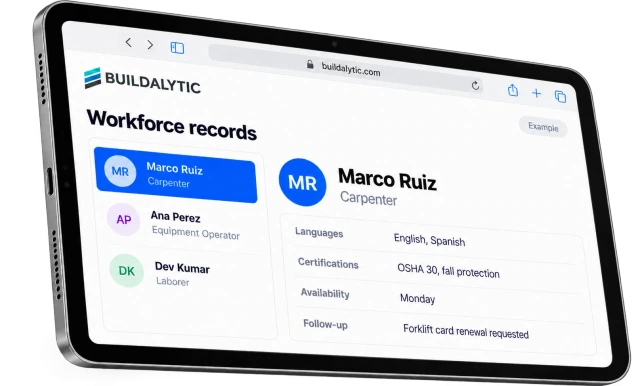
Who is OSHA 30, free next week and closest to this job? Brody's workforce profiles answer that in one search, because workers keep them current by phone.
Sheet 01, the profile
Six things you need to know. What is on a workforce profile?
Trade and skills, certifications with expiry dates, language, regions, availability, a verified phone and project history. Every field carries its source and the date it was last confirmed, so the office knows what to trust.
Skills and trades
Journeyman or apprentice, primary trade and the other work each person can do, like framing, forms or finish carpentry.
Certifications and expirations
Track OSHA course completion, first aid and equipment qualifications. Keep actual certificate expiry dates and required refresher dates separate. OSHA Outreach cards do not expire.
Languages
The language each worker prefers for calls and texts. Crew dispatch uses it for every notice.
Regions and availability
Where each worker is willing to travel and when they are free, confirmed by the worker, not guessed.
Verified phone
A number confirmed on a live call or text reply, so dispatch and safety notices reach the right person.
Project history
The jobs each worker has been on and the roles they held, built from assignments and conversations.
Why worker records go stale
A worker database is only as good as its last update. Brody updates it every time he talks to someone.
Phone numbers change, certifications expire and people move regions. When the only way to keep a record current is data entry, it falls behind, and the office finds out when a notice bounces or a certification has lapsed on site.
Brody reaches workers where they already are, on a call or a text in their language, and asks them to confirm their own details. What they say goes on the profile with the date, and into your HR record.
Searchable for dispatch
Find the right people, then send them their site. How do supers staff a job from workforce profiles?
Search by trade, certification, language, region and availability, and send the people you pick their notice by text from the same screen.
Profiles feed dispatch. Qualified, available and reachable, in one list.
Crew dispatch by call and textKept current
No data entry. How does Brody keep every profile up to date?
Brody calls new hires on day one, recalls workers before a certification lapses and reaches everyone once a year. Workers confirm their own details, and each answer goes on the profile and into your HR record.
01Expiry recalls before a certification lapses
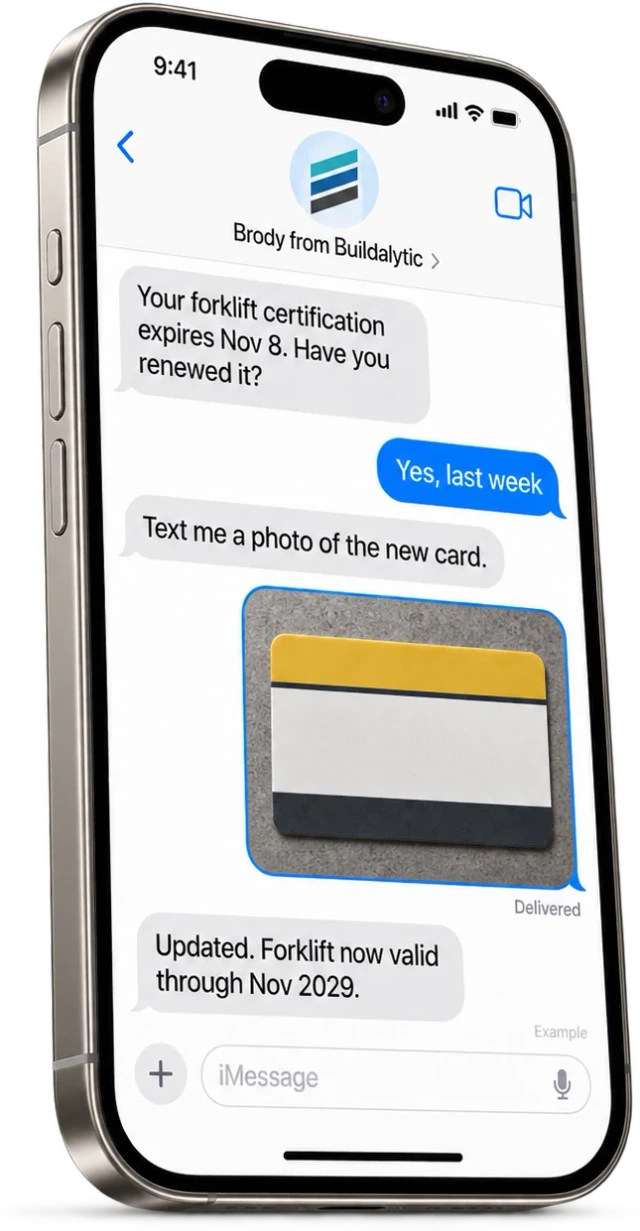
Brody watches every expiry date. Ahead of the lapse, he texts or calls the worker, asks about the renewal and requests a photo of the new card. The new date goes on the profile and into your HR record.
02New hire onboarding calls
On day one, Brody calls each new hire in their language to confirm their phone, trades, certifications, languages, regions and availability. The profile is complete before their first assignment.
03Yearly refresh for everyone
Contact details drift. Brody reaches every worker at least once a year to confirm what changed, and marks the phone number as verified when the worker answers.
04HR record updated by employee ID
Brody matches each worker to the existing record in Oracle HCM, Vista or SharePoint by employee ID and updates that record, instead of creating a duplicate.
05Subcontractor profiles with opt in sharing
Subcontractor profiles follow the same model. A profile built from your conversations is your data. A sub can opt in to a shared profile they own and choose which general contractors see it.
System of record
Your HR system stays in charge. Where do workforce profiles live?
Brody is the conversation layer that keeps your existing records current. He reads and writes the record you already have, by employee ID.
| Job | Your HR system or worker database | Brody |
|---|---|---|
| Official employee record | Holds it | Reads it and updates it by employee ID |
| Phone numbers | Stored as entered | Confirmed on each call or text reply |
| Certifications | Stored with dates | Recalls the worker before each one expires |
| New hires | Record created by HR | Onboarding call fills the profile on day one |
| Languages | Optional field | Used for every call and text to that worker |
| Payroll and HR processes | Stays where it is | Not replaced |
Worker data stays yours. It is never sold and never used to train models for other companies. Trust and security
Setup
From roster to living profiles. How do you set up workforce profiles?
Connect your roster, choose the fields you track, approve the outreach, and the profiles fill in as workers confirm their details.
Connect the roster
Link Oracle HCM, Vista or SharePoint, or upload a spreadsheet with employee IDs and phone numbers.
Choose the fields
Pick the trades, certifications and details you track, and which ones count as required.
Approve the outreach
Review what Brody asks on onboarding, refresh and recall calls and texts, and when he reaches out.
Let the profiles fill in
Workers confirm their own details. Each answer goes on the profile and back to your HR record.
The facts
Workforce profiles. What do you get, and what does it cost?
One full Platform plan at $99 per operating user per month, or $89 per user per month billed annually. Start with one paid user. Standard setup is free.
| What it is | A living profile for every craft worker, built and kept current by Brody’s calls and texts, with each field’s source and date. |
| Who it is for | Contractors with large craft workforces, safety teams, workforce planners and HR teams. |
| What is on a profile | Skills, certifications and expirations, safety training, languages, regions, availability, verified phone and project history. |
| How it stays current | Onboarding calls, expiry recalls and a yearly refresh, all by call or text in the worker’s language. |
| Integrations | Updates Oracle HCM, Vista and SharePoint by employee ID. Spreadsheets work too. |
| Subcontractor profiles | Your data by default. Subs can opt in to a shared profile they own and choose who sees it. |
| Price | Enterprise is the same platform with agreed organizational, support, capacity or deployment requirements. Ordinary onboarding has no setup fee. Additional engineering, substantial migration, private deployment and private-model projects are optional and separately quoted. Company headcount alone does not require an upgrade. |
| Data | Never sold and never used to train models for other companies. |
| How to start | An evaluation with one region or one trade. |
What is a workforce profile in construction?
A workforce profile is a living record of one craft worker, with their trade, skills, certifications, languages, crew and past jobs in one place. It is the record a contractor checks before staffing a job, and many crews call it a baseball card. With Brody, each field shows where it came from and when it was last confirmed.
What information goes on a workforce profile?
Trades and skills, training records such as OSHA 10 and OSHA 30, certificates with actual expiry dates, site refresher requirements, safety training, preferred language, regions, availability, project history and a verified phone number. You choose the fields you track and which ones count as required.
Where does the profile information come from?
From your roster and from the workers themselves. Brody calls and texts each worker in their language to confirm their own details, with an onboarding call for new hires and a yearly refresh for everyone. Every call opens with Brody saying he is an AI assistant for your company, and a worker who wants a person is passed to your team.
Can Brody remind us before a certification expires?
Yes. Brody watches the expiry date on every certification. Before one lapses, he texts or calls the worker to ask about the renewal and requests a photo of the new card. The new date goes on the profile and into your HR record, and the safety team sees anything still open.
Can a superintendent ask Brody who is certified for a task?
Yes. Search by trade, certification, language, region and availability, for example OSHA 30 carpenters free next week near the Bayview job, or ask Brody in a project channel. Results feed straight into crew dispatch, so the people you pick get their assignment by call or text.
Does this replace our HR system?
No. Your HR system stays the system of record and payroll stays where it is. Brody updates worker records in Oracle HCM, Vista and SharePoint by employee ID instead of creating a second database, and works from spreadsheets too. Other systems can be added with a custom connector, quoted before work starts.
Who can see a worker’s profile?
People in your company under the permissions you set, and Brody’s answers respect each user’s permissions in your connected systems. Worker data is never sold and never used to train models for other companies. A subcontractor can opt in to a shared profile they own and choose which general contractors see it.
What do workforce profiles cost?
Supported workforce profiles are included in the Platform. One full Platform plan at $99 per operating user per month, or $89 per user per month billed annually. Start with one paid user. Standard setup is free. Calls, messages and AI work use company pools. Large rollout requirements are scoped before activation.
Every worker. Every certification.
Keep every profile current with Brody.
Start with one region or one trade. Brody calls and texts workers in their language and updates your HR record.
One full Platform plan. No standard setup fee. Start with one supported workflow.
Plan your rollout
Pricing, security reviews, procurement and rollout across your projects and regions.