
Migration
Switch without missing a call. Move your company phones to Brody.
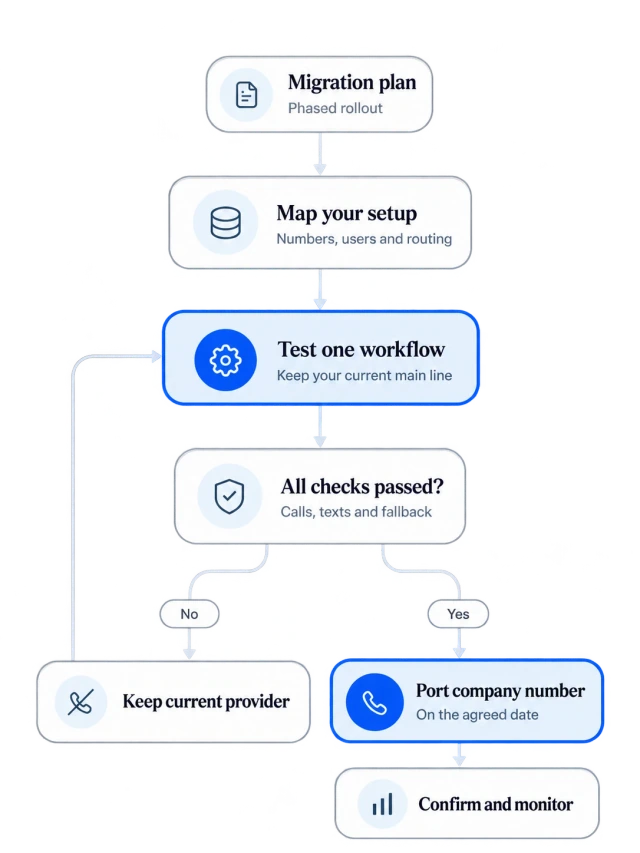
Brody starts alongside your current phone system on one workflow. Your numbers, users, routing and messaging move in planned phases, and your main number moves only after every check passes on your real setup.
Standard setup is free. Any substantial migration is scoped and quoted before work begins.
What moves
What comes across from your current system? Your setup, line by line.
We map everything your office uses today and rebuild it on Brody before anything changes for callers. Numbers, users, routing, devices, texting and messaging all move.
Main number and direct lines
Your main number and any direct lines are ported once every check passes. Caller ID keeps showing your company name.
Extensions and departments
Every office user keeps an extension, grouped into departments such as estimating, accounting, dispatch and safety.
Ring groups and queues
Ring several people at once or in order, hold callers in a queue and offer a callback instead of a long wait.
Business hours and holidays
Office hours, holiday schedules and after hours routing are set per department, the way your office runs them today.
Voicemail
Every voicemail arrives in the right inbox as an email with a transcript, filed against the caller and the job.
Existing phones and browser workspace
Office users keep their existing phones for calls, texts and email. Company routing, records and approvals are managed in the browser workspace.
Desk phones you keep
IP desk phones at the front desk, the estimating room or the yard are registered and tested before port day.
Business texting
Shared texting with photos, opt outs and history, with the sender registration required in each country. US local numbers use A2P 10DLC.
Fax where used
Offices that still send and receive fax keep those numbers working after the move.
Contacts and directory
Setup loads your contacts and people, and staff call each other by extension or name and see who is available.
Team messaging
Project channels and direct messages with history, files, search and mobile access replace the messaging you use today.
Meetings
Group calls and video meetings are built in, or keep using your existing Teams, Zoom or Google Meet.
What stays
What does not change? Your number, your name and your tools.
Callers dial the same number, your company name stays on caller ID, and the systems your team already works in stay where they are.
| Your phone numbers | Callers dial the same main number and direct lines before and after the move. |
| Caller ID | Calls keep showing your company name. |
| Meetings | Keep your existing Teams, Zoom or Google Meet if you prefer, or use the built in group calls and video meetings. |
| Your records systems | Procore, Vista, SharePoint and OneDrive stay as they are. Brody connects to them and writes updates back. |
| Your current provider | Keeps your main line until port day, and keeps running until your team confirms everything works on Brody. |
| Old call history | Stays with your current provider. Export what you want to keep before you cancel the old service. |
Phases
Who does what, and when? Seven phases, one owner on each side.
Every migration follows the same order. Dates are agreed in your rollout plan, and the main number moves only in phase five, after every check passes.
| Phase | What Buildalytic does | What your team does |
|---|---|---|
| 01Plan and inventory | Lists every user, number, extension, ring group, queue, desk phone, fax line and after hours rule you have today, and agrees the rollout plan with you. | Names an owner for the move, shares your current setup and flags anything else you rely on, such as paging or a front desk console. |
| 02Set up in parallel | Starts Brody on one workflow, such as daily reports, after hours calls or bid coverage, on a new number or with call forwarding. Registers your business texting. | Picks the first workflow. Your current system keeps the main line, so nothing changes for your office or your callers. |
| 03Configure and train | Builds routing for people, departments, business hours and after hours, sets up extensions, ring groups and voicemail, sets the required emergency calling location for each device and trains your team. | Confirms the routing rules in plain language, tests existing phones, opens the browser workspace and joins training. |
| 04Verify every check | Tests every line on the porting checklist on your real setup and confirms in writing what is live for your setup. | Tests the agreed calling, routing and emergency capabilities for each country and supported device with us, then signs off on each check. |
| 05Port the main number | Ports your main number and direct lines on the date agreed in your rollout plan. Caller ID keeps showing your company name. | Approves the port and provides the account details your current provider requires. |
| 06Run on Brody | Supports your team at support@buildalytic.com and adjusts routing as your office asks. Calls fall back to people and voicemail if the AI or browser workspace is unavailable. | Uses the new system every day and reports anything that does not ring the way your office expects. |
| 07Retire the old system | Confirms with your team that every number, user and device is working on Brody. | Exports anything you want to keep from the old system, then cancels the old service once your team confirms everything works. |
Readiness checklist
What has to be true before we port? Every check passes on your real setup.
Your main number moves only when every line on this list passes in a test on your real setup, and your current provider keeps ringing until then.
Calling
Human and AI calls in and out, your company caller ID, and many calls at the same time on the main number.
Routing
Named people, departments, business hours, ring groups, queues and callbacks ring the way your office expects.
Handoffs
Warm and cold transfers, hold, no answer handling and voicemail to email work for every user.
Devices
Each office user tests existing phones, call routing and browser workspace access. Supported desk phones are configured and tested.
Texting
Shared texting with ownership, photos, opt outs and history runs on your approved registered business texting campaign.
Email
Company mailboxes are connected and share one task history with calls and texts.
Records
Call logs, recordings where consent allows, search and export all work before the old system goes away.
Failure handling
If the AI or browser workspace is unavailable, calls fall back to people and voicemail so no caller hits a dead line.
Emergency calling
Emergency calling availability and location requirements are confirmed and tested for each country and supported device. US deployments include E911 setup where supported.
Internal calling
Staff call each other by extension or name, transfer internally and see who is available.
Team messaging
Project channels and direct messages with history, files, search and mobile access replace the messaging you use today.
Meetings
Group calls and video meetings work, either built in or through your existing Teams, Zoom or Google Meet.
Anything else you use
Fax, paging, a front desk console or any other service you rely on today is listed and tested.
Written confirmation
Phone features roll out in stages, so we confirm in writing what is live for your setup before any port.
Risk and rollback
What if something does not pass? Your current system stays live until it does.
Until port day there is nothing to roll back, because your current provider still holds the main number. A failed check simply means you stay where you are until it passes.
Calls keep working throughout
Your current provider keeps ringing until port day. Brody starts on a new or forwarded number for one workflow, next to the phones you have.
Nothing changes for callers
Callers dial the same number before and after the move, and caller ID keeps showing your company name.
A port is scheduled, not rushed
The port date is set in your rollout plan only after every check passes and what is live for your setup is confirmed in writing.
A failed check stops the port
If any check fails, your main number stays on your current system until it passes on a retest. Your office keeps working as it does today.
No dead lines
If the AI or browser workspace is unavailable, calls fall back to people and voicemail, and that fallback is tested before port day.
The old service stays until you confirm
You cancel the old service only once your team confirms everything works on Brody. Export your old records before you do.
From your current system
Where are you moving from? The same plan, from any starting point.
The phases and checks are the same whether you start from RingCentral, Dialpad, Nextiva, 8x8, Zoom Phone, Microsoft Teams Phone, an answering service or personal cell phones.
RingCentral
Brody covers the office phone basics RingCentral is known for and runs next to it until every check passes.
- Main number and direct lines
- Extensions, ring groups and queues
- Mobile, desktop and desk phones
- Messaging and meetings
Dialpad
Start Brody on a new number or with forwarding for one workflow while your Dialpad lines keep working.
- Main number and direct lines
- Users and extensions
- Routing and business hours
- Contacts and people
Nextiva
Point after hours calls or one workflow at Brody first. Your current Nextiva lines keep working.
- Main number and direct lines
- Users and extensions
- After hours routing
- Registered business texting
An answering service
Forward your company line to Brody, or only after hours calls at first, and keep your service until you are confident.
- Your company number, by forwarding
- Who gets which calls
- What counts as urgent
- Quiet hours and approvals
Personal cell phones
Supers, PMs and estimators keep using their existing phones for calls, texts and email. Office teams manage company-number routing and records in the browser workspace.
- Business calls on the company number
- Company caller ID on their cell
- Personal numbers kept private
- A line that stays when people leave
8x8, Zoom Phone or Teams Phone
The same plan applies. We map your users, numbers, routing and devices, then run every check before a port.
- Main number and direct lines
- Users, extensions and routing
- Devices you keep
- Teams or Zoom for meetings, if you like
Key facts
What should IT and operations know? Migration at a glance.
No setup fee. Standard onboarding includes your company number, normal messaging registration, a standard roster import, released connector setup and two 45-minute assisted sessions for your first two supported workflows.
| What it is | A planned move of your company phones, numbers, users and messaging from your current provider to Brody by Buildalytic. |
| Who it is for | Construction companies on RingCentral, Dialpad, Nextiva, 8x8, Zoom Phone, Microsoft Teams Phone, an answering service or personal cell phones. |
| How it starts | Brody starts on one workflow on a new or forwarded number while your current provider keeps the main line. |
| When the number moves | Only after every check on the porting list passes on your real setup and what is live is confirmed in writing. |
| If a check fails | The main number stays on your current system until the check passes. |
| Timeline | Agreed in your rollout plan and planned around your office, not a cutover weekend. |
| Migration cost | No setup fee. Standard onboarding includes your company number, normal messaging registration, a standard roster import, released connector setup and two 45-minute assisted sessions for your first two supported workflows. Substantial historical migrations require a separate approved quote. |
| Office phone access | Office phone access is included in each paid operating user. There is no separate office-seat surcharge. Each user contributes to the company calling pools. |
| Field and subs | Scoped field participants can reply and share updates for free. Calls, messages and AI work use company pools. Full workspace access requires a paid operating user. |
| Emergency calling | Emergency calling and required locations are confirmed for each country and supported device before the main number moves. |
| Texting | Country appropriate sender registration, including A2P 10DLC for US local numbers, with opt outs honored at once. |
| Your data | Your calls, texts and records belong to your company and can be exported at any time. |
| How to start | Book a demo. Platform customers start with a free 14 day evaluation on one workflow with their real data. |
How do we switch from RingCentral without missing calls?
Brody starts next to RingCentral on one workflow, on a new number or with call forwarding, while RingCentral keeps your main line. Your main number is ported only after every check on our porting list passes on your real setup, and RingCentral keeps ringing until then.
Can we keep our main number and direct lines?
Yes. We port your main number and any direct lines from RingCentral or another provider. They move only after every check passes on your real setup, and your current provider keeps ringing until then.
How long does a migration take?
It depends on how many users, numbers and devices you have, and the dates are agreed in your rollout plan. Setup is planned around your office, not a cutover weekend, and the main number moves when every check passes rather than on a fixed date.
What happens if a check fails?
Your main number stays on your current system. We fix the issue and test again on your real setup, and the port is scheduled only once every check passes. Nothing changes for your callers in the meantime.
What does a migration cost?
No setup fee. Standard onboarding includes your company number, normal messaging registration, a standard roster import, released connector setup and two 45-minute assisted sessions for your first two supported workflows. Substantial migrations require an optional scope and quote before work begins.
Do we have to move everyone at once?
No. Most companies start with Brody on one workflow, such as daily reports or after hours calls, on a new or forwarded number. The office moves over when the team is ready and the porting checks pass.
Will our business texting keep working?
Your company uses the sender registration required for each country, configured during onboarding. US local business numbers use A2P 10DLC. Shared texting with photos, opt outs and history is tested before your main number moves.
How does emergency calling work after the move?
Emergency calling capabilities, numbers and location requirements are confirmed for each country and supported device before activation. For US office lines, this includes E911 registration, dispatchable locations and on site notifications where supported. Your main number moves only after the agreed checks pass.
Ready when your checks are.
Plan your move to Brody.
Book a demo to map your current setup. Brody starts on one workflow next to your phones, and your main number moves only after every check passes.
One full Platform plan. No standard setup fee. Start with one supported workflow.
Plan your rollout
Pricing, security reviews, procurement and rollout across your projects and regions.