

Procore
Project management · Live
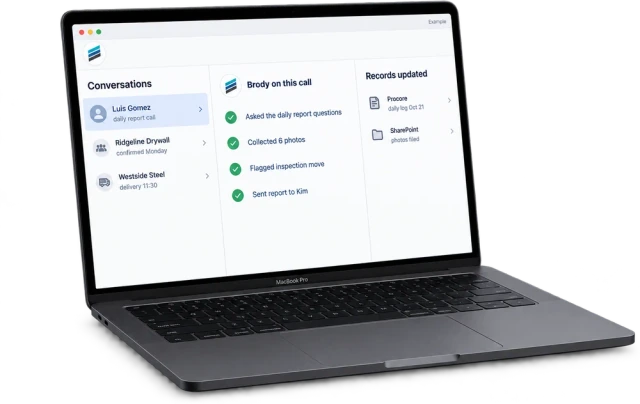
Reads projects, people and documents, then writes daily logs, photos and contacts back to the job.
DetailsIntegrations
Brody by Buildalytic reads projects, people and documents from Procore, Vista, SharePoint and the other systems you run, then writes daily logs, photos and contact updates back. Your admin connects each system during setup.
Standard connectors are included in the Platform plan.
Directory, 34 systems
Brody works with the project management, accounting, document, email, chat, CRM and bidding tools construction teams already use.
Project management · Live
Reads projects, people and documents, then writes daily logs, photos and contacts back to the job.
Details
Project management · Live
Ties field updates, photos and answers from calls and texts to the right ACC and Autodesk Build project.
Details
Project management · Live
Answers field questions from the drawings and markups your team keeps in Bluebeam.

Project management · Live
Reads the schedule so Brody can confirm dates with crews and flag work that is slipping.

Project management · Live
Takes workforce plans in and sends crew confirmations and availability back.

ERP and accounting · Live
Reads jobs, vendors and employees, then writes compliance status and contact updates back.
Details
ERP and accounting · Live
Writes compliance and time related status back to Sage 100 Contractor or Sage Intacct.

ERP and accounting · Live
Keeps customer and vendor records current for smaller contractors.
ERP and accounting · Live
Keeps job, vendor and employee contacts current from what Brody hears on calls and texts.

ERP and accounting · Live
Reads projects and vendors, then writes contact and compliance updates back.

ERP and accounting · Live
Reads jobs and subcontracts so Brody can chase paperwork and log what comes back.

ERP and accounting · Live
Keeps customer, vendor and project records current from calls, texts and email.
ERP and accounting · Live
Updates worker records by employee ID from Brody’s calls and texts, without duplicates.

Documents and files · Live
Answers from your project documents and files photos and reports to the right job folder.

Documents and files · Live
Reads shared job folders and saves reports and attachments where your team expects them.

Documents and files · Live
Answers from shared job folders and saves photos and daily reports to the right one.

Documents and files · Live
Files photos, reports and attachments into the job folder your team already uses.

Documents and files · Live
Reads plans and specs from shared folders and saves field photos back to the job.

Documents and files · Live
Follows up by text and email on unsigned subcontracts and change orders.

Documents and files · Live
Reads the sub lists, rosters and logs your team keeps in spreadsheets and adds new rows.

Email and calendar · Live
Works from connected mailboxes, drafts replies for approval and files attachments to the job.

Email and calendar · Live
Works from connected Google mailboxes with drafted replies and approved sending.
Email and calendar · Live
Books site visits and estimates into the right calendar and texts reminders.
Communication · Live
Posts call summaries, alerts and daily reports to the right project channel.

Communication · Live
Sends alerts, call summaries and field questions to the channel your office watches.

Communication · Live
Keeps existing Twilio numbers and routes their calls and texts through Brody.

CRM and service · Live
Logs calls and new leads to the right contact and deal.

CRM and service · Live
Logs calls, texts and bid conversations to the right account and opportunity.

CRM and service · Live
Books service calls and sends job updates for service contractors.
CRM and service · Live
Creates booking requests or visits with customer details and job notes from Platform receptionist calls.

CRM and service · Live
Books jobs from the AI receptionist straight into the Housecall Pro schedule.

Bidding · Live
Pulls invited subs and bid packages so Brody can follow up without CSV upkeep.

Bidding · Live
Brings bid invitations and project leads into Brody’s follow up calls and texts.

Automation · Live
Connects Brody to the tools without a direct connector, for steps that can wait a few minutes.
How connections work
Brody reads what he needs and writes back what he finished. Every write is logged with the call or text it came from.
Brody reads projects, people, documents and schedules, then writes daily logs, photos, compliance status and contact updates back.
Each connection respects the permissions you already set in that system, and answers follow each user’s access.
The admin for each system authorizes the connection. You need an admin for that system, not a developer.
Standard connectors come with the Platform plan. A custom connector is quoted at a fixed price.
| Setup | An admin for each system authorizes the connection and picks the projects and folders Brody can use. |
| Data | Stays in your account and follows each user’s permissions. Procore sourced data is never used for AI training. |
| Price | One full Platform plan at $99 per operating user per month, or $89 per user per month billed annually. Start with one paid user. Standard setup is free. |
| How to start | Connect one system during setup and run a 14 day evaluation on one real project. |
No double entry
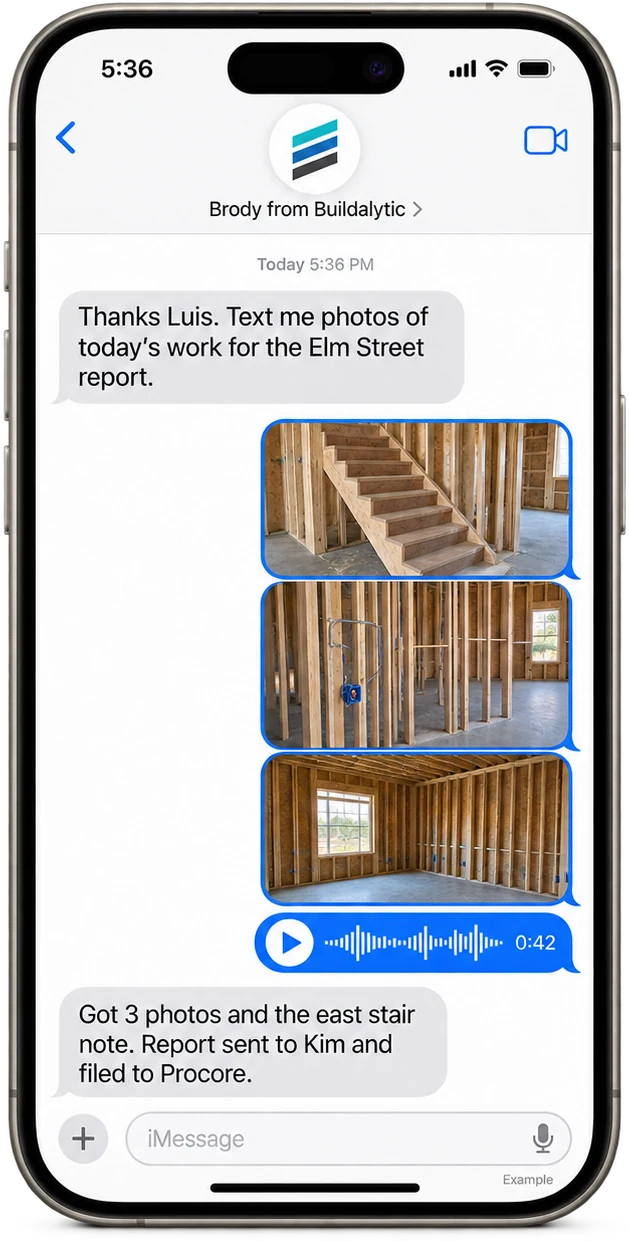
The super calls in once. The daily log, the photos and the PM's email all update without anyone typing.
Brody by Buildalytic is the AI teammate for construction. One company number answers and makes calls, texts and emails with crews, subcontractors, suppliers and customers in their own language, and updates the systems your team already runs. Most construction software depends on someone entering data after the fact. Brody gets that data from the conversations already happening on calls, texts and email, then puts it where your team already looks.
Your systems stay the system of record. Brody does not replace Procore or Vista. He keeps them current.
Brody works with project management tools like Procore, Autodesk Construction Cloud and Bluebeam, ERPs like Trimble Viewpoint Vista, Sage, CMiC and QuickBooks, documents in SharePoint, OneDrive, Google Drive, Box and Dropbox, and email in Outlook and Gmail. He also works with Teams, Slack, HubSpot, Salesforce, ServiceTitan, BuildingConnected and Zapier.
Both. Brody reads what he needs from your systems, such as projects, people, documents and the schedule, so he can answer questions and run calls. Then he writes completed work back, such as daily logs, photos, compliance status and contact updates, so your team never enters the same thing twice.
You need an admin for that system, not a developer. Your Procore or Vista admin authorizes the connection during setup and picks the projects and folders Brody can use. IT joins if your company requires it, and for private cloud or local AI.
Calls and texts keep working on your company number, because they do not depend on the connection. Your admin reconnects the system, and every write Brody makes is logged with its source, so your team can see what reached the system.
Yes. Brody answers calls, texts crews and follows up with subs on your company number with no integration at all. Daily reports go out by email, and documents loaded into the knowledge base answer field questions. Connect a system when you want the work written into it.
Tell us what you run on the demo. We confirm how Brody connects to each of your systems for your account before you sign, and connect them during setup. All standard integrations in this directory are live. Your admin authorizes each connection and confirms its read and write scope during setup.
Yes. Tell us what you run and we will say how Brody connects to it. For tools that do not need instant updates, Zapier covers the long tail, and a custom connector is available at a fixed quote.
Yes. Released standard connectors are included. Your admin provides the required permissions. New connectors or capabilities need an approved scope and quote before work starts.
Integrations are built on each company’s published developer tools. We intend to join partner programs and marketplaces where they fit, and this page will say so only once that is true.
Your systems, kept current.
Connect the systems you run and put Brody on one real project for 14 days.
One full Platform plan. No standard setup fee. Start with one supported workflow.
Pricing, security reviews, procurement and rollout across your projects and regions.