
Exception management
Brody acts before work slips. Proactive follow up on every job.
Reactive tools wait for someone to call in or check a dashboard. Brody watches each job, then calls, texts or emails the right person first, follows up until the item is handled and reports back to your team.
You choose what Brody does alone and what waits for your approval.
Reactive versus proactive
Most tools wait to be asked. Brody starts the conversation.
The same seven situations, handled two ways. A reactive tool holds the information until someone looks. Brody uses it to reach the person who can act while there is still time.
| Situation | Reactive tools | Brody, proactive |
|---|---|---|
| A late delivery | The super notices the truck is missing and starts calling the supplier. | When a delivery passes its window or the supplier emails a delay, Brody calls the supplier for a new time, then texts the super and crew. |
| An expiring certificate | Someone finds the lapsed COI when they next open the log. | Brody requests the renewal from the sub and their broker 60, 30 and 14 days before the policy expires, or on the schedule you set, and tracks it. |
| A missing daily report | The PM spots the gap the next morning and chases the super. | If no report is in by the time you set, Brody texts the super, then calls and takes the report by phone, then tells the PM. |
| An unconfirmed crew | The foreman makes calls at night and learns at the gate who is missing. | Brody texts each worker the site and start time, reminds anyone silent, then calls, and sends the super the list the evening before. |
| A sub start | The PM learns on the first morning that the sub is not coming. | Brody confirms the start with the sub’s office or foreman before the week begins and reports the answer back. |
| A moved inspection | The date changes and the people it affects hear about it late. | When a schedule date moves, a rule tells everyone it affects. Brody confirms inspections before the day arrives and reminds the owner of any that are not booked. |
| Weather on a pour day | The super checks the forecast the morning of the pour. | When rain is forecast for a pour, Brody warns the super and the concrete supplier by 2 PM the day before. |
Sheet 01, the watch list
Brody keeps watch on every job. What does he watch, and what does he do?
Each trigger goes to the person or company who can fix it, and steps up to the PM when nothing moves. Every one runs by a rule your team can change.
Late deliveries
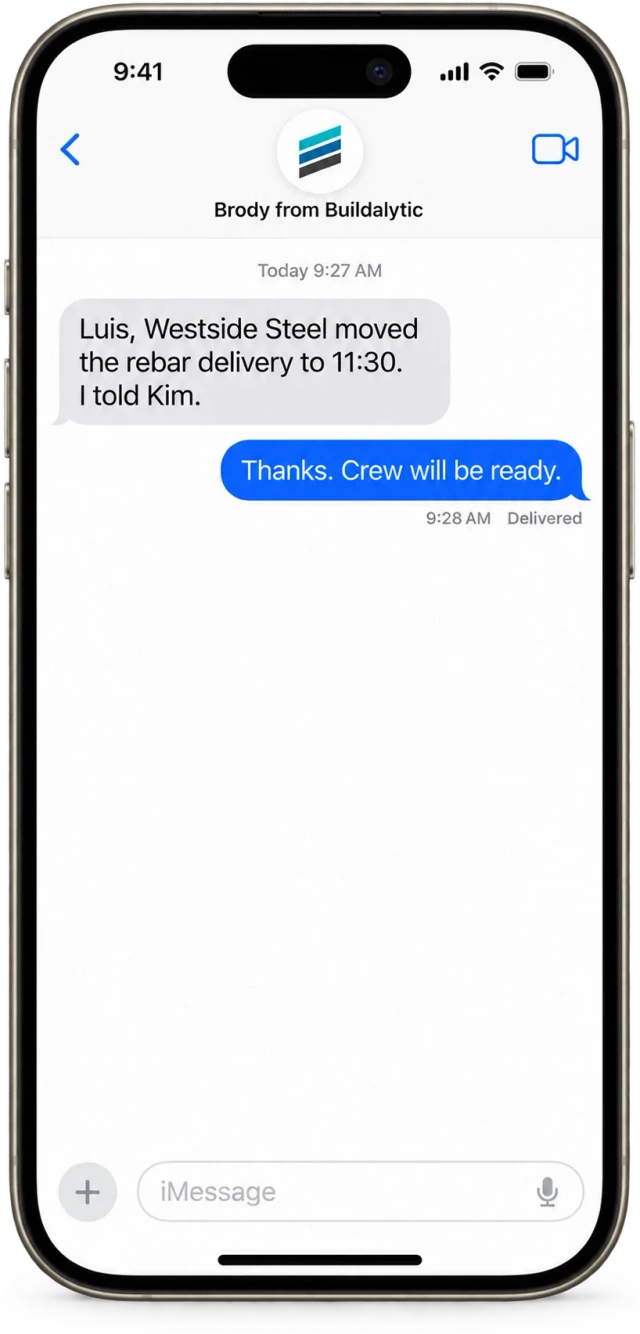
When a delivery passes its window or the supplier emails a delay, Brody calls the supplier for a new time, texts the super and crew and posts in the job channel.
Unconfirmed rentals
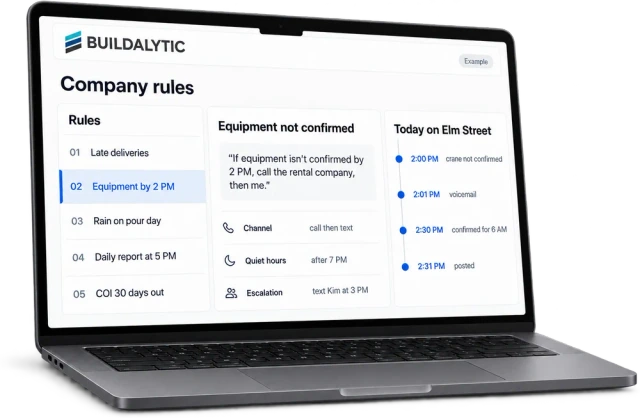
When a crane or pump is not confirmed by 2 PM the day before, Brody calls the rental company. If it is still open, he alerts the PM.
Rain on a pour day
When rain is in the forecast for a pour, Brody warns the super and the concrete supplier so the decision gets made early.
Sub starts
When a sub has not confirmed Monday’s start, Brody calls their office or foreman and reports the answer back to the PM.
Missing daily reports
When no daily report is in by 5 PM, Brody calls or texts the super and takes the report by phone. If it is still missing at 6 PM, he texts the PM.
Unbooked inspections
When an inspection the schedule needs is not booked, Brody reminds the person who owns it, then follows up.
Expiring COIs
When a certificate is 30 days from expiring, Brody requests the renewal from the sub and their broker, tracks it and tells the project coordinator.
Your own rules
When something your team tracks from memory today needs a follow up, write it as a plain sentence and Brody watches for it too.
Before it hurts
Most problems on a job show up early. Someone just has to make the first call.
Brody makes that call. He reads the same signals your team does, follows the rule you wrote and tells everyone affected, in their language. Your super hears about the late rebar with a new time already in hand.
Sheet 02, daily and weekly touchpoints
Proactive work runs on a rhythm. When does Brody reach out?
Some follow up should not wait for a problem. These touchpoints run at the times your rules set, so the check in happens whether or not anyone remembers it.
End of day, daily reports
If no daily report is in by the time you set, Brody texts the super, then calls and takes the report by phone, then tells the PM.
Day before, equipment
Crane and pump rentals not confirmed by 2 PM the day before get a call to the rental company, then the PM if still open.
Day before, weather
When rain is forecast for a pour, the super and the concrete supplier hear about it while there is still time to decide.
Friday and Sunday, crews
Each worker gets their site and start time on Friday. Anyone silent gets a follow up on Sunday, and the super gets the list.
Before the week, subs
Brody confirms start dates and manpower with each sub before the week begins and tells the PM who is coming.
Before they lapse, certificates
COI renewals are requested 60, 30 and 14 days before a policy expires. Workers are asked to renew a card or certificate 30 days before it lapses.
How rules work
You set the rules in plain language. Brody follows them every time.
Each rule says what to watch, who to contact, which channel to use, when quiet hours apply, how to escalate and whether Brody needs approval first.
Rules in your words. Brody reads back what a rule will do, and it runs once you approve it.
See custom workflowsRules in plain language
Write a rule the way you would say it to a new project engineer. Brody reads back what it will do, and it runs once you approve it.
Quiet hours
Brody respects quiet hours for each person and their time zone. Urgent rules can be set to reach a named person after hours.
Approval before sensitive actions
Each rule says what Brody does alone and what needs a person first, such as a message to an owner. A PM approves from a text, the browser workspace or the job channel.
Escalation paths
Brody steps up from a text to a call to a manager when nothing moves, with the people and times you choose.
Your channels
Each rule picks calls, texts, email or the job channel, all from your company number.
Everything logged
Every call, text, email and action is logged on the job with who asked, what Brody did and which record changed.
Signals
Where does Brody get the signals?
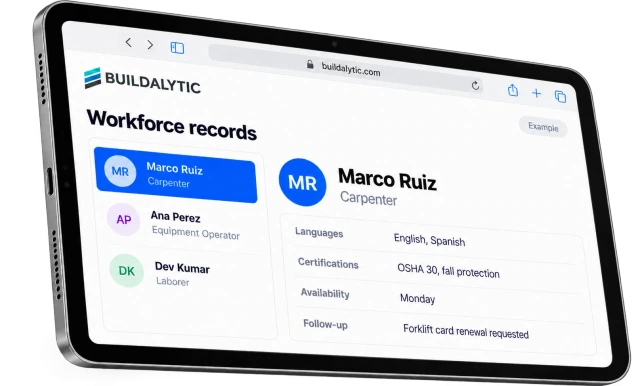
Brody reads what is already happening on the job. Calls and texts on your company number, email from suppliers and subs, the schedule in Procore or P6, supplier confirmations and the forecast for each site all feed the same rules.
- Conversations on calls, texts and email
- Schedules from Procore and P6
- Supplier messages and weather for each site
Approvals
Brody asks first when you want him to.
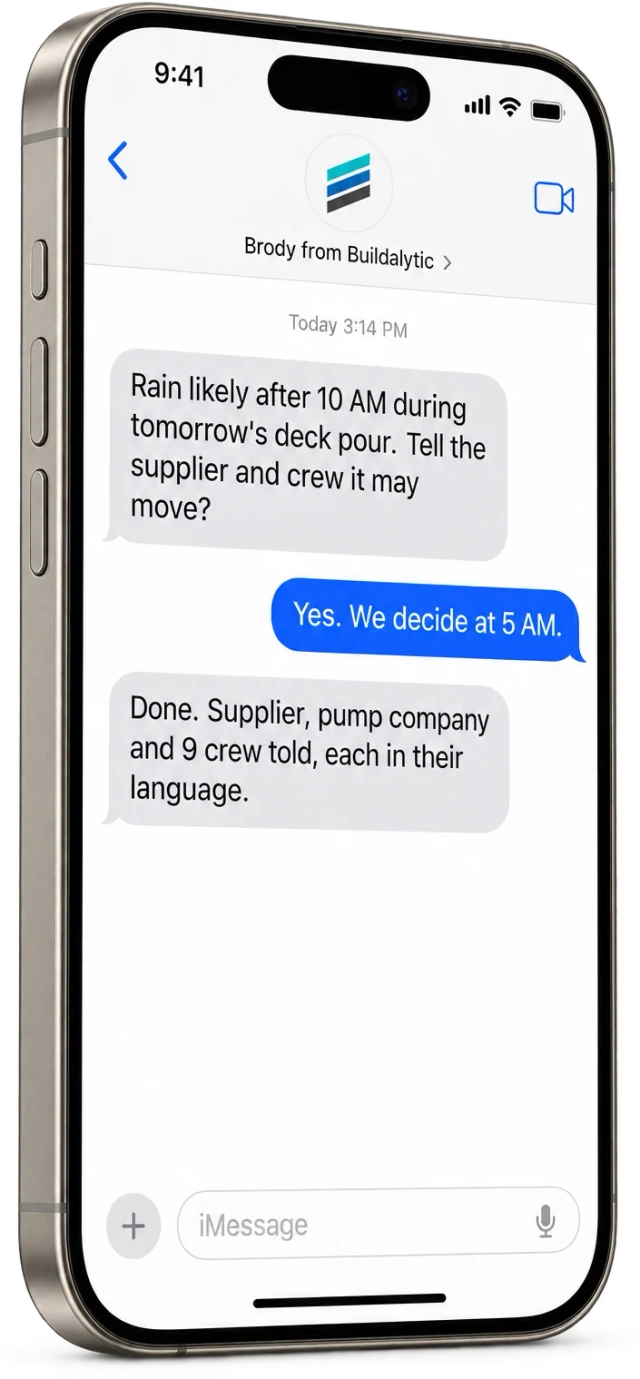
Mark any rule for approval and Brody asks the named person by text or in the job channel, then waits for the answer. Here he checks with the PM before warning the crew about rain on a pour day, then confirms everyone was told.
- Approval before acting, if you want it
- Quiet hours per person and time zone
- Every attempt and answer logged on the job
Rule library
What rules do teams write first? Five to start with.
Late deliveries, equipment rentals, weather on pour days, missing daily reports and expiring insurance. Each one is a single sentence, so change the times, the people and the channel to match how your company runs.
01Late deliveries
“If any delivery is more than an hour late, call the superintendent and text the PM.”
02Equipment
“If equipment isn’t confirmed by 2 PM the day before, call the rental company, then me.”
03Weather
“If rain is forecast on a pour day, warn the super and the concrete supplier by 2 PM the day before.”
04Daily reports
“If a daily report is missing at 5 PM, call the super. If it is still missing at 6 PM, text the PM.”
05Insurance
“If a sub’s COI expires in 30 days, request the renewal and tell the project coordinator.”
Key facts
What is exception management by Brody? The short version.
Exception management by Brody is proactive. He watches every commitment and schedule on your jobs and follows your company rules to reach the right person before something slips. Each row below stands on its own.
| What it is | Proactive exception management. Brody, the AI teammate in Buildalytic, watches every commitment and schedule on your jobs and reaches the right person first, by your company rules. |
| Who it is for | PMs, superintendents and project coordinators at GCs and subs who track deliveries, rentals, subs, reports, inspections and insurance by hand. |
| What Brody watches | Late deliveries, unconfirmed equipment rentals, rain on pour days, unconfirmed sub starts, missing daily reports, unbooked inspections and expiring COIs. |
| Scheduled touchpoints | Daily report checks at the time you set, rental confirmations the day before, crew confirmations on Friday and Sunday and COI renewals before they lapse. |
| Inputs | Calls, texts and email on your company number, schedules from Procore and P6, supplier messages and weather. |
| Rule settings | Plain language rules with who to contact, which channel, quiet hours, escalation steps and approval before acting. |
| Channels | Calls, texts, email and job channels, all from your company number. |
| Compliance | AI disclosure on every call, TCPA consent and calling windows for outbound calls, registered business texting with opt outs. |
| Price | One full Platform plan at $99 per operating user per month, or $89 per user per month billed annually. Start with one paid user. Standard setup is free. |
| Usage controls | You approve any additional-use budget before activation. Unapproved overages are not charged. Your activation plan records what pauses at the limit and the human or voicemail fallback for inbound calls. An alert alone is not a spending cap. |
| How to start | No setup fee. Standard onboarding includes your company number, normal messaging registration, a standard roster import, released connector setup and two 45-minute assisted sessions for your first two supported workflows. |
Is Brody proactive, or does he wait to be asked?
Brody is proactive. Reactive tools wait for someone to call in or check a dashboard. Brody watches the schedule, conversations, email, supplier messages and the weather for each job. When a rule is met, he calls, texts or emails the right person first, follows up and reports back to your team.
How do we control when and how Brody reaches out?
Each rule sets what Brody watches, who he contacts, which channel he uses, the quiet hours, the escalation steps and whether he needs approval first. Each company turns rules on or off, and every attempt is logged on the job.
Can Brody check in on a regular schedule?
Yes. A rule can run at a time you set, such as a daily report check at the end of the day, rental confirmations by 2 PM the day before, crew confirmations on Friday and Sunday, and COI renewal requests 60, 30 and 14 days before a policy expires.
What kinds of alerts does Brody send?
Brody watches for late deliveries, unconfirmed crane or pump rentals, rain on a pour day, unconfirmed sub starts, missing daily reports, unbooked inspections and expiring COIs. When one happens, he follows your company rules to call, text or email the right people and tell your team.
Who receives each alert?
The person your rule names, such as the super for a late delivery, the PM for an unconfirmed sub or the project coordinator for an expiring COI. Brody also reaches the outside party who can fix it, such as the supplier or rental company, and posts in the job channel when the rule says to.
Can we choose which alerts we get?
Yes. Each company turns rules on or off and writes its own as a plain sentence, for example “If equipment isn’t confirmed by 2 PM the day before, call the rental company, then me.” Brody reads the rule back and it runs once you approve it.
How does Brody know a daily report is missing?
Brody knows which jobs expect a daily report and who files it. If no report has come in by the time your rule sets, such as 5 PM, he calls or texts the super, takes the report by phone and tells the PM if it is still missing later.
Can alerts go out by text, call or email?
Yes. Each rule picks the channel and the escalation, such as a text first, then a call, then the PM if the item is still open by a set time. Alerts can also post in the job channel, and every attempt is logged on the job.
Will Brody ever act on an alert without approval?
Only if your rule allows it. Each rule says whether Brody acts on his own or asks first. When approval is needed, Brody asks the named person by text or in the job channel and waits for the answer.
Will Brody call people at night?
Not unless your rule says to. Each rule has quiet hours, and Brody respects them for each person and their time zone. Urgent rules can be set to reach a named person after hours.
What does it cost?
One full Platform plan at $99 per operating user per month, or $89 per user per month billed annually. Start with one paid user. Standard setup is free. Each paid user adds 50 AI calling minutes, 250 messaging units, 250 human US calling minutes and 500 standard AI work items each month. These separate pools are shared across the company, not reserved for individual users.
Every delivery watched. Every slip followed up.
Let Brody make the first call.
Start with one real job and three rules. Brody watches it, acts by your rules and shows your team every step.
One full Platform plan. No standard setup fee. Start with one supported workflow.
Plan your rollout
Pricing, security reviews, procurement and rollout across your projects and regions.