
Field photo capture
Field photo capture by text. Text a photo and it lands in the right job.
Brody by Buildalytic is job site photos by text for construction companies. Foremen, supers, subs and suppliers text photos to your company number, and Brody files each one to the right project, area and date, adds it to the daily report and pushes it to Procore.
No app and no login. Works on any phone, and field workers need no paid seats. Calls and texts use company allowances.
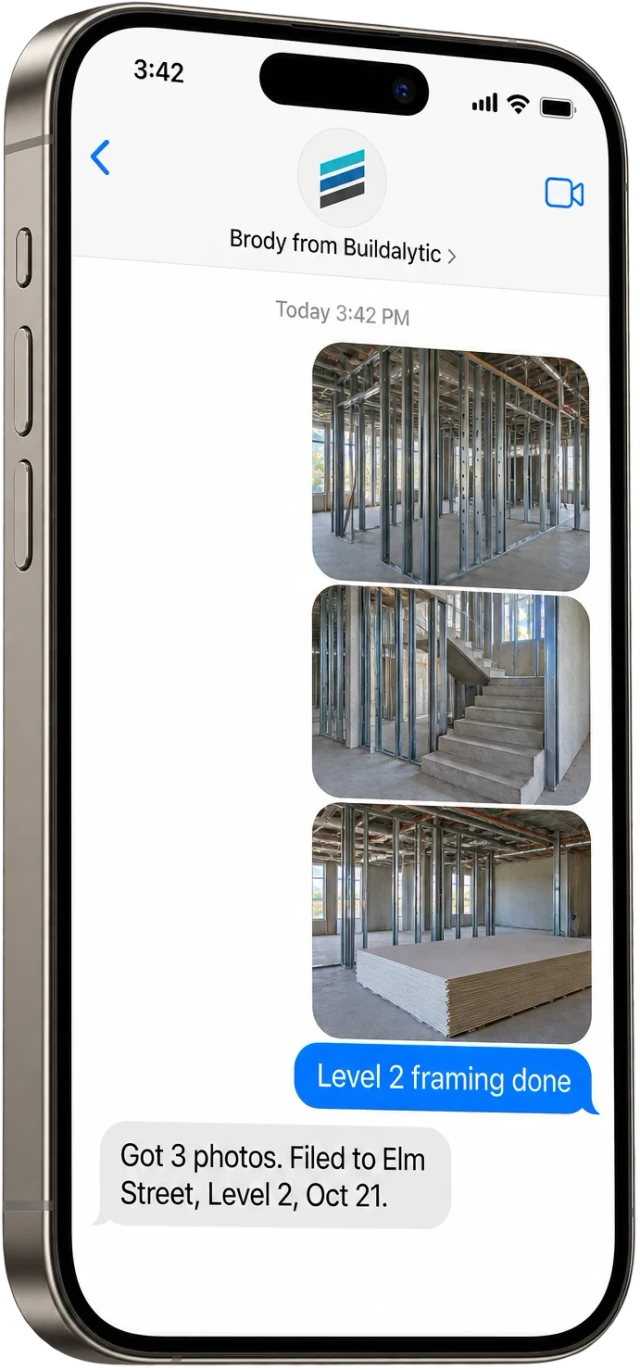
The same number they already call. Photos, short videos, voice notes and captions all go to one place.
Sheet 01, the photo
Six things Brody does with every photo.
Brody recognizes the sender and their job, files the photo to the right project, area and date, writes a caption, adds it to that day’s daily report and pushes it to Procore. He asks a question only when the job or area is unclear.
Knows the sender
Brody recognizes the phone number, the person, their company and the job they are assigned to today.
Asks only when unclear
If someone works two jobs or the area is not obvious, Brody asks one short question. Otherwise he files it without a word.
Files to project and date
Each photo goes to the right project, area and date, so Level 2 framing never ends up in the wrong job folder.
Adds caption and location
Brody writes a short caption from the text, the voice note or the area named, and records where on the job it was taken.
Joins the daily report
Photos texted during the day are added to that day’s daily report, grouped by area, before it goes to the PM.
Pushes to your systems
Brody sends each photo to Procore photos and to the SharePoint or OneDrive folder you set for the project.
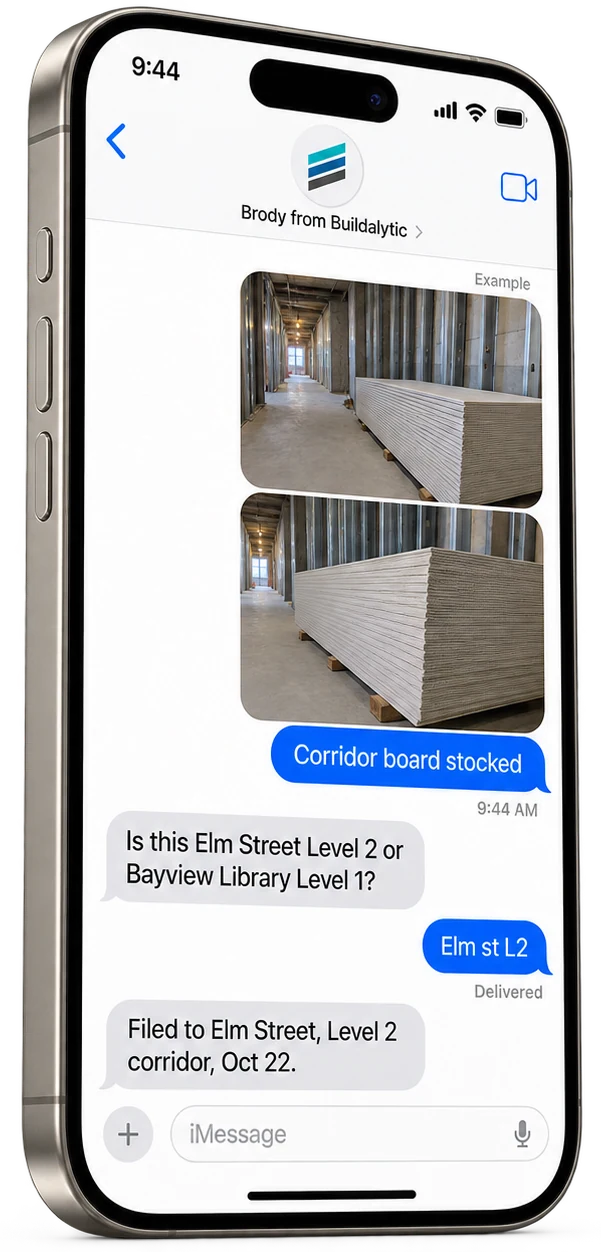
The camera roll problem
The photos exist. They are on twelve different phones. Now every one is on the job record.
Field crews take the right photos every day. Then the photos sit in personal camera rolls, group texts and email threads until someone in the office asks for them, usually after a dispute, a change order, an RFI or a punch walk.
With Brody the habit stays the same. Snap the photo and text it to the company number. Brody does the sorting, the naming and the uploading, and the office can find any photo by asking for it.
The photo log
Every photo, sorted.
Each project gets a photo log by date and area, with who sent each photo, their company and the caption. Filter by level, by sub or by day.
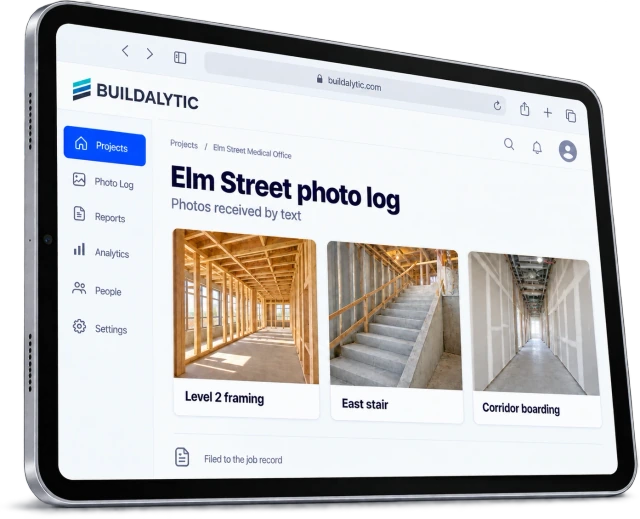
Ask for it in plain words. Text Brody or ask in a project channel for “yesterday’s east stair photos” and he sends them back.
Project channelsPhoto only days
No report call came in.
Some days the super is too busy to call in a report but the photos still arrive. Brody sends an honest photo log for that day, clearly labeled as photos only.
- Lists each photo with sender, area, time and caption
- Never fills in manpower, hours or work nobody reported
- Asks the super to call in a full report when one is required
Where photos go
One text from the field.
Every photo is stored on the job record in Buildalytic, added to that day's daily report and pushed to Procore photos and the SharePoint or OneDrive folder you choose.
01The job record in Buildalytic
Every photo, video and voice note is stored on the project with the sender, their company, the area, the date and the caption. That record is the one Brody searches when someone asks for a photo later.
02That day’s daily report
Photos texted during the day are added to the daily report for that date, grouped by area. When the super calls in the report, Brody can ask about anything the photos show that the report has not covered.
03Procore photos
Brody pushes each photo to the matching Procore project album with the date and caption, so the PM and the owner see the same photos without anyone uploading them by hand.
04SharePoint or OneDrive folders
Pick a folder pattern once, for example project, then date, then area. Brody saves each photo to the right folder so the office file structure stays clean.
05Project channel and text search
Anyone in the office can ask Brody for photos in a job channel or by text. He sends back the matching photos with who took them and when.
Who can send photos
Anyone on the job can send. Brody matches each sender to their company.
Your own supers and foremen, subcontractor crews and supplier drivers all text the same number. Brody knows which company each sender works for and which job they are on.
- Photos, short videos, voice notes and captions
- Any phone that can send a text, in the language they text in
- Unknown numbers get one question before anything is filed
- No paid seats or app for subs and suppliers. Calls and texts use company allowances
Setup
From job list to first photo. How do you set up field photo capture?
Load your jobs and people, pick where photos go, set retention and access, then share the company number with the field.
Load jobs and people
Import projects, areas, crews, subs and suppliers with their phone numbers from a spreadsheet or your existing systems.
Pick where photos go
Connect Procore and choose a SharePoint or OneDrive folder pattern for each project.
Set retention and access
Choose how long photos are kept and who in the office can ask Brody for them.
Share the number
Tell the field to text photos to the company number. Brody starts filing with the first one.
The facts
Field photo capture.
One full Platform plan at $99 per operating user per month, or $89 per user per month billed annually. Start with one paid user. Standard setup is free.
| What it is | A way for anyone in the field to text job photos to your company number and have Brody file each one to the right project, area and date. |
| Who it is for | General contractors and subcontractors whose supers, foremen, subs and suppliers take job photos on their own phones. |
| What senders need | Any phone that can send a text. No app, login or paid field seat. Calls and texts use company allowances. |
| What they can send | Photos, short videos, voice notes and captions. |
| What Brody does | Recognizes the sender and job, asks only when unclear, files, captions and adds each photo to that day’s report. |
| Where photos go | The job record in Buildalytic, the daily report, Procore photos and SharePoint or OneDrive folders. |
| Finding photos | Ask Brody in a project channel or by text by job, area, date or sender. |
| Photo only days | A clearly labeled photo log, with no invented work or manpower. |
| Price | One full Platform plan at $99 per operating user per month, or $89 per user per month billed annually. Start with one paid user. Standard setup is free. Each paid user adds 50 AI calling minutes, 250 messaging units, 250 human US calling minutes and 500 standard AI work items each month. These separate pools are shared across the company, not reserved for individual users. |
| Data | Stored with the job record, retention set by your company, never sold and never used to train models for other companies. |
| How to start | A 14 day evaluation on one real project. |
Get started
Three ways in.
Book a demo
Have the field text photos on one job for 14 days and see them filed, captioned and in Procore.
02Pair it with daily reports
Supers call in the report and text the photos, and Brody puts both in one daily report.
03See the price card
Included messages, overage rates and usage alerts on one page.
How does field photo capture by text work?
Anyone in the field texts photos to the same company number they already call. Brody recognizes the sender and the job they are on, files each photo to the right project, area and date, adds a caption and puts it in that day’s daily report. He also pushes it to Procore and the SharePoint or OneDrive folder you choose.
Do crews need an app to send photos?
No. Photos go out as normal text messages from any phone, with no app to install and no password to remember. Foremen, supers, subs and suppliers text the company number the same way they text anyone else, and they need no paid seats. Calls and texts use company allowances.
How does Brody know which job a photo belongs to?
Brody knows each sender’s phone number, their company and the job they are assigned to that day. A caption, a voice note or the area named in the text tells him where on the job it was taken. If someone works two jobs or the area is unclear, he asks one short question before filing.
Can subcontractors send photos too?
Yes. Brody matches each sender to their company and to the job they are working on, so a photo from a drywall foreman or a delivery driver lands on the right project with their company name attached. A number Brody does not know gets a short question about who they are and which job it is.
Where are the photos stored?
Every photo is stored with the job record in Buildalytic, kept for as long as your company sets and exportable at any time. Copies go to Procore photos and the SharePoint or OneDrive folder you pick for the project. Your photos are never sold and never used to train models for other companies.
Can photos attach to the daily report?
Yes. Photos texted during the day are added to that date’s daily report, grouped by area. On a day with photos but no report call, Brody sends a photo log clearly labeled as photos only, and he never fills in work or manpower that nobody reported.
Can we find photos later by job and date?
Yes. Ask Brody in a project channel or by text, for example “send me yesterday’s east stair photos.” He searches by job, area, date, sender and caption and sends back the matching photos. The same photos are in the photo log for each project.
What does it cost?
One full Platform plan at $99 per operating user per month, or $89 per user per month billed annually. Start with one paid user. Standard setup is free. Each paid user adds 50 AI calling minutes, 250 messaging units, 250 human US calling minutes and 500 standard AI work items each month. These separate pools are shared across the company, not reserved for individual users.
Snap it. Text it.
Let Brody file every job photo.
Start with a 14 day evaluation on one project. The field texts photos to your company number and Brody puts each one on the right job.
One full Platform plan. No standard setup fee. Start with one supported workflow.
Plan your rollout
Pricing, security reviews, procurement and rollout across your projects and regions.