
Platform overview
Every call, text and email. Brody is the AI teammate for construction.
Brody by Buildalytic is the AI teammate for construction. One company number answers and makes calls, texts and emails with crews, subcontractors, suppliers and customers in their own language, and updates Procore, Vista, SharePoint and OneDrive.
Brody says who he works for and that he is an AI assistant on every call.
Phone features are everywhere. What makes Brody useful is that he remembers what was said and keeps your records current.
Sheet 01, the shared record
Eight things every job runs on. What does the shared record hold?
The shared record holds your organizations, people, crews, projects, documents, tasks, commitments and conversation history. Each fact Brody hears is filed there with its source and date.
Organizations
Your company, GCs, subs, suppliers, owners, brokers and inspectors, with the people who speak for each.
People
Every super, PM, foreman, worker and contact, with phone, language, role and the jobs they are on.
Crews
Who works together, who leads them, what they are qualified for and where they report tomorrow.
Projects
Each job with its schedule, site details, contacts, subs, open items and daily history.
Documents
Specs, drawings, contracts, certificates and reports, answered from with sources and permissions.
Tasks
What someone needs to do next, who owns it and when it is due, created from calls and texts.
Commitments
Promises made on a call or in an email. A delivery window, a start date, a revised quote.
Conversation history
Every call, text, email and chat on the job, searchable and tied to the record it changed.
Every channel
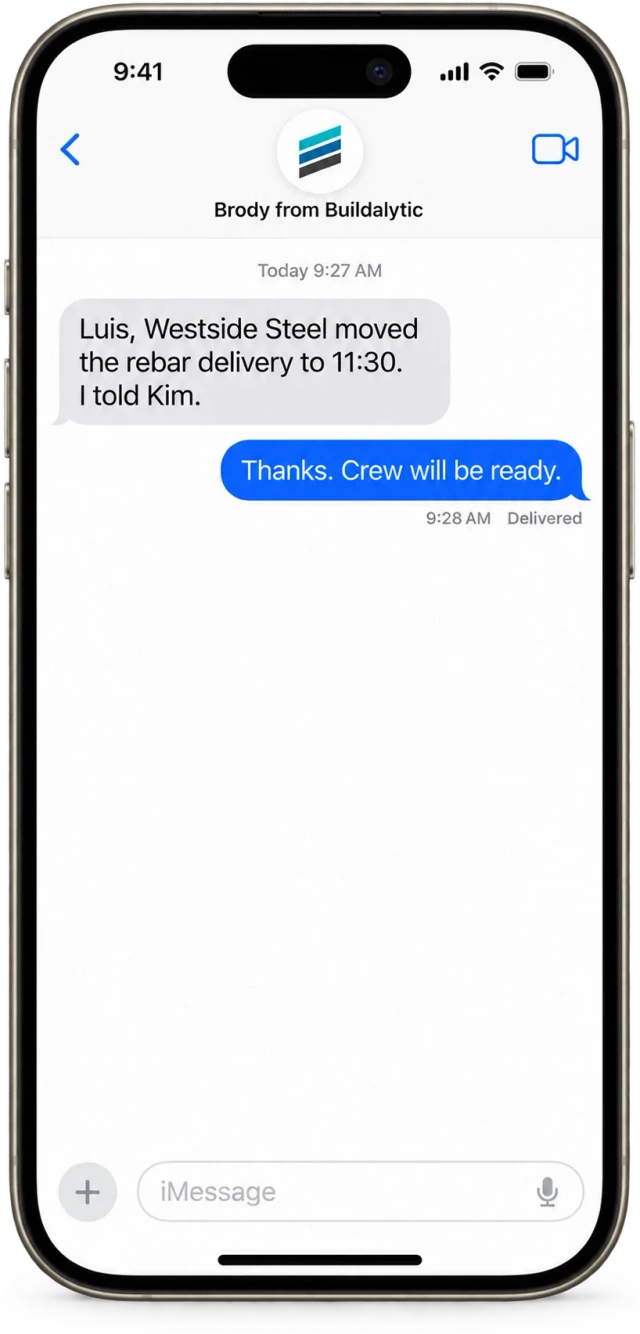
The supplier emails. The super texts. The sub calls back. Brody puts it all in one thread on the job.
Construction runs on phone calls and text messages, and the record usually lives in someone's head. Brody handles inbound calls, outbound calls, two way texting, connected email and job channels on one company number, so nothing lives only in a voicemail or a personal phone.
- Many calls at once, in and out on your company number, with branded caller ID
- Two way texting with opt outs and job aware threads
- Job photos texted to the company number, captioned and filed to the right job
- Connected email with attachments filed to the right job
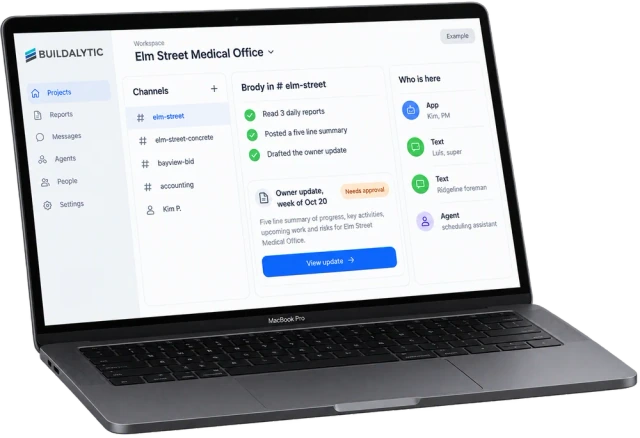
- Project channels where office, field and subs talk with Brody
How Brody works
One call in. How does a conversation become a record?
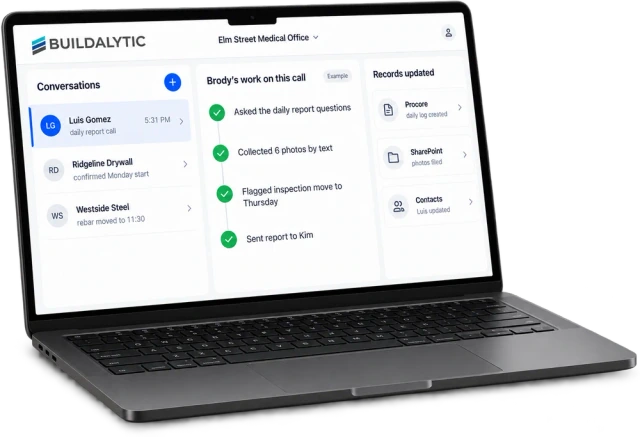
Brody runs the call, does the follow up and writes the answer into each system that needs it. Here is one superintendent's daily report call, from man count to the finished daily log.
Conversations, work, records. The left pane is everything coming in, the middle is what Brody did, the right is what changed.
Daily reports by phoneBrody, rules and approvals
Your rules, in plain language. How do you control what Brody does?
You write company rules in plain language and choose which actions need a person to approve. Brody follows them on every job and logs everything he does.
01Company rules
For example, if any delivery is more than an hour late, call the superintendent and text the PM. Each rule sets who to notify, which channel, quiet hours and escalation steps.
02Approvals
Pick what Brody can do alone and what needs a person first. A PM can approve a message to an owner from a text, the browser workspace or the job channel.
03Proactive follow up
Brody watches commitments and the schedule. When a crane is not confirmed by 2 PM the day before or a COI expires in 30 days, he follows up before someone has to ask.
04Audit trail
Every call, text, email and action is logged on the job with who asked, what Brody did and which record changed.
05Permissions
Answers from documents and connected systems respect each user’s access. A foreman sees what a foreman should see.
Build or buy
We own the construction logic. Which parts does Buildalytic build, and which does it buy?
Buildalytic builds the construction layers, including the shared record, workflows, knowledge base and connectors. It buys the regulated phone layers, such as carrier service, numbers, texting registration and emergency calling, from established carriers.
| Layer | Approach | Why it matters to you |
|---|---|---|
| Shared record, tasks, approvals, campaigns | Built by Buildalytic | This is the product. It is designed around jobs, crews, subs and commitments, not generic contacts. |
| Knowledge base and connectors | Built by Buildalytic | Construction permissions and sources, so answers come from your specs, schedule and ERP with a citation. |
| Workflow engine | Built by Buildalytic | Long waits, retries, approvals and stop rules run on our own engine, on the same number and records. |
| Carrier, numbers, texting, porting, emergency calling | Bought from established carriers | Regulated, proven infrastructure for the line your business depends on. |
| Office phone system features | Bought and integrated | Extensions, ring groups, queues and desk phones on mature technology, connected to Brody. |
| AI models and voice | Routed across leading providers | Each task uses the model that fits it, and we can switch providers without changing your setup. |
Private models
AI that learns your company. Can Brody use a model trained on our own data?
Yes. For larger contractors, Buildalytic post-trains open-weight models for tasks like daily report extraction, COI field reading and bid intent, using your calls, reports and your team's reviewed corrections. Each model is evaluated on your own work before go live, frontier models stay in use where they are stronger, and you own the weights.
The facts
The Buildalytic platform. What is included, and what does it cost?
One full Platform plan at $99 per operating user per month, or $89 per user per month billed annually. Start with one paid user. Standard setup is free. Each paid user adds 50 AI calling minutes, 250 messaging units, 250 human US calling minutes and 500 standard AI work items each month. These separate pools are shared across the company, not reserved for individual users.
| What it is | One platform for construction calls, texts, email and project channels, with Brody as an AI teammate and one shared record behind every conversation. |
| Who it is for | General contractors, subcontractors and trades with office staff, supers, foremen, crews and subs to coordinate. |
| Channels | Inbound and outbound calls, two way texting, connected email, project channels and web chat, all on your company number. |
| Control | Company rules in plain language, approvals where you want them and a full audit trail on every job. |
| Integrations | All standard integrations on the published list are live. Your admin authorizes access and read or write permissions. |
| Languages | English and Spanish fully tested, with more languages on the published tested list. |
| AI assistants | A Buildalytic connector for ChatGPT and a Claude connector through MCP let signed in office users ask Brody to draft a crew text, check a COI or find a sub’s status from the assistant they already use. |
| Price | One full Platform plan at $99 per operating user per month, or $89 per user per month billed annually. Start with one paid user. Standard setup is free. Each paid user adds 50 AI calling minutes, 250 messaging units, 250 human US calling minutes and 500 standard AI work items each month. These separate pools are shared across the company, not reserved for individual users. |
| Deployment | Buildalytic cloud by default, private cloud or local AI on your own servers as add ons. |
| How to start | A 14 day evaluation on one real project. |
What is an AI teammate for construction?
Brody by Buildalytic is the AI teammate for construction. One company number answers and makes calls, texts and emails with crews, subcontractors, suppliers and customers in their own language, and updates Procore, Vista, SharePoint and OneDrive. He works on your company number alongside your office staff, supers and PMs. Every conversation updates one shared record of your people, crews, projects, documents, tasks and commitments.
What can Brody do on day one?
Setup covers your company number, your knowledge base, two workflows and training for your team. Good first workflows are daily reports by phone, bid coverage with subs and crew confirmations by text. You can start with a 14 day evaluation on one real project.
Which systems does Brody update?
Standard integrations are live, including Procore, Trimble Viewpoint Vista, Autodesk Construction Cloud, SharePoint, OneDrive, Outlook, Gmail and Sage. Brody reads and writes within the permissions your admin approves. Office users can also work through the Buildalytic connector for ChatGPT and the Claude connector through MCP.
How does Brody know who it is talking to?
Brody matches the calling or texting number to a person in the shared record, which holds their company, role, language and the jobs they are on. If the number is new, he asks who is calling and which job it is about, then saves the contact. He always says he is an AI assistant and who he works for.
What needs approval before Brody acts?
You decide. Each company rule sets what Brody can do alone and what needs a person first, such as sending a change to an owner or calling a customer about money. A PM can approve from a text, the browser workspace or the job channel, and every action is logged on the job.
How is Brody different from Procore’s AI agents?
Procore’s AI agents work inside Procore for the people who use Procore. Brody works on your company number, calling and texting supers, foremen, subs and suppliers who may never open Procore, then writes what they said into Procore. A team can use both. Check Procore’s current plans for what its agents include.
Do field workers need an app?
No. Crews, foremen, subs and suppliers work with Brody by phone call and text message on any phone. Office staff use the Buildalytic browser workspace. Scoped field participants can reply and share updates for free. Calls, messages and AI work use company pools. Full workspace access requires a paid operating user.
How much does the platform cost?
One full Platform plan at $99 per operating user per month, or $89 per user per month billed annually. Start with one paid user. Standard setup is free. Each paid user adds 50 AI calling minutes, 250 messaging units, 250 human US calling minutes and 500 standard AI work items each month. These separate pools are shared across the company, not reserved for individual users.
One number. One record.
See Brody run a real job.
Put Brody on one project for 14 days. Calls, texts and email come in, and your records stay current without anyone typing.
One full Platform plan. No standard setup fee. Start with one supported workflow.
Plan your rollout
Pricing, security reviews, procurement and rollout across your projects and regions.