
Knowledge base
Your company’s knowledge, in one place. Ask Brody anything about your work.
Brody’s knowledge base holds your specs, drawings, RFIs, submittals, schedules, safety data sheets and contacts, every call, text and email, and the records in Procore, Vista, SharePoint and OneDrive. Anyone on your team, in the office or the field, can ask by phone, text, email or a project channel, and every answer names its source.
No app for the field. Works on any phone that can text.
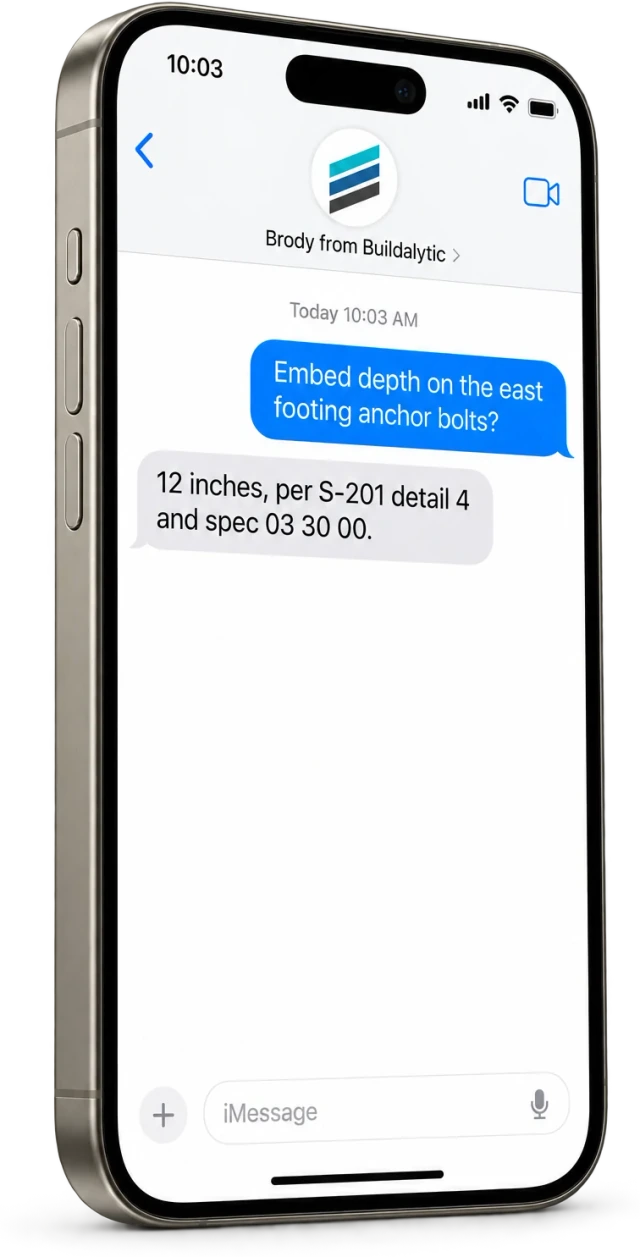
Sheet 01, what Brody knows
Everything your company runs on. What goes into the knowledge base?
Your documents, your conversations and the records in the systems you already use, organized by job and kept with their source and date.
Specs, drawings and contracts
Spec sections, drawing sheets and details, finish schedules, approved products and contract documents for each job.
RFIs and submittals
The RFI log and its answers, and the approved submittals, so a question about a substitution has a record behind it.
Schedules
What starts tomorrow, when the inspection is, pour times, deliveries and what moved, from the current schedule for that job.
Safety data sheets
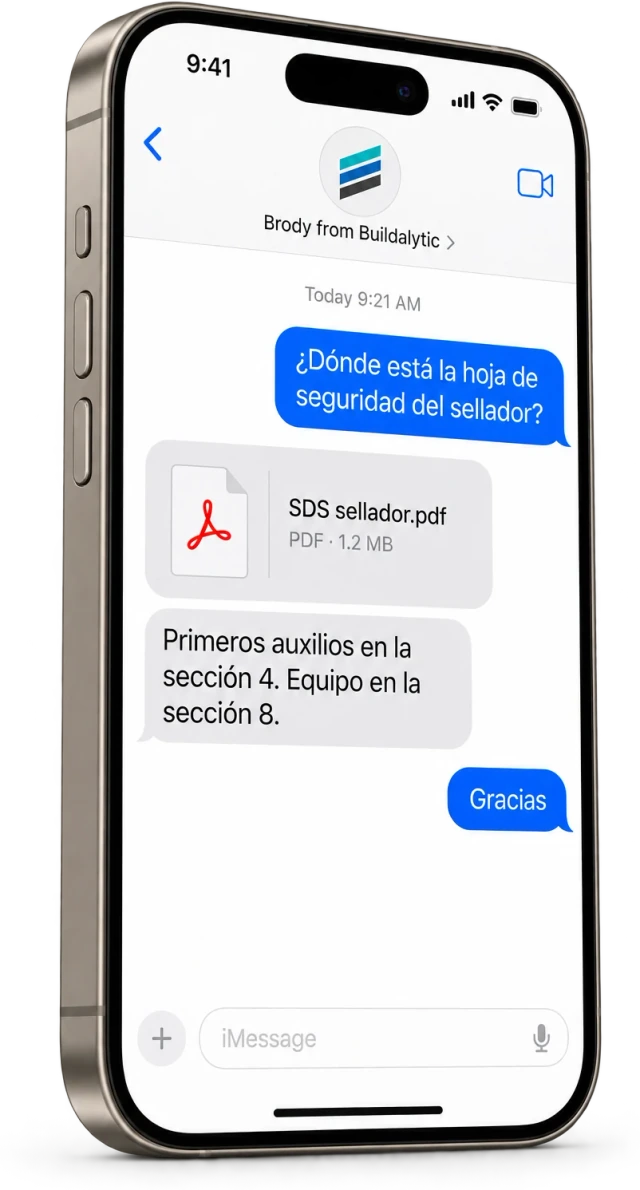
The SDS for each product on site, with the section for handling, first aid or protective equipment.
Contacts and site logistics
Who runs each crew, the inspector for Thursday, supplier contacts, gate codes, laydown areas, parking and delivery rules.
Calls, texts and email
Every call, text, email and project channel message on the job, filed to the shared record with its source and date.
Connected records
Projects, documents, people and records in Procore, Vista, SharePoint, OneDrive and the other systems you connect.
Answers your team gives
When a PM or super answers a question Brody could not, that answer is saved for the next person who asks.
On the deck
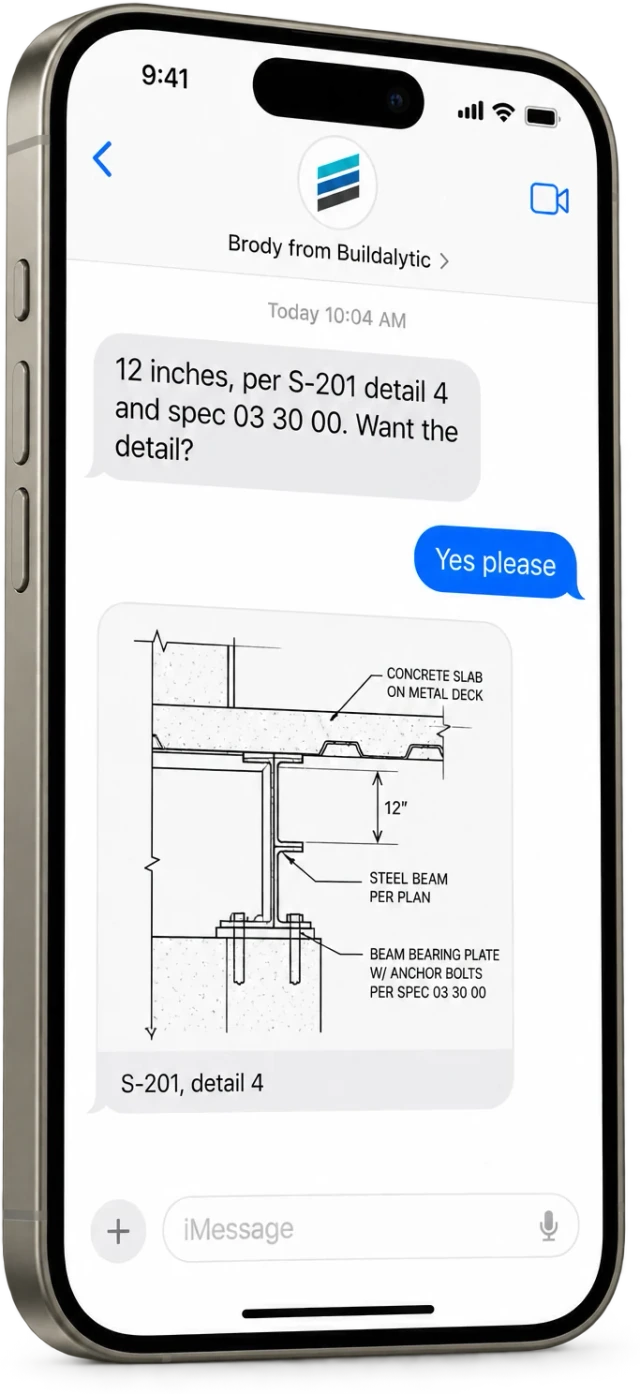
Your foreman is forty feet up. The spec book is in the trailer.
Instead of calling the PM or climbing down, he sends a text. Brody finds the section, answers in plain words and offers to send the detail. The PM keeps working, and the question and answer are on the job record.
How answers work
Every answer has a source. How does Brody answer a question?
Brody searches only the sources connected to your company and that job, checks what the person is allowed to see, answers in plain words and names the sheet, section or record it came from.
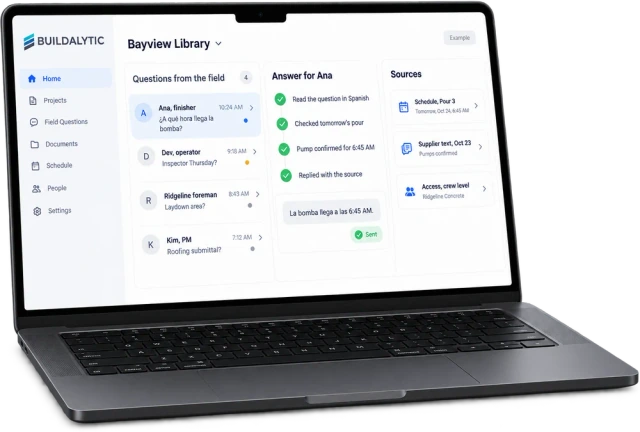
Your sources only
Brody answers from the documents, conversations and records connected to your company and that job. He does not guess.
A source on every answer
Each reply names the sheet, section, RFI or record it came from. Brody can send the page or the detail so the person can check it.
Permissions follow the source
Answers follow each person’s access to the source document. A sub’s foreman can get the pour time without seeing contract values or another sub’s scope.
Unknown answers routed and saved
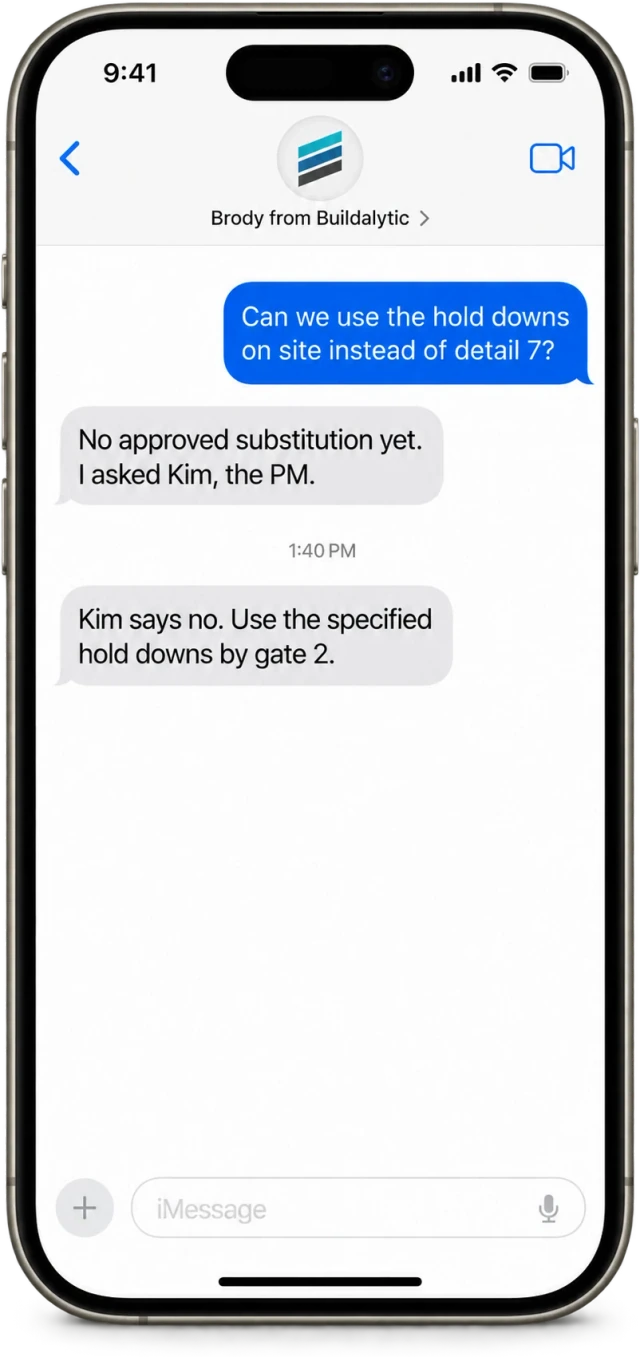
If the sources do not answer it, Brody asks the person who owns that topic, sends their reply back and saves it for next time.
Their language
A question asked in any tested language is answered in that language, with the same source. The original and the translation stay on the record.
Safety questions
Brody sends the safety data sheet and points to the right section. He is not a replacement for 911 or your safety lead.
When Brody does not know
He asks the right person and remembers the answer.
If the sources do not answer a question, Brody does not guess. He routes it to the PM, super or engineer contact who owns that topic, sends their reply back and saves it for the next person who asks.
- Routed by job, trade and topic
- Reply goes back to the person who asked
- Answers saved for next time
Every language
Asked in their language. Answered in it.
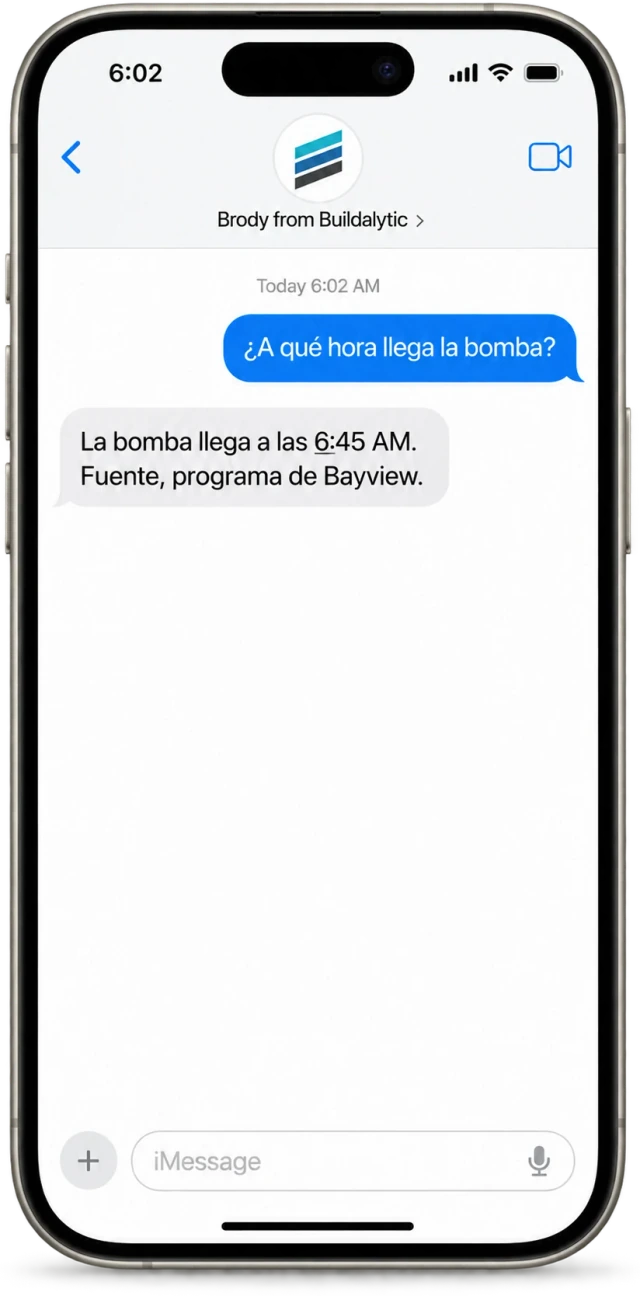
A finisher can text in the language they use every day and get the answer in that language, with the same source. Brody keeps the original and the translation on the record, and the same knowledge base answers by phone, text, email and web chat.
- Answers in the language of the question
- Original and translation stored
- Phone, text, email and web chat
How it stays current
New work flows in as it happens. How does the knowledge base stay current?
Documents and record updates come in from the systems you connect, and every call, text and email adds to the record. Answers your team gives are saved, so the knowledge base grows with each job.
01Connected systems
Brody reads from Procore, Vista, SharePoint, OneDrive and the other systems you connect, so new documents, RFIs, submittals and record updates there are available to answer from.
02Every conversation
Each call, text and email on a job is filed to the shared record with its source and date. What a supplier confirmed on Tuesday can answer a question on Thursday.
03Answers from your team
Questions Brody routes to a PM, super or engineer contact come back with an answer, and that answer is saved to the knowledge base.
04Revisions and addenda
How revised sheets, addenda and replaced documents are handled is set up with your team during onboarding, so answers come from the current set.
05Documents outside your systems
No setup fee. Standard onboarding includes your company number, normal messaging registration, a standard roster import, released connector setup and two 45-minute assisted sessions for your first two supported workflows.
Sheet 02, who asks
One knowledge base for the whole company. Who asks Brody, and what do they ask?
Office and field ask the same knowledge base by phone, text, email or a project channel. Each person gets answers only from the sources they can open. These are example questions.
Superintendents
“Which subs are on site Thursday?” and “What did the inspector say about the shoring yesterday?”
Foremen
“What is the embed depth on detail 4 of S-201?” and “When does the pump arrive tomorrow?”
Project managers
“What did the drywall sub commit to on last week’s call?” and “Which submittals are still open on this job?”
Estimators
“Which subs confirmed they are bidding the drywall package?” and “Has every bidder received addendum 2?”
Safety
“Send me the SDS for the curing compound.” and “Who on tomorrow’s crew holds a current fall protection certification?”
Office and accounting
“Who is the billing contact for our concrete supplier?” and “Has the electrical sub’s certificate of insurance expired?”
Brody uses it too
The same knowledge behind the work Brody does. How does Brody use it on his own?
Brody works from the same knowledge base when he calls subs, dispatches crews and files reports, so what he says matches your documents and records.
When he calls a sub
Brody answers bid questions only from the loaded bid documents and confirms each sub has the invitation, the plans and every addendum.
02When he dispatches a crew
Each worker gets the site, start time, gate code, who to report to and what to bring, from the job information you load.
03When he files a report
Brody asks the questions on your daily report template, checks that nothing is missing and files the report to the right job and to Procore.
Security and ownership
Your knowledge stays yours. Who can see it, and where does it go?
Your knowledge base belongs to your company. It is held in your organization, filtered to it on every request and never used for anyone else.
- Held in your organization and filtered to it on every request
- Never used to answer other customers’ questions or to train models for other companies
- Your admin decides which sites, folders, projects and systems Brody may read
- Answers follow each person’s access to the source document
- Owners and admins can export your data at any time
- Local AI on your own servers for sensitive projects
Key facts
Brody’s knowledge base in brief. What is the construction knowledge base?
The essentials for operations, IT and field leads, one fact per row.
| What it is | One knowledge base for your company. Anyone on the team asks a question and Brody answers from your documents, conversations and connected records, with the source. |
| Who it is for | Superintendents, foremen, project managers, estimators, safety and office staff, plus the crews and subs you add to a job. |
| Sources | Specs, drawings, contracts, RFIs, submittals, schedules, safety data sheets, contacts, calls, texts, email and the records in the systems you connect. |
| Connected systems | Procore, Autodesk Construction Cloud, SharePoint, OneDrive, Vista and the other systems on the published list. |
| Channels | Phone call, text, email, project channels and web chat, all on your company number. |
| Citations | Every answer names the sheet, section, RFI or record it came from. |
| Permissions | Answers follow each person’s access to the source document. |
| Unknown answers | Routed to the person who owns the topic, sent back to the asker and saved for next time. |
| Languages | Every tested language. Questions are answered in the language they were asked in. |
| Data ownership | Your data belongs to your company and is never used to train models for other companies. |
| Price | One full Platform plan at $99 per operating user per month, or $89 per user per month billed annually. Start with one paid user. Standard setup is free. Each paid user adds 50 AI calling minutes, 250 messaging units, 250 human US calling minutes and 500 standard AI work items each month. These separate pools are shared across the company, not reserved for individual users. |
| Cost to the field | Free for field workers, subcontractors and suppliers. No app and no login. |
| How to start | No setup fee. Standard onboarding includes your company number, normal messaging registration, a standard roster import, released connector setup and two 45-minute assisted sessions for your first two supported workflows. |
What is a construction knowledge base?
A construction knowledge base brings a company’s documents, conversations and records together so people can ask a question in plain words and get an answer with its source. Brody’s knowledge base holds your specs, drawings, RFIs, submittals, schedules, safety data sheets, contacts, calls, texts, email and the records in the systems you connect.
What goes into Brody’s knowledge base?
Specs, drawings, contracts, RFIs, submittals, schedules, safety data sheets, contacts and site logistics, plus every call, text, email and project channel message on the job. Connected systems such as Procore, Autodesk Construction Cloud, SharePoint, OneDrive and Vista add their documents and records. Files outside those systems can be loaded during setup.
Is the knowledge base only for the field?
No. Superintendents, foremen, PMs, estimators, safety and office staff all ask the same knowledge base. People ask by phone, text, email or in a project channel, and each person gets answers only from the sources they are allowed to see.
Does Brody show which document an answer came from?
Yes. Every answer names the drawing sheet, spec section, RFI or record it came from. Brody can also send the page or the detail so the person can check it.
Who can see what in the knowledge base?
Your admin decides which sites, folders, projects and systems Brody may read, so areas such as HR, payroll and legal can stay out of scope. Within that scope, answers follow each person’s access to the source document, so a sub’s foreman can get the pour time without seeing contract values, change order pricing or another sub’s scope.
Is our knowledge base used for other customers?
No. Your knowledge base is held in your organization and filtered to it on every request. It is never used to answer other customers’ questions and never used to train models for other companies. Your calls, texts, documents and records belong to your company.
What happens when the answer is not in the knowledge base?
Brody does not guess. He routes the question to the person who owns it, such as the PM, the super or the engineer of record contact, and sends their reply back to the person who asked. The answer is saved so the next person gets it right away.
Can crews ask questions in their own language?
Yes. A question texted in any tested language gets an answer in that language, whether it is English, Spanish or another language on the list. Brody keeps the original message and the translation on the record.
Do crews need an app?
No. The knowledge base works by plain text message and phone call on any phone. Field workers, subs and suppliers need no paid seats or login. Their calls and texts use company allowances.
What does it cost?
One full Platform plan at $99 per operating user per month, or $89 per user per month billed annually. Start with one paid user. Standard setup is free. Each paid user adds 50 AI calling minutes, 250 messaging units, 250 human US calling minutes and 500 standard AI work items each month. These separate pools are shared across the company, not reserved for individual users.
Every question answered. Every answer sourced.
Give your whole team one place to ask.
Start with one real job. Brody loads its documents, connects your systems, answers the office and the field, and sends what he does not know to the right person.
One full Platform plan. No standard setup fee. Start with one supported workflow.
Plan your rollout
Pricing, security reviews, procurement and rollout across your projects and regions.