
Procore integration
Procore integration. Brody puts calls, texts and photos into Procore.
The Brody integration for Procore connects your company number to your Procore projects. Supers call in their dailies and crews text photos, and Brody writes daily logs, job photos, notes and contact updates to the right project. It is for GCs and subs who run their jobs in Procore.
Works with
Procore stays the record. Brody fills it from the conversations already happening on your number.
Sheet 01, with Procore
Six jobs, one connection. What does Brody do with Procore?
Brody writes daily logs from phone calls, files job photos texted to your number, answers field questions from project documents and keeps the project directory current. Each one lands in the right Procore project with its source saved.
Daily logs from a phone call
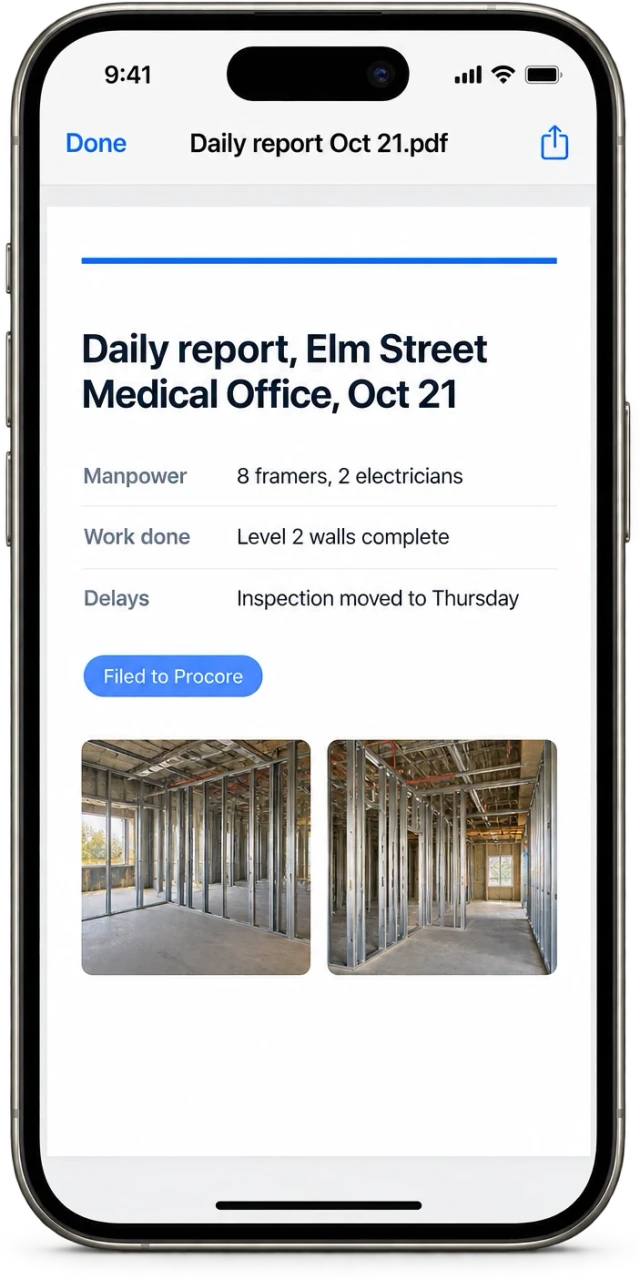
Supers call in, Brody asks your template questions and writes the daily log to the project.
02Field photo capture
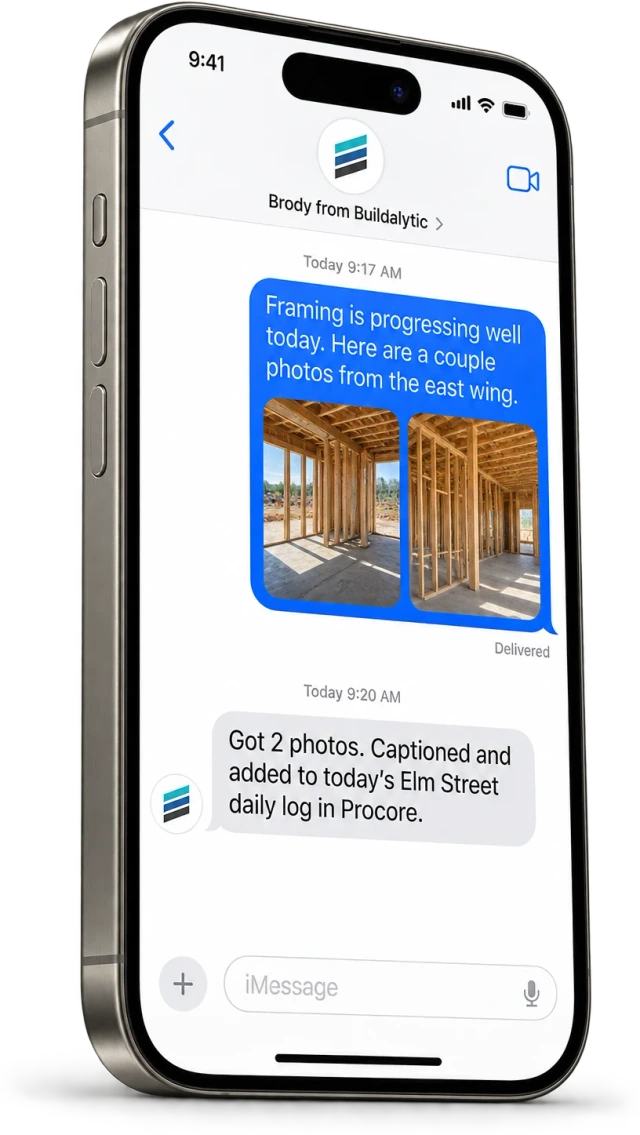
Crews text photos to the company number. Brody captions them, files them to the job and adds them to the daily report.
03Field knowledge from documents
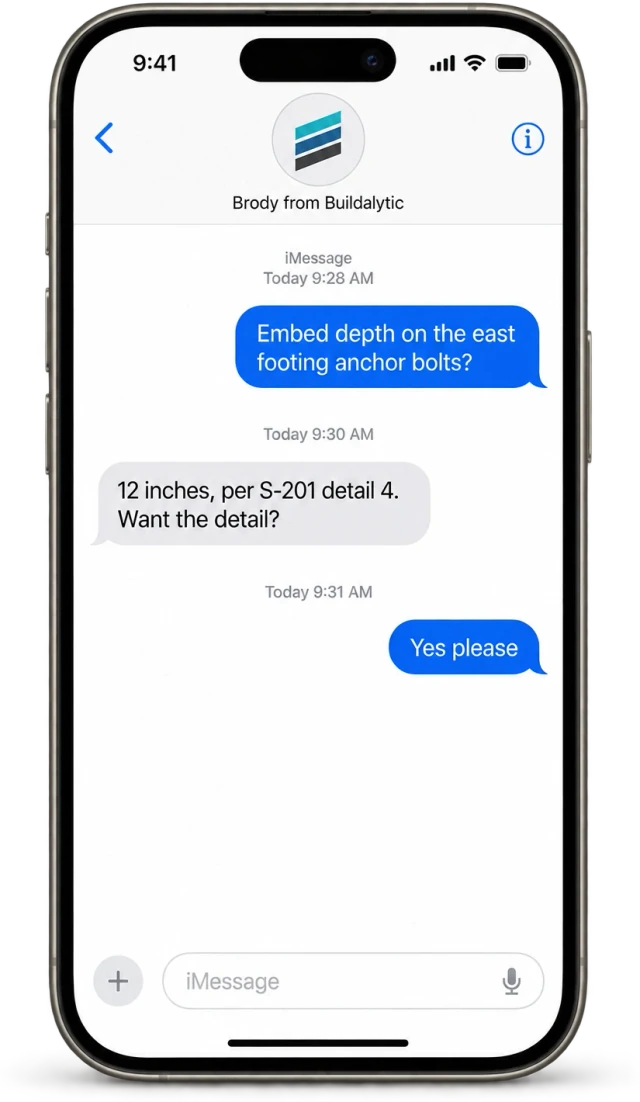
A foreman texts a question and gets an answer from the project documents with the source.
Contacts kept current
New numbers, new foremen and changed emails from calls and texts update the project directory.
Schedule aware follow up
Brody reads the schedule so he can confirm crews, deliveries and inspections before the day arrives.
Notes on the job
Delays, inspection changes and promises from calls are written to the project as notes your team can find.
From the truck to the log
One short call from the truck. The Procore daily log is written, with photos attached.
Procore is where your team expects the daily log, the photos and the notes. The hard part has always been getting them in from the field. Brody does that part on a phone call and a few text messages.
Nothing new for the field to install, and nothing new for the office to check. The work shows up where it always did.
Two way
What goes in and out. What does Brody read from Procore and write back?
Brody reads projects, the directory, documents, the schedule and prior daily logs. He writes back daily logs, photos, notes and contact updates, only on the projects your admin chooses.
| Data | Brody reads | Brody writes back |
|---|---|---|
| Projects | Project names, addresses and status | Notes on delays, inspections and commitments |
| Directory | Companies and contacts on each project | New and corrected phone numbers and emails |
| Documents | Specs, drawings and project documents for field knowledge | None. Documents stay as they are |
| Schedule | Upcoming work, deliveries and inspections | None. Brody follows up, your team updates the schedule |
| Daily log | Prior logs for context | New daily logs with manpower, work done, delays and safety |
| Photos | None | Job photos texted to the company number, captioned and filed |
Every write is traceable. Each entry in Procore links back to the call or text it came from.
Platform overviewData and partnership
Procore’s rules, respected. How is our Procore data handled?
Procore data stays in your account, follows Procore permissions and is never used to train, fine tune or benchmark AI models.
01Never used for AI training
Procore sourced data is never used to train, fine tune or benchmark AI models. That includes private models and Buildalytic Labs.
02Your account, your projects
A Procore admin authorizes the connection and picks the projects. You can disconnect at any time.
03Permissions follow Procore
Answers drawn from Procore respect what each person is allowed to see there.
04Partner program
We build on Procore’s published developer tools. We intend to apply to the Procore Partner Program and the App Marketplace, and we do not claim a listing or partner tier today.
The facts
Brody and Procore. What do you get, and what does it cost?
One full Platform plan at $99 per operating user per month, or $89 per user per month billed annually. Start with one paid user. Standard setup is free. Each paid user adds 50 AI calling minutes, 250 messaging units, 250 human US calling minutes and 500 standard AI work items each month. These separate pools are shared across the company, not reserved for individual users.
| What it is | A two way connection between Brody and your Procore projects. |
| Who it is for | General contractors and subcontractors that run their projects in Procore. |
| Brody reads | Projects, directory contacts, documents, schedule and prior daily logs. |
| Brody writes back | Daily logs, job photos, notes and contact updates. |
| AI training | Procore sourced data is never used to train, fine tune or benchmark any model. |
| Price | One full Platform plan at $99 per operating user per month, or $89 per user per month billed annually. Start with one paid user. Standard setup is free. Each paid user adds 50 AI calling minutes, 250 messaging units, 250 human US calling minutes and 500 standard AI work items each month. These separate pools are shared across the company, not reserved for individual users. |
| How to start | Connect Procore during setup and run a 14 day evaluation on one real project. |
What does Brody write into Procore?
Daily logs with manpower, work completed, delays and safety notes, job photos texted to your company number, notes on delays and inspections, and directory contact updates. Brody reads projects, the directory, documents, the schedule and prior daily logs so he knows the job. Every write is logged with the call or text it came from.
Does a person review entries before they post?
You decide. Brody can post daily logs and photos directly, or hold them for the super or PM to approve first, using the same approval rules as the rest of the platform. Either way, each entry links back to the conversation it came from.
Can crews text photos straight into Procore?
Yes. Crews text job photos to your company number. Brody files each one to the right job, adds a caption, attaches it to the daily report and sends it to the project in Procore.
Is Brody listed in the Procore App Marketplace?
Not today. The integration is built on Procore’s published developer tools and connected through your own Procore account. We intend to apply to the Procore Partner Program and the App Marketplace, and we will say so here only once that is true.
How is Brody different from Procore AI agents?
Procore’s AI agents work inside Procore for the people who use Procore. Brody works on your company number, calling and texting supers, foremen, subs and suppliers who may never log in, then writes what they said into Procore. Check Procore’s current plans for what its agents include.
What Procore permissions does Brody need?
A Procore admin on your team authorizes the connection during setup and chooses the projects Brody can work with. Brody needs to read the projects, directory, documents and schedule, and to write daily logs, photos and directory updates. Answers follow the permissions your Procore users already have.
Is our Procore data used to train AI?
No. Data that comes from Procore is never used to train, fine tune or benchmark any AI model, including private models and Buildalytic Labs work. It stays in your account and is used only to do your work.
What does it cost?
One full Platform plan at $99 per operating user per month, or $89 per user per month billed annually. Start with one paid user. Standard setup is free. Each paid user adds 50 AI calling minutes, 250 messaging units, 250 human US calling minutes and 500 standard AI work items each month. These separate pools are shared across the company, not reserved for individual users.
Procore, without the typing.
Let the field fill Procore by phone.
Connect Procore and put Brody on one real project for 14 days. Daily logs, photos and contacts arrive on their own.
One full Platform plan. No standard setup fee. Start with one supported workflow.
Plan your rollout
Pricing, security reviews, procurement and rollout across your projects and regions.