
Trimble Viewpoint Vista integration
Viewpoint Vista integration. Brody connects your field conversations to Vista.
The Brody integration for Trimble Viewpoint Vista connects your company number to your ERP. Brody reads jobs, vendors and employees, then writes COI compliance status and contact updates back. It is for contractors who run accounting, subcontracts and HR in Vista.
Works with
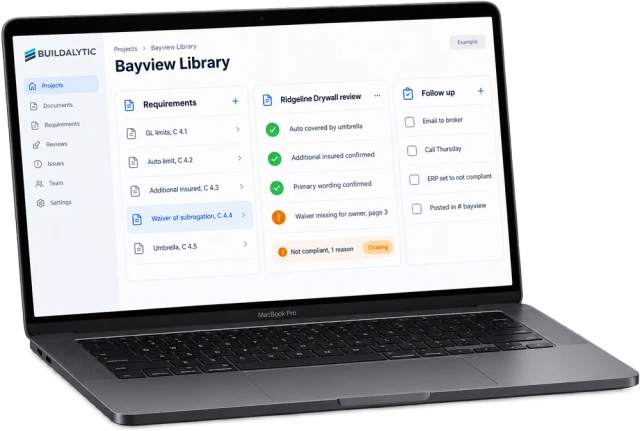
Your ERP is only as good as its data. Brody keeps it current from calls, texts and email.
Sheet 01, with Vista
Compliance, people, vendors. What does Brody do with Vista?
Brody keeps COI compliance status, renewals, worker records and vendor contacts current in Vista, and uses your Vista roster to dispatch crews by text. It is the work that usually needs a coordinator, a spreadsheet and a lot of phone calls.
COI compliance status
Certificates collected, checked against requirements and marked compliant or not on the vendor in Vista.
Renewals before they lapse
Brody asks for renewals ahead of expiry and updates the status the moment the new certificate is accepted.
Worker records by employee ID
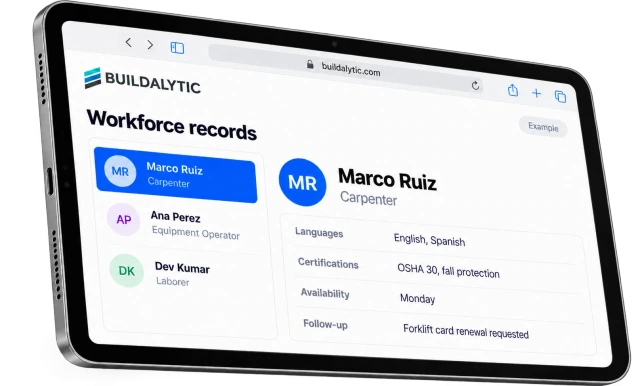
Phone numbers, certifications and availability confirmed by text update the existing employee record.
Vendor contacts
New project managers, brokers and billing contacts heard on calls are written to the right vendor.
Crew dispatch from your roster
Brody uses employees from Vista to text crews their site and start time in their language.
Job lookups in the field
Supers and foremen ask about a job by text and get answers from job and vendor data they are allowed to see.
Compliance, closed out
From the broker to your ERP. Keep the correction and the status together.
A corrected certificate should not sit in an inbox while the vendor stays on hold. Brody checks it against the subcontract and updates the permitted compliance fields in Vista when it passes.
- Check
- Compare the certificate with the subcontract requirements, including endorsements and dates.
- Follow up
- Request missing items from the broker. Keep unresolved requirements visible to the team.
- Write back
- Update the authorized compliance status in Vista when the check passes, with the source and check logged.
Two way
What goes in and out. What does Brody read from Vista and write back?
Brody reads jobs, vendors, subcontracts, insurance requirements and employees. He writes back compliance status, vendor contacts and confirmed employee details, within the scope your Vista admin sets.
| Data | Brody reads | Brody writes back |
|---|---|---|
| Jobs | Job names, numbers and status | None. Jobs stay managed in Vista |
| Vendors and subcontracts | Vendors, subcontracts and their insurance requirements | Compliance status and vendor contact updates |
| Employees | Employee list, contact details and crafts | Confirmed phone numbers, certifications and availability |
| Certificates | Current compliance status | Accepted, deficient or expiring status after each check |
Updates, not duplicates. Brody matches people and vendors to existing records before writing anything.
Workforce profilesData and partnership
Your ERP, your rules. How is our Vista data handled?
Vista data stays in your account, within the scope your admin sets, and is never sold or used to train models for other companies.
01Your account, your scope
Your Vista admin authorizes the connection and decides which data Brody can read and which fields he can update.
02Never used for other companies
Your Vista data is never sold and never used to train models for other companies.
03Every update is logged
Each change shows the call, text or email it came from and the check Brody ran before writing it.
04Trimble partner path
We build on the Vista API Trimble provides to developers. We intend to bring Brody to Trimble Agent Studio when it opens to partners, and we do not claim a Trimble Marketplace listing today.
The facts
Brody and Vista. What do you get, and what does it cost?
One full Platform plan at $99 per operating user per month, or $89 per user per month billed annually. Start with one paid user. Standard setup is free. Each paid user adds 50 AI calling minutes, 250 messaging units, 250 human US calling minutes and 500 standard AI work items each month. These separate pools are shared across the company, not reserved for individual users.
| What it is | A two way connection between Brody and Trimble Viewpoint Vista. |
| Who it is for | Contractors that run accounting, subcontracts and HR in Vista. |
| Brody reads | Jobs, vendors, subcontracts, insurance requirements and employees. |
| Brody writes back | COI compliance status, vendor contacts and confirmed employee details. |
| COI checks | Calls and messages within a workflow also use their channel pools. Call transcription and its ordinary summary are included in AI calling time. There is no separate standard email or COI-check meter. Unusually large documents or intensive processing need an agreed scope before activation. |
| Price | One full Platform plan at $99 per operating user per month, or $89 per user per month billed annually. Start with one paid user. Standard setup is free. Each paid user adds 50 AI calling minutes, 250 messaging units, 250 human US calling minutes and 500 standard AI work items each month. These separate pools are shared across the company, not reserved for individual users. |
| How to start | Connect Vista during setup and run a 14 day evaluation on one real project. |
What Vista data can Brody read and update?
Brody reads jobs, vendors, subcontracts, insurance requirements and employees. He writes back COI compliance status, vendor contacts and confirmed employee details such as phone numbers, certifications and availability. Employee updates match the existing record by employee ID instead of creating a duplicate.
How does Brody connect to Vista?
The connector is built on the Vista API that Trimble provides to developers. Your Vista admin authorizes the connection during setup and decides which data Brody can read and which fields he can update. Every change is logged with the call, text or email it came from.
Does it work with Vista in the Trimble cloud and on premise?
Tell us how your Vista is hosted, in the Trimble cloud or on your own servers, before setup. The connector uses the Vista API Trimble provides, and we confirm the connection path for your environment before the evaluation starts.
Is Brody listed on the Trimble Marketplace?
Not today. Trimble has announced Agent Studio for customers and partners to build agents, and we intend to bring Brody there when it opens. We will only claim a Marketplace listing or partnership once it is live.
Who approves changes before they post to Vista?
You do. Your Vista admin sets which fields Brody can update, and you can require a person to approve an update first. For example, Brody can prepare the exact compliance entry for a certificate and a person in AP applies it.
Does Brody replace Vista or Trimble field tools?
No. Vista stays your system of record, and Trimble’s own field tools keep their role. Brody works on your company number with subs, brokers and crews by call, text and email, then writes what they confirmed into Vista.
How does it help with insurance compliance?
Brody collects each certificate, checks it against the subcontract requirements, such as additional insured and waiver of subrogation, and follows up with the broker until it is fixed. When a certificate is accepted or about to expire, he updates the compliance status on the vendor in Vista, so AP and project teams see the same answer.
What does it cost?
One full Platform plan at $99 per operating user per month, or $89 per user per month billed annually. Start with one paid user. Standard setup is free. Each paid user adds 50 AI calling minutes, 250 messaging units, 250 human US calling minutes and 500 standard AI work items each month. These separate pools are shared across the company, not reserved for individual users.
Compliance that closes itself out.
Keep Vista current from the field.
Connect Vista and put Brody on one real project for 14 days. Certificates, contacts and worker details update as people answer.
One full Platform plan. No standard setup fee. Start with one supported workflow.
Plan your rollout
Pricing, security reviews, procurement and rollout across your projects and regions.