
A crew assignment is confirmed when the intended person acknowledges the current job, start time, location and relevant instructions. Track sent, delivered, acknowledged, declined and unresolved separately. If the assignment changes, request confirmation of the changed version and escalate non-response to the dispatcher.
What to take away
- Delivery is a channel status; acknowledgement is a work status.
- A changed time or location requires a fresh confirmation.
- Give the dispatcher a visible unresolved list.
Send the details someone needs to act
A dispatch text should name the job, date, start time, meeting location, responsible contact and any approved access instructions. Avoid unexplained abbreviations that mean different things across projects. Ask for a clear acknowledgement and give the person a way to decline or flag a problem.
Do not use a long group thread as the only assignment record. A reply such as “got it” is hard to interpret if three start times appear above it. Keep the current assignment identifiable and show who is expected to respond. For multilingual crews, confirm the meaning of dates, addresses and instructions rather than relying on a translated greeting.
Keep the status vocabulary honest
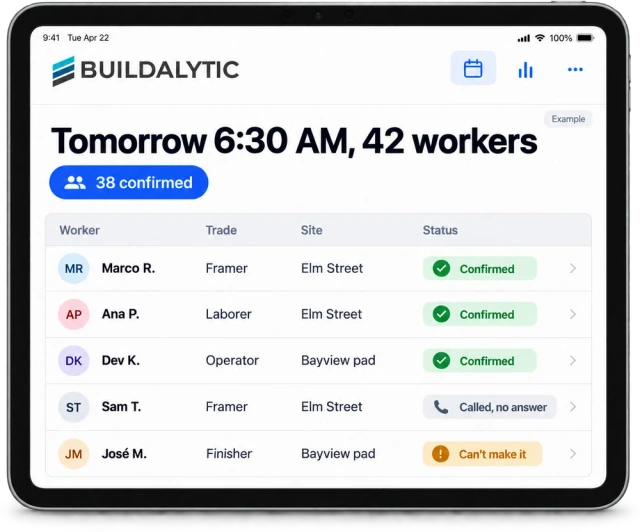
Illustrative dispatch: six people receive a 7 a.m. assignment. Four acknowledge, one reports they cannot attend and one does not answer. The honest summary is four confirmed, one declined and one unresolved. It is not “six scheduled and notified” as a substitute for actual coverage.
| State | Meaning | Action |
|---|---|---|
| Sent | The system attempted the message | Check delivery failures |
| Delivered | The channel reports delivery | Still waiting for acknowledgement |
| Acknowledged | The intended person confirms the current assignment | Count as confirmed under your rule |
| Declined or conflict | The person cannot accept as written | Dispatcher resolves coverage |
| No response | No usable answer by the cutoff | Use the fallback contact process |
Treat changes as a new instruction
If the start moves from 7 a.m. to 9 a.m., issue a clear changed assignment referencing the job and date. Ask recipients to confirm the new time. Acknowledgement of the old message should not carry forward automatically. Keep an understandable history so the dispatcher can see who might still act on the earlier version.
Avoid sending a series of fragments such as “make it nine,” “other entrance” and “ask Lee.” Put the current instruction together in one record. Use a phone call or another approved contact path when the cutoff is near and a person has not acknowledged. Do not let reminders continue after someone has declined or the dispatcher has reassigned the work.
Test the unresolved cases before expanding
Run a small dispatch with a deliberate non-response, a changed time and an employee who replies in their preferred language. Inspect what the dispatcher sees and whether a declined assignment remains distinct from a delivery failure. Check project access so private worker details do not become visible to the whole crew.
Buildalytic’s crew-dispatch-by-text page describes assignments and confirmations through calls and texts. Bring tomorrow’s dispatch format to a demo. Ask to see the current assignment, the acknowledgement and the escalation path in one place, rather than judging the workflow by a successful send animation.
Sources: Buildalytic: crew dispatch by text
Common questions
Does a read receipt prove acceptance?
No. Define an explicit acknowledgement rule and verify it with the intended recipient. A channel receipt does not establish that the person accepted the assignment.
What if someone acknowledges an old instruction?
Keep the version visible and request confirmation of the current assignment. Route ambiguity to the dispatcher before treating the person as confirmed.
Sources and editorial notes
Prepared with AI assistance. Reference date: 2026-10-28. Worked examples are illustrative and are not customer results. Product details can change; confirm the current scope and terms before rollout.
How we prepare and update field notesNeed a blank worksheet? Get the free reporting template and receptionist evaluation checklist.
Try it on your own workflow.
Bring your current process and one difficult example. We will walk through the handoff, permissions and exceptions with you.
Start with the call, text or record your team already handles. Review the expected outcome and the human handoff before choosing a rollout.
Book a workflow demo Explore the relevant capability