

Confirm that the new provider can port your exact number, gather the account authorization details and keep the existing service active while the transfer is arranged. Test incoming calls, outgoing caller ID, messages and routing after the confirmed cutover. Treat business texting and connected services as separate checks rather than assuming everything moves with the number.
What to take away
- Do not cancel the old line before arranging the port.
- Inventory fax, alarms, bundled services and authentication dependencies.
- Use a cutover checklist with a responsible person on both sides.
Know what the number is attached to
List every published number and what it does: office main line, field dispatch, fax, after-hours line or a number used by another service. Record the account holder and an authorized contact. Check signs, vehicles, directories and customer messages so you know the cost of a routing mistake.
A number can be connected to more than a phone handset. Ask about bundled internet, alarm or entry systems and account verification messages. Plan alternatives for critical dependencies before the transfer. This is an inventory exercise; it is not a reason to collect staff passwords or publish carrier account numbers in a shared project channel.
Use a cutover test sheet
Before the change, record the expected behavior for each number. Test from an external phone rather than only calling between extensions on the same system. Have an office owner available to inspect the result and coordinate with the carrier if needed.
| Check | Expected result | Verification |
|---|---|---|
| Inbound call | Correct business greeting and route | Call from more than one outside network if practical |
| Outbound call | Expected business caller ID | Return the call to that number |
| SMS and attachments | Supported, registered messaging path | Test separately from voice |
| Unavailable destination | Expected voicemail or callback fallback | Keep the destination deliberately unanswered |
| Connected service | Service still operates as intended | Have its owner verify it |
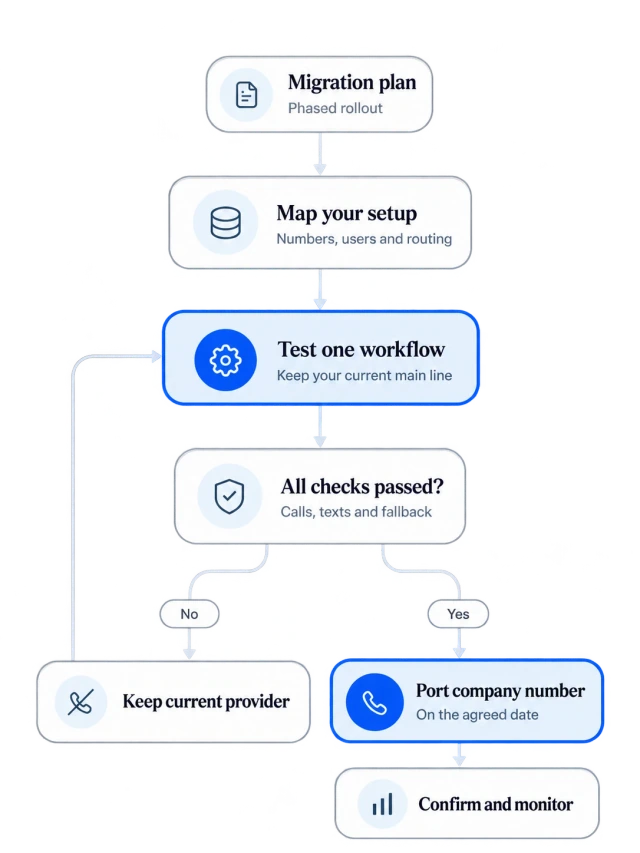
Close the move only after verification
Keep the old bills and written transfer confirmations until the account consequences are understood. Confirm what the old provider will close and what remains billable; a port and cancellation of every bundled product are not the same instruction. Update the team’s quick reference and remove obsolete forwarding rules that could create a loop.
Buildalytic’s migration page describes moving a team and numbers. Bring your number inventory to the migration discussion and ask for a provider-specific plan. The right demonstration includes a failed transfer destination, texting readiness and the person who will own cutover support.
Sources: Buildalytic: migrate
Common questions
Will old messages and call history transfer with the number?
Do not assume they will. Ask what data can be exported or imported, how attachments are handled and what retention arrangements you need before closing an account.
Can I guarantee no interruption?
No provider-specific guarantee follows from this checklist. Confirm a cutover and contingency plan with the receiving provider, including a temporary contact path for essential work.
Sources and editorial notes
Prepared with AI assistance. Reference date: 2026-10-28. Worked examples are illustrative and are not customer results. Product details can change; confirm the current scope and terms before rollout.
How we prepare and update field notesNeed a blank worksheet? Get the free reporting template and receptionist evaluation checklist.
Try it on your own workflow.
Bring your current process and one difficult example. We will walk through the handoff, permissions and exceptions with you.
Start with the call, text or record your team already handles. Review the expected outcome and the human handoff before choosing a rollout.
Book a workflow demo Explore the relevant capability