

Ask whether the subcontractor received the current scope, intends to bid and has any blocker. Record bidding, needs clarification, declined or no response separately. Send the relevant next item, respect a clear decline and keep trade coverage visible to the estimator.
What to take away
- A delivered invitation is not confirmed bid coverage.
- Capture the reason for a non-response before repeating the request.
- Keep deadlines and scope revisions attached to the same invitation.
Find out whether the invite is usable
A subcontractor may ignore an invite because the scope is unclear, the deadline is unrealistic for their workload, the project is outside their area or the message went to the wrong contact. Public estimator discussions raise these kinds of follow-up problems. They are anecdotal signals to investigate, not a response-rate benchmark.
Start with a current scope package, trade, location, due date and estimator contact. Confirm that the recipient is the right estimating contact before adding more reminders. A short, relevant invitation is easier to answer than a large attachment set with no explanation of the requested trade scope.
Sources: Estimator discussion: subcontractor non-response to bid invitations (anecdotal)
Build a coverage view with reasons
An estimator needs to distinguish a likely bid from a name on a distribution list. Ask for a simple status and let the subcontractor explain a blocker. Preserve the date of the last confirmation because an early expression of interest can change.
| Status | Record | Next action |
|---|---|---|
| Bidding | Current intent and expected submission | Follow up near the agreed checkpoint |
| Needs clarification | Specific drawing, scope or commercial question | Assign the answer to the estimator |
| Declined | Reason when voluntarily supplied | Stop repeated solicitation for that invite |
| No response | No usable confirmation | Use a bounded next attempt |
| Submitted | Quote received and referenced | Route to scope and completeness review |
Send a message that can be answered
Illustrative follow-up: “Are you planning to quote the electrical scope for Cedar by Thursday at 2 p.m.? If a scope question or workload issue prevents that, please tell us. Lee is the estimator for clarification.” Add the current package reference rather than assuming the recipient found the original attachment.
If the subcontractor requests a missing sheet, send that item through the approved document path and track whether the answer changes their intent. Do not keep asking for a bid while the estimator has an unanswered scope question. If the deadline or scope changes, identify the revision clearly so a reply is not attached to an obsolete invitation.
Close the loop with estimating
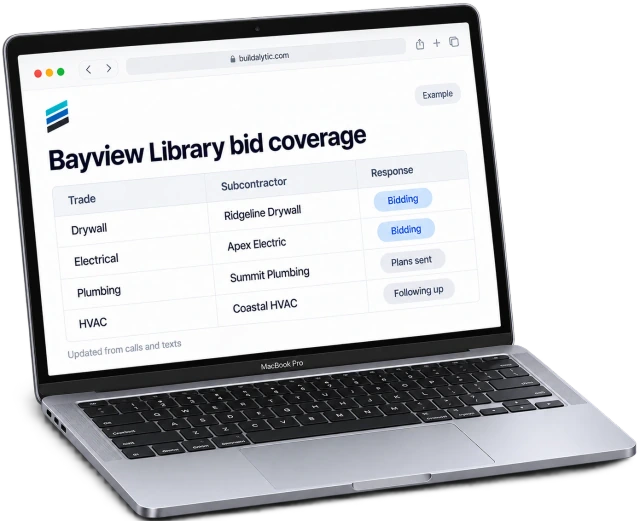
Show the estimator trade coverage, confirmations, unanswered questions and received quotes. A submitted quote still needs review for scope, exclusions and applicable requirements. A follow-up tool should not equate “received” with “complete and accepted.”
Buildalytic’s subcontractor-bid-follow-up page describes invitations, follow-up and coverage. Test a decline, a wrong recipient and a revised deadline in the demo. Check that an estimator can take over a conversation, stop an inappropriate reminder and see why a trade remains uncovered.
Common questions
How many reminders should I send?
Choose a bounded cadence that fits your deadline and relationship. Stop on a clear decline, and resolve an unanswered clarification before repeating the request.
Can AI decide which bid is best?
Bid evaluation involves scope and commercial judgement. Keep collection and status tracking separate from the estimator’s review and award authority.
Sources and editorial notes
- Estimator discussion: subcontractor non-response to bid invitations (anecdotal)
- Buildalytic: subcontractor bid follow up
Prepared with AI assistance. Reference date: 2026-10-28. Worked examples are illustrative and are not customer results. Product details can change; confirm the current scope and terms before rollout.
How we prepare and update field notesNeed a blank worksheet? Get the free reporting template and receptionist evaluation checklist.
Try it on your own workflow.
Bring your current process and one difficult example. We will walk through the handoff, permissions and exceptions with you.
Start with the call, text or record your team already handles. Review the expected outcome and the human handoff before choosing a rollout.
Book a workflow demo Explore the relevant capability