

Track a subcontractor’s insurance documents through requested, received, under review and accepted or returned states. Assign coverage and contract questions to a qualified reviewer. Receiving a certificate is not the same as verifying that the required insurance and endorsements are in place.
What to take away
- A received PDF should not automatically clear a subcontractor to start.
- Ask for the specific missing document or correction.
- Keep the reviewer, decision and applicable period visible.
Separate collection from insurance review
The administrative problem is often simple: the office does not know whether a document was requested, whether the subcontractor sent it to someone else or who is reviewing it. Solve that visibility problem before automating a compliance decision.
A certificate is evidence of insurance; it does not itself amend the policy. State insurance regulators, including Texas, explain that a certificate cannot extend the coverage provided by the policy. Requirements and applicable rules vary, so send coverage, endorsement and contractual questions to your qualified reviewer or insurance adviser. The workflow here organizes collection rather than interpreting coverage.
Sources: Texas Department of Insurance: certificates of insurance FAQ
Create one document request record
Record the subcontractor’s legal name, project, intended start date, request recipient, required document list and review owner. Use the requirements approved for that relationship rather than a generic automated demand that may not apply. Avoid exposing unrelated subcontractor documents in a project-wide message.
Illustrative request: “Please send the insurance documents listed in the attached project requirements for Cedar before the planned start. Our reviewer will check the submission and contact you if an item is missing.” This says what will happen without promising that merely sending a certificate authorizes work.
| State | Evidence | Action |
|---|---|---|
| Requested | Request, recipient and due date recorded | Follow up if no response |
| Received | File linked to the subcontractor and project | Assign review; do not auto-accept |
| Clarification needed | Reviewer identifies a specific issue | Ask for the exact correction or document |
| Accepted for the workflow | Authorized reviewer records the decision | Keep date and applicable period |
| Renewal needed | Relevant document period approaches its end | Request updated documents and review |
Make the reminder specific
Ask whether the request reached the right person and offer a clear submission path. If the subcontractor says the broker is handling it, record that handoff and the next check. When a file arrives, stop the generic “missing COI” reminder and open the review task.
If the reviewer identifies a missing endorsement or a mismatch, quote the approved requirement and request the specific item. Do not let an AI invent coverage wording, decide a policy dispute or tell the subcontractor they are insured for a particular event. A concise administrative request is more useful than a confident but unauthorized interpretation.
Connect the decision to start readiness
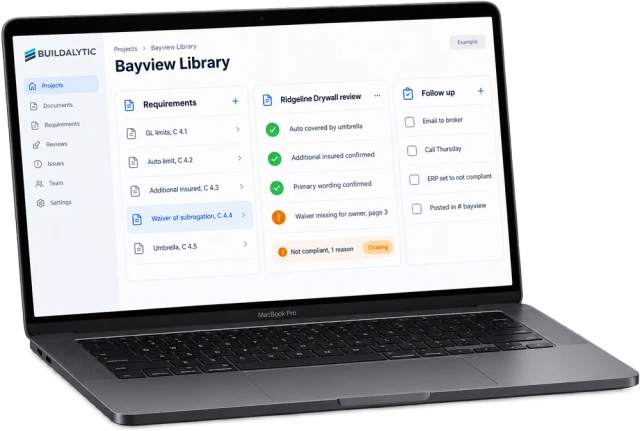
Give the start coordinator a status they can understand: awaiting document, awaiting review, clarification needed or accepted under the project’s process. A planned start date does not justify silently bypassing review. If an exception is allowed, record the authorized person and decision rather than relabeling the submission complete.
Buildalytic’s COI-tracking page describes collection and flagging missing requirements. In a demo, test a received-but-unreviewed file, a corrected submission and an upcoming renewal. Ask who makes the acceptance decision and how the record stays connected to the subcontractor without overstating what a certificate proves.
Sources: Buildalytic: coi tracking
Common questions
Does a certificate prove every contract requirement is satisfied?
No. A qualified reviewer needs to check the applicable requirements and relevant documents. The certificate alone does not change the insurance policy.
Should the reminder stop when a PDF arrives?
Stop the generic missing-file reminder and move the record to review. If a specific correction is required, open a targeted follow-up rather than marking the whole process accepted.
Sources and editorial notes
Prepared with AI assistance. Reference date: 2026-10-28. Worked examples are illustrative and are not customer results. Product details can change; confirm the current scope and terms before rollout.
How we prepare and update field notesNeed a blank worksheet? Get the free reporting template and receptionist evaluation checklist.
Try it on your own workflow.
Bring your current process and one difficult example. We will walk through the handoff, permissions and exceptions with you.
Start with the call, text or record your team already handles. Review the expected outcome and the human handoff before choosing a rollout.
Book a workflow demo Explore the relevant capability