
The short answer
The best construction payroll software is the one that costs every hour to the right job and cost code, handles your union, prevailing wage and multi-state rules, and puts workers' comp on the right class. Contractors already on a construction ERP usually start with its payroll module (FOUNDATION, Vista or Sage 100 Contractor). Others compare construction payroll platforms such as eBacon and Miter, a service such as Payroll4Construction, or general payroll like QuickBooks, ADP, Paychex or Rippling with a certified payroll add-on.
What to take away
- Construction payroll is general payroll plus job costing, union and prevailing wage rates, multi-state taxes, workers' comp by class, fringe and per diem.
- Of the 10 options we checked, only QuickBooks publishes full payroll prices; Rippling publishes a starting platform rate and everyone else quotes.
- In our worked crew week, taxes, workers' comp and fringe added 45% to gross wages, and one wrong comp class changed the cost by about $500.
- Test any finalist on one real week: an overtime worker, a split day across two jobs, an apprentice, a fringe contribution and a second state.
What is construction payroll software?
Construction payroll software pays field and office employees and, unlike general payroll, records what each hour cost on each job. A carpenter who spends Monday on a school addition and Tuesday on a warehouse needs both days paid at the right rate, taxed in the right state, charged to the right cost code and reported to the right workers' comp class. General payroll tools get the paycheck right. Construction payroll tools are supposed to get the paycheck and the job cost right at the same time.
This guide is for contractors choosing the system that runs their own payroll. If you only need certified payroll reports from payroll you already run, or you are a general contractor collecting subcontractors' certified payrolls, our separate guide to the best certified payroll software covers those tools and their state e-filing formats.
Every price and feature below comes from each vendor's own website, checked in November 2026. Where a vendor's pages don't say, the table says “Not stated”, which means ask, not that the feature is missing. The order is a grouping by type, not a ranking. Buildalytic does not run payroll and is not one of the 10 options; how it fits is explained near the end.
What should construction payroll software handle?
Most contractors outgrow general payroll for the same handful of reasons. Before you look at vendors, check which of these apply to your company, because they decide which category of software you need.
- Job and cost code costing: every hour, and its taxes, comp and fringe, lands on a job and cost code so labor reports match the estimate.
- Multiple rates per worker: the same person can earn a shop rate, a union scale and a prevailing wage rate in one week.
- Union payroll: rates, dues, fringe contributions and remittance reports for each local, including contract increases that start mid-period.
- Multi-state and local taxes: withholding follows where the work was done, with reciprocity for crews who live in one state and work in another.
- Certified payroll output: a WH-347 and any state report on public works, built from the payroll you just ran rather than retyped.
- Workers' comp by class: hours and wages reported to the correct class code, with the overtime premium handled the way your state's rating rules require.
- Fringe benefits: cash fringe, plan contributions and, on prevailing wage work, fringe credits calculated correctly.
- Per diem and reimbursements: travel pay tracked by job and kept separate from wages where your plan and your accountant allow.
- Field time capture: mobile timecards or a time app that feeds payroll, so the office isn't keying paper sheets on Monday morning.
Ten construction payroll options at a glance
The table lists what each vendor's own pages say today. “Quote” means the vendor asks you to request pricing or a demo. A few cells are blank in the vendor's documentation because the page we read doesn't mention the feature; ask for a demonstration on your own payroll before you rule anything in or out.
| Option | Type | Published price | Union and multi-state | Certified payroll | Workers' comp | One thing to check |
|---|---|---|---|---|---|---|
| FOUNDATION (Foundation Software) | Construction accounting with a payroll module | Quote; pricing “customizable” | Multi-union, multi-trade and multi-state timecards | Print or electronic reports for many agencies | Tracked; costs post to jobs | Payroll is bought with the accounting system |
| Payroll4Construction | Construction payroll service | Quote from an online form | Union reporting and tracking; multiple state and city payroll | Print and electronic formats | Tracking and reporting | A service, so you hand over processing |
| Vista (Trimble Viewpoint) | Construction ERP with HR and payroll | Quote | Union, multi-state and multi-company payroll | Standard reports for basic federal requirements; exports for LCPtracker or eMars | Not stated on the pages read | Specific state formats may need a third party |
| Sage 100 Contractor | Construction accounting with payroll | Not stated (vendor pages blocked our check) | Union payroll reports; multi-state and local tax reporting with reciprocity | Prints certified payroll and minority reports by job | Supports comp systems, including split rates | Per diem by job is documented; confirm state e-filing |
| eBacon | Construction payroll platform, 15 to 500 employees | Quote after a demo | Union payroll; multi-state taxes by punch location | WH-347 and state-specific reports | Tracking, rate shopping and claims | Fringe trust is for non-union work only |
| Miter | Construction payroll and HR platform | Quote after a demo | Union payroll, reciprocity and multi-state processing | WH-347 and portal submission in 11 states | Rates by job, employee, cost code and state | Not a portal for collecting subs' reports |
| QuickBooks Payroll with Points North | General payroll plus a certified payroll add-on | $50, $88 or $134 a month plus $7, $13 or $17 per employee; Points North quoted | Not stated for construction | Through Points North, which syncs from QuickBooks Online | Comp policy administration through NEXT | No job costing feature named on the pricing page |
| ADP Workforce Now for Construction | General payroll and HR, construction edition | Quote (“Contact Us”) | Union wages, benefits and reports; state and local tax remittance | Prevailing wage and certified payroll reporting | Not stated on the page read | Job costing not described on the page read |
| Paychex Flex | General payroll service | Quote | Not stated for construction | Paychex says its services “support the underlying data”; add-ons such as Points North build reports | Not stated on the page read | Plan on an add-on for certified reports |
| Rippling | General HR and payroll platform | Plans from $8 per employee a month plus a base fee; payroll quoted | Not stated on the construction page | Not stated on the construction page | Not stated on the construction page | Construction page names job costing only |
Sources: Foundation Software: construction payroll software (checked November 2026); Foundation Software: pricing (checked November 2026); Payroll4Construction: construction payroll service (checked November 2026); Payroll4Construction: payroll processing features (checked November 2026); Trimble: Viewpoint Vista (checked November 2026); Trimble Vista help: generating certified payroll reports (checked November 2026); Sage 100 Contractor help: working with payroll (checked November 2026); eBacon: certified payroll (checked November 2026); eBacon: job costing (checked November 2026); Miter: construction payroll (checked November 2026); Miter: certified payroll (checked November 2026); QuickBooks: payroll pricing (checked November 2026); Points North: QuickBooks Online integration (checked November 2026); ADP Marketplace: ADP Workforce Now for Construction features (checked November 2026); Paychex: certified payroll (checked November 2026); Rippling: pricing (checked November 2026); Rippling: construction (checked November 2026)
Which construction accounting systems include payroll?
If you already run a construction ERP, its payroll module is the first thing to price, because payroll that posts straight into job cost and the general ledger removes the most rekeying. The three we checked all document union and multi-state handling; they differ in how they handle certified payroll formats and how much they publish.
FOUNDATION's payroll module describes “multi-union and multi-trade timecards” that cover multiple states without re-entering rates, fringe and deduction calculations, automatic fringe reductions, workers' comp tracking and “print or electronic certified payroll reports” for state, federal and local agencies. Job-costed labor reports tie to the general ledger through its job costing module. Foundation says its pricing is “customizable based on what your business requires” and publishes no figure. Its site also links to Payroll4Construction, a separate payroll service covered below.
Trimble's Vista page says the system can “untangle union payroll, multi-state, multi-company” and contractual payroll requirements, and lists job cost accounting as a core feature. Vista's own help documentation is candid about certified payroll: its standard reports meet “basic federal requirements”, and more specific formats go through a third party, with an export prepared for LCPtracker or eMars. If you work in a state with its own electronic format, ask how that file is produced.
Sage 100 Contractor's payroll help says it calculates union payroll reports, prints certified payroll and minority reports for any job and period, supports multi-state and multi-local tax reporting with reciprocity, handles workers' comp including split rates, and “applies per diem to any job.” It was the only system we checked whose documentation mentions per diem by job in its payroll module. Sage's product pages refused our automated check, so we could not confirm a price; ask a Sage partner.
Sources: Foundation Software: construction payroll software (checked November 2026); Foundation Software: pricing (checked November 2026); Trimble: Viewpoint Vista (checked November 2026); Trimble Vista help: generating certified payroll reports (checked November 2026); Sage 100 Contractor help: working with payroll (checked November 2026)
Which payroll platforms are built only for construction?
eBacon and Miter are payroll systems that sell only to the trades. They suit contractors who want construction rules without replacing their accounting software, since both push job-costed labor into the ledger you already use.
eBacon describes itself as all-in-one software “for contractors with 15 to 500 employees.” Its pages cover job costing by job and cost code, multi-state tax allocation from the location of each time punch with reciprocity, workers' comp tracking, rate shopping and claims, fringe credit management and state-specific certified payroll reports from the same data as the WH-347. It also offers a bona fide fringe trust for open-shop contractors, which it says “excludes union work” and saves non-union contractors an average of $4 per worker-hour in payroll taxes and comp; that figure is eBacon's own claim. eBacon says it integrates with 40-plus accounting platforms. No price is published.
Miter's payroll page covers union payroll with reciprocity agreements and fringes, multi-state processing, workers' comp rates set “at multiple levels” (job, employee, cost code and state), and one “fully burdened labor cost per job and cost code” synced to your ERP. Its certified payroll page names direct submission to state portals in 11 states, including California, New York, New Jersey, Oregon and Washington, and exports in formats for LCPtracker and eMars. Miter is explicit that it is “not a portal for collecting reports from subcontractors.” Pricing is by demo.
Sources: eBacon: certified payroll (checked November 2026); eBacon: job costing (checked November 2026); Miter: construction payroll (checked November 2026); Miter: certified payroll (checked November 2026)
Should you use a construction payroll service or software?
A construction payroll provider runs payroll for you: you send hours, it calculates pay, taxes, union and prevailing wage amounts, files the returns and produces the reports. Software keeps processing in-house. A service suits a company without a payroll specialist, or one whose payroll person is also the controller, estimator's helper and HR. Software suits a team that wants control over timing and corrections.
Payroll4Construction is the construction payroll company in this comparison. It calls itself “a construction payroll service built just for contractors” and lists union payroll and reporting, multi-state and multi-city payroll, fringe calculations, workers' comp tracking, certified payroll in print and electronic formats, and job costing among its free reports. It says it pairs with FOUNDATION, QuickBooks, Sage and other accounting systems. Pricing comes from an instant quote form rather than a published list. Our certified payroll service vs software guide walks through the trade-off in more detail.
Sources: Payroll4Construction: construction payroll service (checked November 2026); Payroll4Construction: payroll processing features (checked November 2026)
Can QuickBooks, ADP, Paychex or Rippling handle construction payroll?
Often, yes, for a small open-shop contractor working in one state. The gaps show up with public works, union locals, crews crossing state lines and job costing that has to tie to an estimate. The usual fix is an add-on, and the pages we read say so plainly.
QuickBooks is the only option here with a complete published price. Its payroll pricing page lists three plans at $50, $88 and $134 a month plus $7, $13 and $17 per employee, with a sale discount on the base fee running when we checked. All three include workers' comp administration through NEXT. The page doesn't name job costing or certified payroll; the closest it gets is reports that help “predict job costs” and project estimates versus actuals on the higher plans. Points North, a certified payroll add-on, pulls employee, wage, hours-by-project and fringe data from QuickBooks Online and builds WH-347 and state reports. Points North quotes its price and also names ADP, Paychex, Paycor and UKG as integrations.
ADP's marketplace page for Workforce Now for Construction lists prevailing wage and certified payroll reporting, union contract wages, benefits and reports, state and local tax remittance and time tracking across job sites. It doesn't describe job costing or workers' comp on that page, and pricing is by contact.
Paychex's own certified payroll article says its payroll services “support the underlying data that certified payroll reporting depends on”, which stops short of saying Paychex produces the WH-347 itself. Plan on an add-on such as Points North for public works. We could not load a Paychex price page during our check.
Rippling's pricing page says plans start at $8 per employee per month plus a base fee, and that payroll pricing depends on headcount and products chosen. Its construction page mentions job costing and tracking hours against projects; it doesn't mention certified payroll, union or workers' comp, so treat those as questions for a demo.
Sources: QuickBooks: payroll pricing (checked November 2026); Points North: QuickBooks Online integration (checked November 2026); ADP Marketplace: ADP Workforce Now for Construction features (checked November 2026); Paychex: certified payroll (checked November 2026); Rippling: pricing (checked November 2026); Rippling: construction (checked November 2026)
What does one crew's week really cost? A worked example
Software choice matters because labor burden is large and easy to misstate. Here is one framing crew's week, costed the way good construction payroll software should cost it. The wages, state unemployment rate, comp rate, fringe and per diem are assumptions for illustration, not quotes or averages. The federal rates are the IRS's: 6.2% employer Social Security, 1.45% employer Medicare, and FUTA at 0.6% after the full state credit on the first $7,000 of each employee's wages, which we assume hasn't been reached yet this year.
The crew is a foreman at $42.00 an hour, two journeyman carpenters at $36.00 and an apprentice at $22.00. The foreman and one journeyman work 45 hours, including 5 hours of overtime at time and a half; the others work 40. That is 170 hours and $6,025.00 of gross wages, of which $195.00 is overtime premium. We assume a 3.0% state unemployment rate, a carpentry comp rate of $9.00 per $100 of payroll applied to straight-time wages (many states' rating rules exclude the overtime premium; check yours), a $9.00 an hour health and welfare contribution on every hour worked, and $45 a day per diem for five days.
| Cost line | How it's calculated | Amount |
|---|---|---|
| Gross wages | Foreman $1,995.00, journeymen $1,710.00 and $1,440.00, apprentice $880.00 | $6,025.00 |
| Social Security and Medicare (employer) | 7.65% of $6,025.00 | $460.91 |
| Federal unemployment (FUTA) | 0.6% of $6,025.00 | $36.15 |
| State unemployment (assumed) | 3.0% of $6,025.00 | $180.75 |
| Workers' comp, carpentry class (assumed) | $9.00 per $100 of $5,830.00 straight-time wages | $524.70 |
| Health and welfare fringe (assumed) | $9.00 x 170 hours | $1,530.00 |
| Total labor burden | Taxes, comp and fringe; 45.35% of gross | $2,732.51 |
| Burdened labor | Gross plus burden; $51.51 per hour worked | $8,757.51 |
| Per diem (assumed) | $45 x 5 days x 4 workers, charged to the job | $900.00 |
| Total crew cost to the job | $56.81 per hour worked, against a $35.44 average wage | $9,657.51 |

Sources: IRS Topic 751: Social Security and Medicare withholding rates (checked November 2026); IRS Topic 759: Form 940, federal unemployment (FUTA) tax (checked November 2026)
Where the worked example goes wrong in weaker software
Run the same week through a system that doesn't know construction and the paychecks can still be right while the job cost and the comp audit are wrong. Three examples from the numbers above show why the job costing and comp features in the table matter.
First, the comp class. If the crew's hours default to a clerical class, assumed here at $0.40 per $100, the comp line drops from $524.70 to $23.32. The job looks $501.38 cheaper this week, and the difference comes back as an additional premium when the insurer audits payroll. Software that sets comp class by job, cost code or employee, as several options document, prevents the default.
Second, the overtime premium. If the system charges comp on the full $6,025.00 instead of $5,830.00 straight time, you pay $17.55 more this week than the assumed rule requires. Small for one crew, it adds up across a year and several crews.
Third, the cost code. If the journeyman who spent Thursday on a second job is charged entirely to the first, both jobs' labor reports are wrong, and so is any change order or bid built from them. Our article on timesheet cost code errors covers how those errors start in the field. Per diem has the same problem: if it isn't tracked by job, it drops into overhead and the job looks more profitable than it was.
Sources: Miter: construction payroll (checked November 2026); eBacon: job costing (checked November 2026); Sage 100 Contractor help: working with payroll (checked November 2026)
What is the best payroll software for a small construction company?
For a small construction company, the deciding question is usually whether you do public works or union work. A five-person open-shop remodeler in one state is well served by general payroll with good time tracking: QuickBooks publishes its prices, includes comp administration and connects to the accounting many small contractors already use. Rippling and Paychex are alternatives if you want HR and benefits in the same place.
Once you bid prevailing wage jobs, sign with a union or send crews across a state line, the add-ons and workarounds start to cost more than a construction system. That is the point to price a construction payroll platform such as eBacon (which names 15 employees as its lower bound) or Miter, a service such as Payroll4Construction, or the payroll module of the accounting system you plan to grow into. Adding Points North to QuickBooks is a middle path for a contractor whose only gap is certified reports.
Sources: QuickBooks: payroll pricing (checked November 2026); Points North: QuickBooks Online integration (checked November 2026); eBacon: certified payroll (checked November 2026); Miter: construction payroll (checked November 2026); Payroll4Construction: construction payroll service (checked November 2026)
Payroll software for commercial and public works contractors
Commercial contractor payroll software has to survive three things at once: several union locals with different fringe schedules, prevailing wage jobs that each carry their own wage determination, and state reporting that differs by agency. For these contractors, the most important column in the table is certified payroll, and the most important question is how the state file is produced.
Miter names its 11 portal-submission states. Vista documents standard federal reports and third-party exports. FOUNDATION and Payroll4Construction describe print and electronic certified reports, and eBacon names state-specific reports. Ask each finalist to produce the exact file your busiest agency accepts, from a test payroll, during the demo.
If you are a general contractor, remember that your subcontractors' certified payrolls are a separate problem from your own payroll. None of the payroll systems above is built to collect and review other companies' reports. That job belongs to the collection tools in our certified payroll software guide.
Sources: Miter: certified payroll (checked November 2026); Trimble Vista help: generating certified payroll reports (checked November 2026); Foundation Software: construction payroll software (checked November 2026); Payroll4Construction: payroll processing features (checked November 2026); eBacon: certified payroll (checked November 2026)
How to choose construction payroll software: a checklist
Shortlist two or three options from the right category, then put each one through the same test. Use a real past week, not the vendor's demo data, and have your payroll person and your project accountant both in the room.
- Bring a week with an overtime worker, a worker split across two jobs, an apprentice, a fringe plan contribution and, if it applies, a second state.
- Ask the vendor to show the burdened cost of that week by job and cost code, and compare it to your own calculation like the worked example above.
- Check workers' comp: where the class is set, how the overtime premium is treated and what report you would hand your auditor.
- Have them produce the WH-347 and the state certified payroll file for your busiest agency from that same payroll.
- Confirm union handling: rates and fringe for each local, mid-period contract increases and remittance reports by hall.
- See how per diem and reimbursements are tracked by job and kept out of taxable wages where your plan allows.
- Watch a field timecard flow from the crew's phone into payroll and job cost without rekeying.
- Get a written price for your headcount and modules, including setup, extra states, certified reports and year-end forms.
- Ask who corrects a mistake after payroll is processed, how fast, and whether corrections or off-cycle runs cost extra.
How Buildalytic fits
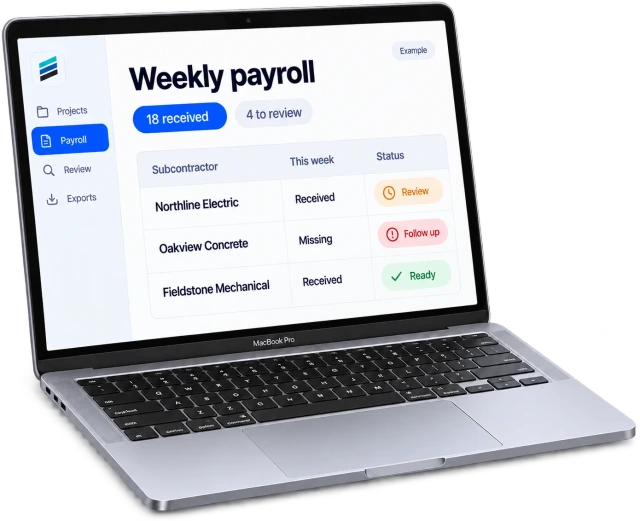
Buildalytic does not run payroll, and it is not a replacement for any of the systems above. Keep your payroll where it is. What Buildalytic does is the certified payroll work around it: collecting subcontractors' certified payrolls on public works, reviewing them against the wage determination, and having Brody, its AI teammate, chase missing or corrected weeks by call and text until they arrive.
One customer story shows the scale of that follow-up. A 120-person electrical subcontractor in San Diego used Brody to collect missing hours, classifications and fringe details and check rates and apprentice ratios on its prevailing wage jobs, alongside its existing payroll system. Certified payrolls filed on time went from 74% to 100%, progress payments held for payroll issues went from $384K to $0, and payroll admin time fell from 42 hours a month to 12. Pricing for the certified payroll workflow is quoted per project.
Sources: Buildalytic: collect subcontractor payrolls; Buildalytic: San Diego electrical subcontractor ends payroll-related payment holds
Common questions
What is the best construction payroll software?
It depends on your setup. Contractors on a construction ERP usually use its payroll module (FOUNDATION, Vista or Sage 100 Contractor). Others compare construction payroll platforms such as eBacon and Miter, a service such as Payroll4Construction, or general payroll with an add-on.
What is the best payroll software for a small construction company?
For a small open-shop contractor in one state, general payroll such as QuickBooks ($50 a month plus $7 per employee on its base plan, checked November 2026) is often enough. Once you take on public works, union work or multi-state crews, price eBacon, Miter or Payroll4Construction.
Which construction payroll software handles union and multi-state payroll?
FOUNDATION, Vista, Sage 100 Contractor, eBacon, Miter and Payroll4Construction all document union and multi-state payroll on their own pages. ADP Workforce Now for Construction documents union wages, benefits and reports, plus state and local tax remittance.
Who are the construction payroll companies that run payroll for you?
Payroll4Construction is a payroll service built only for contractors, and it pairs with FOUNDATION, QuickBooks, Sage and other accounting systems. General payroll providers such as ADP and Paychex also run payroll for contractors, usually with add-ons for certified payroll.
Can QuickBooks Payroll do construction payroll?
For basic payroll with workers' comp administration, yes. Its pricing page doesn't name job costing or certified payroll, so contractors on public works often add a tool such as Points North, which builds WH-347 and state reports from QuickBooks Online data.
How much does construction payroll software cost?
Of the 10 options we checked, only QuickBooks publishes full prices ($50 to $134 a month plus $7 to $17 per employee). Rippling lists plans from $8 per employee a month plus a base fee. FOUNDATION, Vista, eBacon, Miter, Payroll4Construction, ADP and Paychex quote.
What is the difference between construction payroll software and certified payroll software?
Construction payroll software runs paychecks, taxes, job costing and workers' comp. Certified payroll software produces the weekly WH-347 and state reports that prove prevailing wages were paid, often from payroll run elsewhere. Many construction payroll systems do both.
Sources and editorial notes
- Foundation Software: construction payroll software (checked November 2026)
- Foundation Software: pricing (checked November 2026)
- Payroll4Construction: construction payroll service (checked November 2026)
- Payroll4Construction: payroll processing features (checked November 2026)
- Trimble: Viewpoint Vista (checked November 2026)
- Trimble Vista help: generating certified payroll reports (checked November 2026)
- Sage 100 Contractor help: working with payroll (checked November 2026)
- eBacon: certified payroll (checked November 2026)
- eBacon: job costing (checked November 2026)
- Miter: construction payroll (checked November 2026)
- Miter: certified payroll (checked November 2026)
- QuickBooks: payroll pricing (checked November 2026)
- Points North: QuickBooks Online integration (checked November 2026)
- ADP Marketplace: ADP Workforce Now for Construction features (checked November 2026)
- Paychex: certified payroll (checked November 2026)
- Rippling: pricing (checked November 2026)
- Rippling: construction (checked November 2026)
- IRS Topic 751: Social Security and Medicare withholding rates (checked November 2026)
- IRS Topic 759: Form 940, federal unemployment (FUTA) tax (checked November 2026)
- Buildalytic: collect subcontractor payrolls
- Buildalytic: San Diego electrical subcontractor ends payroll-related payment holds
Prepared with AI assistance. Reference date: 2026-11-19. Worked scenarios use typical figures and are not customer results. Product details can change; confirm the current scope and terms before rollout.