
The short answer
In California's DIR eCPR system, a week with no work is reported as non-performance: choose Non-performance as the payroll type in the online form, or set statementOfNP to true in an XML file. DIR offers this option, but no statute or DIR guidance makes a no-work eCPR mandatory; the legal duty is to submit payroll at least every 30 days while work is performed and within 30 days after the final day. Filing non-performance for idle weeks keeps the project record complete, and corrections to a submitted week are made by amendment.
What to take away
- Online form: on Payroll Setup, choose Non-performance instead of Regular.
- XML: set statementOfNP to true; any worker data in the file is ignored.
- Submitted records cannot be edited. Submit an amendment for the same period, which takes precedence.
- V1 XML is supported until January 13, 2027. Move to V2 and include the version element.
What the law actually requires
Labor Code section 1771.4 requires eCPRs at least once every 30 days while work is being performed, and within 30 days after the final day of work. No penalty applies until 14 days past that deadline; the penalty is $100 per day, capped at $5,000 per project, and only against the firm that failed to file. DIR's FAQ calls weekly submission the best practice.
Neither the statute nor DIR's FAQ, guides or Public Works Manual says a no-work eCPR is required. DIR provides the option, and using it shows reviewers that a missing week was idle rather than unreported.
Sources: California Labor Code section 1771.4 (checked November 2026); DIR, Public works SB 854 FAQ
How to report a no-work week in the online form
From DIR's upload guide:
- Log in at services.dir.ca.gov/pw. Next to the project, choose Submit, then Manual.
- On Payroll Setup, pick the Contract With party, choose Non-performance as the payroll type, and set the reporting type and dates.
- Sign the acknowledgement and submit. Save the confirmation PDF.
Sources: DIR, Upload eCPR guide (May 2026)
How to report a no-work week by XML
In the XML file, set statementOfNP to true, in lowercase, and set forWeekEnding to the week-ending date. Any worker data in the file is ignored. When statementOfNP is false, DIR expects at least one worker with hours above zero. Choose schema 2.0 when you upload, answer No to Amendment unless you are amending, and Yes to Final only if this is your last payroll.
DIR's platform page also says contractors can submit a single eCPR record covering multiple weeks of non-performance. DIR has not published a step-by-step guide for that feature, so check the portal's current options.
Sources: DIR, eCPR XML guidelines V2; DIR, eCPR XML submission V2 FAQ; DIR, Submit V2 eCPR XML file user guide; DIR, Public works website services
Common situations
How the official guidance handles the cases contractors ask about most.
| Situation | What to do |
|---|---|
| First week on a project | If your company is not listed on the project, request addition first. The projectID must match DIR's record or the file fails |
| Idle week mid-project | Optional non-performance record for that week |
| Several idle weeks | Non-performance; DIR says one record can cover multiple weeks |
| Last week of your work | Answer Yes to Is this the final payroll for the project; DIR's FAQ says this is required |
| Sole proprietor with no payroll | DIR's FAQ says the owner should still submit eCPRs |
| Ready-mix hauling company | DIR does not require non-performance reports |
Sources: DIR, eCPR XML guidelines V2; DIR, Request addition to a project; DIR, Public works SB 854 FAQ; DIR, Submit V2 eCPR XML file user guide
Fixing a week you already submitted
A submitted record cannot be changed or deleted, except non-performance submissions. Instead, submit a new record for the same pay period. The amendment takes precedence, and the original stays on file. If you filed a payroll for a week when nobody actually worked, submit a Statement of Non-Performance amendment.
For XML, answer Yes to Is this XML upload an Amendment to a previous payroll and pick the original payroll run. The amendment appears nested under the original, for example as run 2-1, and Amend is available only on the original run.
Sources: DIR, Public works SB 854 FAQ; DIR, Submit V2 eCPR XML file user guide
XML errors that fail a file
DIR's V2 guidelines and XML FAQ list these failures:
- A classification without a name attribute
- projectID missing or not matching DIR's record
- contractorPWCR not exactly 10 digits; NA is no longer allowed
- An invalid forWeekEnding date
- firstName or lastName missing or in the wrong place
- A deduction tag missing or outside its block
- The selected schema version not matching the file
Sources: DIR, eCPR XML guidelines V2; DIR, eCPR XML submission V2 FAQ
Warnings that pass but look wrong
DIR flags these as likely mapping errors even though the file is accepted:
- totalDeductions not equal to the sum of the deductions
- The straight-time hourly rate equal to gross pay
- Identical deductions across several workers
Sources: DIR, eCPR XML guidelines V2
File size and version limits
A file can hold up to 500 workers, and a draft preview is available only for files under 250. V1 XML is supported until January 13, 2027, and every file needs a version element, 2.0 for V2. If your payroll software still exports V1, plan the switch now.
Sources: DIR, eCPR XML submission V2 FAQ; DIR, eCPR XML guidelines V2
How Buildalytic helps
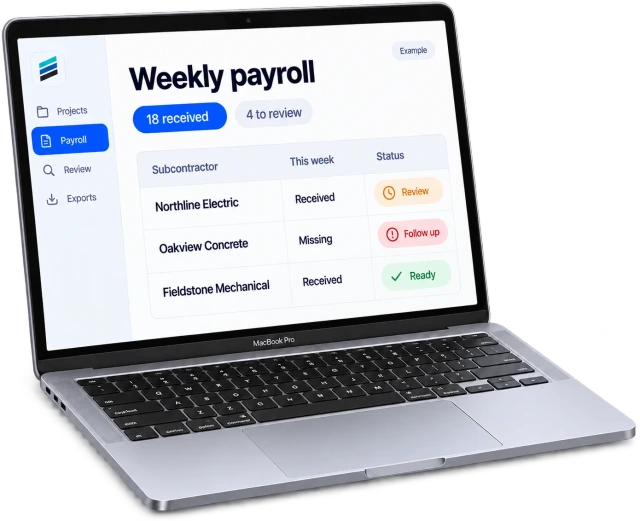
Buildalytic collects and reviews certified payrolls for each job. You set up the employers and the weeks each one should report, payroll files land against the right employer and week, and reviewers see what is missing, what is awaiting review and what is marked no work. Brody, Buildalytic's AI teammate, chases missing weeks by call and text with each sub's payroll contact.
For California jobs, Buildalytic shows which weeks each sub has filed, marked no work or still owes before DIR's 30-day clock, and Brody follows up on the gaps. A San Diego electrical subcontractor reports in its own published results that every certified payroll has gone in on time, up from 74 percent, with no progress payment held for payroll issues, compared with $384K held before.
Buildalytic does not decide which law applies, and it does not replace the agency's acceptance. Your team still certifies and files. If you want a quick check first, the free payroll exception report at /payroll-exception-report reviews a week of payroll for common exceptions before it goes out.
Common questions
Do I have to file an eCPR for a week with no work?
No statute or DIR guidance makes it mandatory. The legal duty is at least every 30 days while work is performed and within 30 days after the final day. Filing non-performance for idle weeks keeps the record complete.
How do I report no work in eCPR?
Online, choose Non-performance as the payroll type on Payroll Setup. In XML, set statementOfNP to true.
Can I edit an eCPR after I submit it?
No, except non-performance submissions. Submit an amendment for the same pay period; it takes precedence and the original stays on file.
When does V1 XML stop working?
DIR supports V1 until January 13, 2027. Use V2 with the version element set to 2.0.
What is the penalty for late eCPRs?
$100 per day, starting 14 days after the deadline, capped at $5,000 per project, against the firm that failed to file.
Sources and editorial notes
- California Labor Code section 1771.4 (checked November 2026)
- DIR, Public works SB 854 FAQ
- DIR, Upload eCPR guide (May 2026)
- DIR, eCPR XML guidelines V2
- DIR, eCPR XML submission V2 FAQ
- DIR, Submit V2 eCPR XML file user guide
- DIR, Public works website services
- DIR, Request addition to a project
Prepared with AI assistance. Reference date: 2026-11-23. Worked scenarios use typical figures and are not customer results. Product details can change; confirm the current scope and terms before rollout.