
The short answer
On New Jersey prevailing wage projects, each contractor files certified payroll on form MW-562 within 10 days of each payday, in two places: with the public body that awarded the contract, and online with NJDOL through the NJ Wage Hub. The online filing has been required since a 2023 law took effect in August 2024 and does not replace the copy to the public body. Contractors must also be registered under the Public Works Contractor Registration Act before they bid or work.
What to take away
- File in two places: the public body and the NJ Wage Hub. One does not replace the other.
- Each payroll is due within 10 days of the date wages were paid.
- Form MW-562 (2/25) is current, and the 6/23 version is still accepted.
- A submitted payroll cannot be edited. Resubmit for the same week-ending date and the latest one counts.
Register before you bid or work
Every contractor and subcontractor that bids on or performs construction-related public works must register under the Public Works Contractor Registration Act. Registration is online only since August 15, 2024. Fees are $500 for one year, or $750 for two years if you have been continuously registered for two years with no violations, plus a $4 online service fee and 1.9 percent for card payments. Allow 30 days for processing.
Contractors that directly employ craft workers must take part in a U.S. Department of Labor registered apprenticeship program for each craft they employ, as a condition of registration.
Sources: NJDOL, Public Works Contractor Registration (checked November 2026); NJDOL, Prevailing Wage Act and regulations
Where certified payroll goes: two places
P.L.2023, c.138 amended N.J.S.A. 34:11-56.29 to require online submission of certified payroll to NJDOL in addition to the public body, or the lessor on leased projects. The law took effect 365 days after its August 16, 2023 approval. NJDOL posts the online payrolls publicly with only addresses and Social Security numbers redacted, while the public body gets unredacted copies.
If the prime has not set up the project in the Wage Hub yet, subs keep submitting to the public body as before.
Sources: P.L.2023, c.138; NJDOL, NJ Wage Hub; NJDOL, NJ Wage Hub FAQ
Form MW-562: what it shows
MW-562, Payroll Certification for Public Works Projects, is used for each week and for the final certification. Its columns cover:
- Job title and work classification
- Sex, race and ethnicity
- Daily hours, straight time and overtime
- Hourly rate and gross pay
- FICA, federal, state and other deductions, and net pay
- Fringe benefit cost per hour
- No Work Week and Final Certification checkboxes
Sources: NJDOL, Form MW-562 Payroll Certification for Public Works Projects
The statement of compliance
The signer certifies that they pay or supervise payment, that every worker received full weekly wages with no rebates and only permissible deductions, that rates are not below the wage determination and classifications match the work, that apprentices are registered with the U.S. Department of Labor, and that fringe benefits were paid to plans or in cash. Falsification can lead to civil or criminal prosecution.
Sources: NJDOL, Form MW-562 Payroll Certification for Public Works Projects
How to file on the NJ Wage Hub, step by step
NJDOL's Wage Hub user guide covers the flow. In plain terms:
- Create a myNJ account, then a Wage Hub account with your FEIN, registration number and 10-digit registration reference ID.
- The prime or the public body adds the project and its subs. Subs cannot add projects themselves.
- Each pay period, enter the payroll by hand, duplicate and edit a prior week, upload a completed MW-562 PDF, or upload NJDOL's CSV templates, one for hours and deductions and one for fringe benefits.
- Give every worker an occupational classification. Since February 18, 2025 a payroll cannot be submitted without one.
- Submit within 10 days of payday and keep the confirmation number. Deliver the same payroll to the public body.
- File No Work Week certifications for idle weeks, and check Final Certification on your last payroll.
Sources: NJDOL, NJ Wage Hub contractor user guide; NJDOL, Certified payroll updates archive; P.L.2023, c.138
What stops a Wage Hub submission
NJDOL notes these problems:
- Blank fields in manual entry
- Invalid fields, shown in red, block submission
- A worker without an occupational classification
- Large payrolls entered as PDF; NJDOL suggests the CSV upload for more than 10 employees
Sources: NJDOL, NJ Wage Hub FAQ; NJDOL, NJ Wage Hub contractor user guide; NJDOL, Certified payroll updates archive
Corrections
A submitted payroll cannot be changed in the Wage Hub. To correct it, submit again for the same week-ending date; the latest submission is the one that counts. Send the corrected copy to the public body too.
Sources: NJDOL, NJ Wage Hub FAQ
Penalties and records
Administrative penalties run up to $2,500 for a first violation and up to $5,000 for each later one, with $5,000 per day for working in violation of a stop-work order and possible debarment for 3 years. Failing to keep or falsifying records is an offense with fines of $2,500 to $25,000 on conviction. If records requested by the Commissioner are not produced within 10 days, the public body may be directed to withhold 25 percent of the amount due, up to $100,000.
Keep payroll records for 2 years from the date of payment, and worker orientation forms for at least 6 years. The Act applies to municipal awards over $19,375, effective July 1, 2024, and to other public bodies over $2,000.
How Buildalytic helps
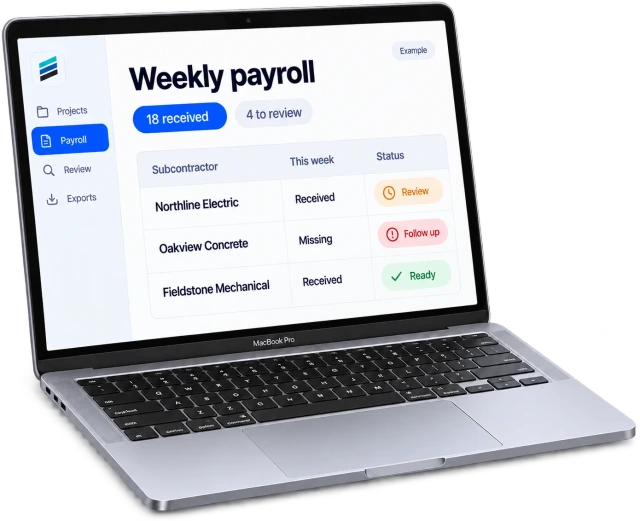
Buildalytic collects and reviews certified payrolls for each job. You set up the employers and the weeks each one should report, payroll files land against the right employer and week, and reviewers see what is missing, what is awaiting review and what is marked no work. Brody, Buildalytic's AI teammate, chases missing weeks by call and text with each sub's payroll contact.
For New Jersey jobs, each week is tracked against the 10-day clock, reviewers check classifications and the statement before filing, and Brody follows up with subs that owe a week to the public body or the Wage Hub.
Buildalytic does not decide which law applies, and it does not replace the agency's acceptance. Your team still certifies and files. If you want a quick check first, the free payroll exception report at /payroll-exception-report reviews a week of payroll for common exceptions before it goes out.
Common questions
Where do I file certified payroll in New Jersey?
In two places: with the public body that awarded the contract, and online with NJDOL through the NJ Wage Hub.
When is New Jersey certified payroll due?
Within 10 days of the date wages were paid for each payroll period.
Which form do I use?
MW-562, Payroll Certification for Public Works Projects. The 2/25 version is current and the 6/23 version is still accepted.
Can I fix a payroll after I submit it on the Wage Hub?
Not by editing. Submit again for the same week-ending date; the latest submission counts.
Do subcontractors need to register?
Yes. Every contractor and sub that bids on or performs public works must register under the Public Works Contractor Registration Act.
Sources and editorial notes
- NJDOL, Public Works Contractor Registration (checked November 2026)
- NJDOL, Prevailing Wage Act and regulations
- P.L.2023, c.138
- NJDOL, NJ Wage Hub
- NJDOL, NJ Wage Hub FAQ
- NJDOL, NJ Wage Hub contractor user guide
- NJDOL, Form MW-562 Payroll Certification for Public Works Projects
- NJDOL, Certified payroll updates archive
Prepared with AI assistance. Reference date: 2026-11-23. Worked scenarios use typical figures and are not customer results. Product details can change; confirm the current scope and terms before rollout.