
The short answer
Since January 1, 2026, every contractor and subcontractor on a New York Labor Law Article 8 public work project must file its own certified payroll electronically with the NYS Department of Labor through the Certified Payroll system on MPWR. You log in with a NY.gov account, set up the project with its PRC number, and submit every week of the project at least once every 30 days, either by typing it in or by uploading an XML file built to DOL's schema. Weeks with no work are still reported, and filing is a condition of payment.
What to take away
- Electronic filing became mandatory on January 1, 2026, for new and existing Article 8 projects. Payrolls for weeks before 2026 do not have to be entered.
- Every employer files its own payroll. A prime that does not ask for a sub's payroll does not exempt the sub.
- You cannot set up a project without its PRC number, your FEIN and your Contractor Registry number.
- Upload is XML only, one project and one week per file, up to 500 employees. CSV and spreadsheets are not accepted.
Who has to file New York certified payroll electronically
Labor Law section 220-j requires electronic certified payroll on public work covered by Article 8. NYSDOL's FAQ says every contractor and subcontractor on the project submits its own payroll, at every tier. Article 9 building service work and federal-only projects are outside this requirement.
New York City public work and work under NYC roadway excavation permits use the city's own payroll system, not MPWR, so check which system your contract names before you start.
Sources: NYSDOL, Electronic Certified Payroll FAQ (checked November 2026); New York Labor Law section 220-j; NYSDOL, Electronic Payroll Submission
What you need before your first submission
Have these ready before you open the portal. Missing any one of them stops project setup.
| Item | Where it comes from | Notes |
|---|---|---|
| NY.gov account | ny.gov | Log in at the MPWR login page or through the Certified Payroll tile on your NY.gov dashboard |
| Contractor Registry certificate | NYSDOL Contractor Registry | Required since December 30, 2024: before bidding for contractors, before starting work for subs. $200 fee, $100 for certified MWBEs, valid 2 years |
| PRC number | The public entity that let the contract | Ask the public entity first, then the Bureau of Public Work. Some maintenance and emergency PRCs are annual and cover several projects |
| FEIN | Your company records | Used to tie the payroll to your company |
| Payment bond | Your surety | Only for public improvement projects, when the portal asks for it |
Sources: NYSDOL, Certified Payroll contractor guide; NYSDOL, Contractor Registry FAQ; NYSDOL, Electronic Certified Payroll FAQ (checked November 2026)
How to submit certified payroll in MPWR, step by step
NYSDOL's contractor guide lays out the flow. In plain terms:
- Log in with NY.gov and open Certified Payroll on MPWR.
- On the dashboard, choose New Project. Enter your FEIN and Contractor Registry number, then the PRC number, project address, dates, payroll days, project type and whether you are the prime or a sub. Check it carefully: after you save, only limited edits are allowed.
- Choose Add Payroll and pick the week-ending date.
- Enter each worker by hand, reuse workers from the Employee Bank, copy a prior week, or upload one XML file for that week. XML upload only works for a week that has no entries yet.
- Upload supplemental benefit documentation showing payment, the plan and its contact. NYSDOL prefers union remittance forms where they exist.
- Choose Submit Weekly Payroll, check the Acknowledge and Declaration boxes, and submit.
- On the last week of your work, check Final Work Week and pick the reason code.
Sources: NYSDOL, Certified Payroll contractor guide; NYSDOL, Electronic Certified Payroll FAQ (checked November 2026)
The 30-day cycle and how due dates work
The statute defines monthly as at least once every 30 days, unless your contract requires more often. In MPWR the 30-day cycle runs from the project start date, holds up to five weekly payrolls, and the dashboard shows each due date. You can file early, and filing weekly as each payroll closes is the easiest way to never be late.
Every week of the project has to be accounted for, either with a payroll or a no-work entry. A gap in weeks is what reviewers notice first.
Sources: New York Labor Law section 220-j; NYSDOL, Certified Payroll contractor guide
What each weekly payroll must include
For every worker, the payroll shows the following. Use exactly one identifier: the last four digits of the Social Security number, or the date of birth if there is no SSN.
- Name and address
- Last four digits of SSN, or date of birth
- Work schedule and work category (classification)
- Hours worked each day and week
- Hourly rate and supplemental benefits
- Deductions, gross wages and net wages
Sources: NYSDOL, Certified Payroll contractor guide; NYSDOL, P898 Guide for employers on Article 8 public work (2026 update)
XML upload rules that cause rejections
NYSDOL's bulk upload guide lists the problems that make a file fail. Check these before you upload:
- The PRC number in the file does not match the project
- The week-ending date does not match the payroll you opened
- The same worker appears twice
- Both date of birth and SSN last four are filled in for one worker
- An Other Benefit amount has no explanation
- Dates fall outside the payroll week
- State names are abbreviated instead of spelled out
- A work category is not in the classification list
- Any field breaks the schema's length, value or date format rules
Sources: NYSDOL, Bulk upload file guide
Weeks with no work, pauses and the final week
No-work weeks are still reported. For a partial week, enter zero hours for the days nobody worked. For a whole week with no work, check No Work Week. For a longer break, use Enter Work Pause Dates so the portal stops expecting payrolls. On your last week, check Final Work Week.
Sources: NYSDOL, Certified Payroll contractor guide; NYSDOL, Electronic Certified Payroll FAQ (checked November 2026)
Corrections after you submit
You can edit and resubmit a payroll inside an edit window after it is submitted. NYSDOL's own pages have described this window differently, as 14 days past the due date in the contractor guide and as an extended window on the Electronic Payroll page, so confirm the cut-off in the portal or with the Bureau before you rely on it. Keep a note of what changed and why for every correction.
Sources: NYSDOL, Certified Payroll contractor guide; NYSDOL, Electronic Payroll Submission
Penalties, payment holds and records
Section 220-j sets a penalty of $100 per day once a payroll is more than 14 days late. NYSDOL says it is not issuing these fines yet and will email registered contractors before it starts. Filing certified payroll is also a condition of payment under section 220, so a missing payroll can hold your money even before any fine.
Willfully inaccurate payroll records can be a class E felony, and a civil penalty of up to $1,000 can apply. Keep original payroll records for at least six years. Submitted payrolls feed a public database on Data.NY.gov with personal information removed.
Sources: New York Labor Law section 220-j; NYSDOL, Electronic Certified Payroll FAQ (checked November 2026); New York Labor Law section 220; NYSDOL, Article 8 frequently asked questions
Checklist before each MPWR submission
Run through this before you click submit.
| Check | Why it matters |
|---|---|
| Week-ending date matches the payroll week | A mismatch fails XML upload |
| Every worker has one identifier, SSN last four or DOB | Both or neither causes an error |
| Every work category is on the PRC schedule | Unlisted categories are rejected |
| Benefit documentation is attached | Required with each payroll |
| No week is skipped since the last submission | Missing weeks count as late |
| Acknowledge and Declaration checked by someone who can certify | The payroll is sworn under penalty of perjury |
How Buildalytic helps
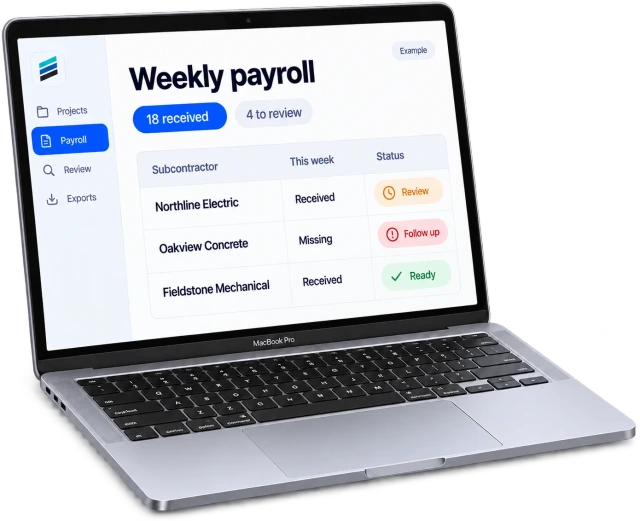
Buildalytic collects and reviews certified payrolls for each job. You set up the employers and the weeks each one should report, payroll files land against the right employer and week, and reviewers see what is missing, what is awaiting review and what is marked no work. Brody, Buildalytic's AI teammate, chases missing weeks by call and text with each sub's payroll contact.
For New York jobs, reviewers check each week against the PRC schedule before it goes into MPWR, and Brody follows up with any sub that has not sent its week or that needs to file its own payroll.
Buildalytic does not decide which law applies, and it does not replace the agency's acceptance. Your team still certifies and files. If you want a quick check first, the free payroll exception report at /payroll-exception-report reviews a week of payroll for common exceptions before it goes out.
Common questions
When did New York start requiring electronic certified payroll?
January 1, 2026, for new and existing Article 8 projects. Payrolls for weeks before 2026 do not have to be entered. December 31, 2025 was the statute's deadline for DOL to build the public database.
Do subcontractors file their own payroll in MPWR?
Yes. NYSDOL says every contractor and subcontractor submits its own payroll electronically. A prime not asking for it does not exempt the sub.
Can I upload a CSV or Excel file?
No. MPWR accepts manual entry or an XML file built to DOL's schema, one project and one week per file, up to 500 employees. There is no API.
What if we had no work that week?
Report it. Check No Work Week for a full week, enter zero hours for a partial week, or use Enter Work Pause Dates for a longer break.
Does New York City use MPWR?
No. NYC public work and NYC roadway excavation permits use the city's own payroll system. Check your contract for which one applies.
Sources and editorial notes
- NYSDOL, Electronic Certified Payroll FAQ (checked November 2026)
- NYSDOL, Electronic Payroll Submission
- NYSDOL, Certified Payroll contractor guide
- NYSDOL, Bulk upload file guide
- NYSDOL, P898 Guide for employers on Article 8 public work (2026 update)
- New York Labor Law section 220-j
- New York Labor Law section 220
- NYSDOL, Contractor Registry FAQ
- NYSDOL, Article 8 frequently asked questions
Prepared with AI assistance. Reference date: 2026-11-23. Worked scenarios use typical figures and are not customer results. Product details can change; confirm the current scope and terms before rollout.